

leopechansky
January 26, 2021

Customizable shortcuts

  • January 26, 2021
  • 203 replies
  • 51013 views

The main source of inspiration for this idea was to match the keyboard shortcuts themselves to different keyboard layouts. Right now, users who don’t use US keyboards have to memorize the location of the keys, rather than to use the actual character location to be able to use the shortcuts. Those involving this region are primarily the case:
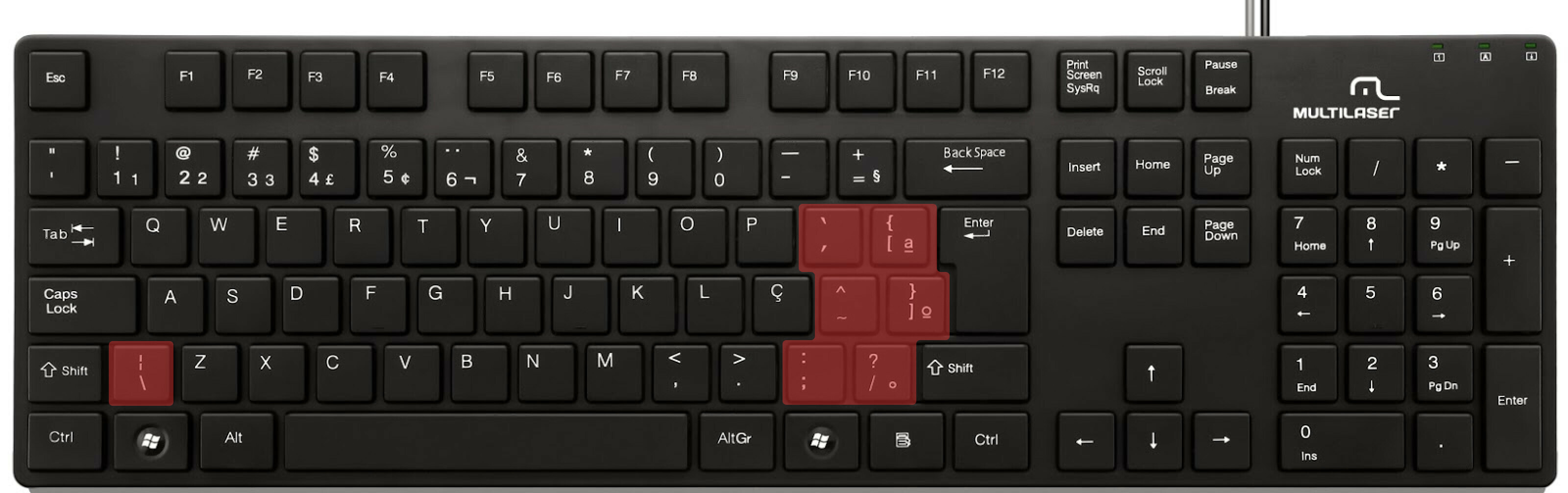

ABNT2 layout (Brazil).

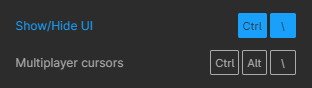
And here’s an example of confusing shortcuts:
image

Although this problem could be solved by just rebinding the shortcuts to the actual character and not the location on the keyboard, I’ve noticed there are some other issues concerning key bindings.

On this forum post, a member of the community asked for help on backing one layer level with a different shortcut from what Figma has right now. This makes the user adapt their workflow to the tool, and not the other way around — and that hinders efficiency. It would be nice if the tool itself provided some sort of customization on this regard.

Although being a workaround, Mac users can customize keyboard shortcuts by application, but it is a bit limited. It’s also not a possibility for Windows users.

I think this could be a game-changer, as i’ve seen people who refused to migrate from other tools to Figma because they couldn’t customize shortcuts. It would also give the user more control over the tool and their workflow.

What do you guys think about it?

203 replies

Joep
February 19, 2024

How about it @Josh ? Ready to be legally compliant in Europe?

Zeke
February 28, 2024

For windows users just use this for now, Clavier+. Lightweight and it has a simple UI not complicated like AutoHotKey.

Kristaps_Stikuts
Active Member
April 4, 2024

And again I have to revert to old version because a huge project is messed up by opt + cmd + T and all text layers are center aligned and since I didn’t notice it before I can’t just undo…

PLEASE FIGMA FIX!!!

P.S. Same with shortcuts like “Bold”, “Quit” etc.
Why are they even there?

Joep
April 4, 2024

Ohgods that sounds terrible

Ron_Frank
Active Member
April 4, 2024

And who at Figma decided: 1. That “T” makes sense for centering text? Like, nearly every other piece of software since MacWrite has used “C”. 2. Who else uses command-option for aligning text? The original keystrokes were command-shift, and then became just command (in word processors). The lack of adherence to existing norms is so flagrant across the keyboard shortcuts, it blows my mind every time.

And that is why we need to be able to customize them. Because so many of the shortcuts that Figma has invented are unique, and therefore, they are difficult to learn and get triggered by mistake.

Sammy_Guergachi
New Participant
May 17, 2024

I wish I could have Ctrl + C copy the image instead of the text in the image… I dont want to do Ctrl + Shift + C

Carioca_Andre
New Participant
May 21, 2024

This thread is almost 4 years old, and we still don’t have a way of customizing shortcuts? I keep hitting cmd+Q instead of cmd+A… there’s a big difference between quitting Figma and selecting all. FREE THE SHORTCUTS. its time!

Joep
May 21, 2024

Preach brother, free the shortcuts

Jordan32
June 6, 2024

I’m attempting to tailor the shortcuts to meet my workflow for greater efficiency. I use a lot of design software, and I have the same shortcuts in all of them. Therefore, it annoys me that Figma, despite being a great product, forbids users from making adaptations to match their daily work processes. Please allow us to personalize shortcuts. Right now, it’s difficult to utilize.

Sammy_Guergachi
New Participant
June 6, 2024

Another reason we need this, on Windows you can have applications that override/intercept shortcuts, which makes them unusable in Figma, so we need a way to change them in Figma to actually use them.