

leopechansky
January 26, 2021

Customizable shortcuts

  • January 26, 2021
  • 203 replies
  • 51013 views

The main source of inspiration for this idea was to match the keyboard shortcuts themselves to different keyboard layouts. Right now, users who don’t use US keyboards have to memorize the location of the keys, rather than to use the actual character location to be able to use the shortcuts. Those involving this region are primarily the case:
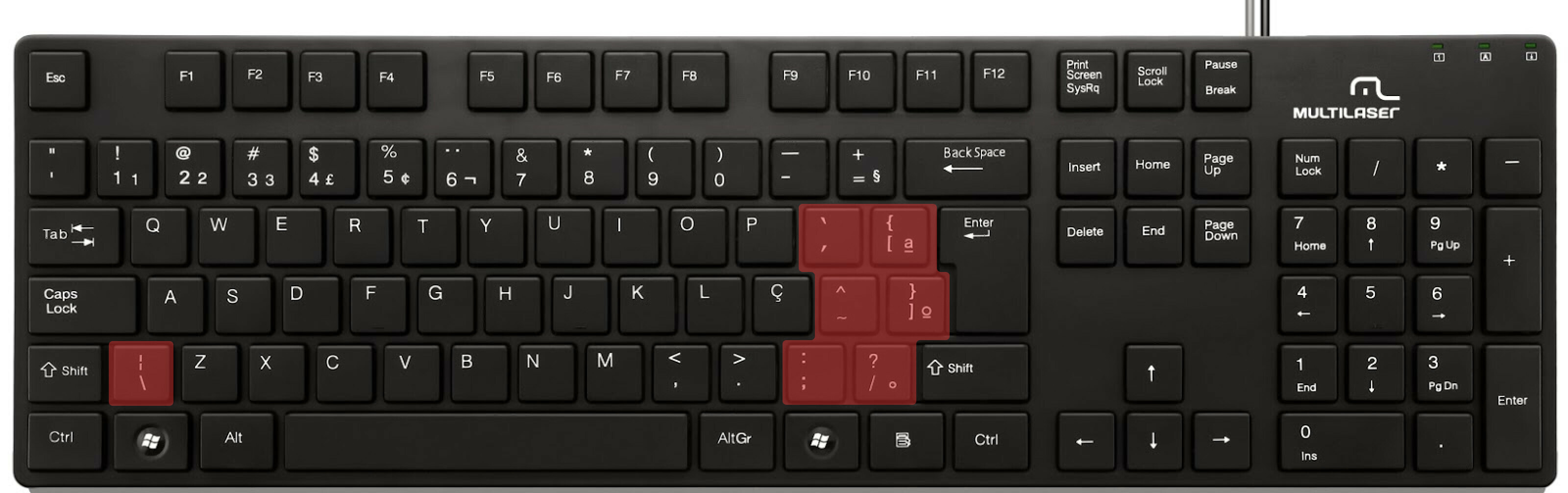

ABNT2 layout (Brazil).

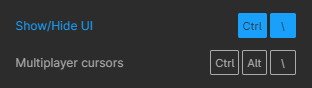
And here’s an example of confusing shortcuts:
image

Although this problem could be solved by just rebinding the shortcuts to the actual character and not the location on the keyboard, I’ve noticed there are some other issues concerning key bindings.

On this forum post, a member of the community asked for help on backing one layer level with a different shortcut from what Figma has right now. This makes the user adapt their workflow to the tool, and not the other way around — and that hinders efficiency. It would be nice if the tool itself provided some sort of customization on this regard.

Although being a workaround, Mac users can customize keyboard shortcuts by application, but it is a bit limited. It’s also not a possibility for Windows users.

I think this could be a game-changer, as i’ve seen people who refused to migrate from other tools to Figma because they couldn’t customize shortcuts. It would also give the user more control over the tool and their workflow.

What do you guys think about it?

203 replies

Federico_Dion
January 26, 2024

Bro, I’m literally struggling to hide/show UI with my tablet keyboard, my spanish keyboard, and my windows spanish+english keyboard…

Federico_Dion
January 26, 2024

How did you solve it? I have the same problem…

Ron_Frank
Active Member
January 26, 2024

I recommend a third party software product called Keyboard Maestro for US $36. I’m not the first to recommend it, but that is how I solved my keyboard shortcut issues (of which I have several 😉 ).

Andrzej_Dabrowski
February 5, 2024

I have a problem with the ‘ś’ letter in Polish. The Windows shortcut 'right alt+S" opens “Add to version history” which is frustrating… is there a way to bypass?
image

Ron_Frank
Active Member
February 5, 2024

I’m sorry I don’t have an answer for you, without using third-party software. Somehow, Figma thinks it’s OK to make keyboard shortcuts without using Control or Command. Which is ridiculous, because only using option and/or shift + any key can always type some sort of character.

Just another unconventional way that Figma decides is OK.

Ugh!

fro
New Member
February 13, 2024

How is this still not fixed? Is it really that hard to have customizable keyboard shortcuts like pretty much any other tool I use?
It’s been over a year since your colleague said it’s in the works. You’ve been ‘actively working’ on this for how long now?

I have dual layout on shift where tapping it creates a bracket (. Somehow it interprets that as the shortcut Shift+1. But for some reason every time I tab shift it zooms to fit. Which happens at least 30 times a day. Then I have to manually zoom back in. I’m going to loose my mind over this. I can’t switch software cause I’m adjusting to my client.
This combined with the recent general bugginess of the software has me desperate to find a new tool to switch to. I am actively looking for alternatives to recommend to future clients.The Keyboard layout switcher ‘fix’ does absolutely nothing for me. It’s frustrating as hell that this seemingly basic feature request is ignored for so many years.

Joep
February 13, 2024

@fro to be precise: this ticket has been open since Jan 2021

Ron_Frank
Active Member
February 13, 2024

Yeah, and yet another crazy thing? Figma actually thought it was a better idea to work on a physical keyboard than to fix this! Just a little salt in the ol’ wound.

Maybe now that they’re getting $1,000,000,000(!) they can spend a little of that on solving this.

Three years and counting…

3-2-1-John
New Member
February 16, 2024

Someone else has probably brought this up, but I need to be able to quickly switch the snapping. Having only one shortcut for pixel grid makes moving from designing to grid to having more flexible positioning makes this lack of customization a pain point for me.

Not to mention all of my other use cases. But particularly, switching snapping is incredibly clunky.

February 16, 2024

Not having the ability to remap or turn off single character shortcuts goes against WCAG accessibility because they could interfere with screen readers. Understanding Success Criterion 2.1.4: Character Key Shortcuts | WAI | W3C
For example the “c” (comment) shortcut should be able to be remapped to another combination or Figma should allow us to turn it off. I’m forever hitting it.

I would have thought Figma would provide this before they are held liable?? Especially in Europe where accessibility standards are WCAG 2.1 AA.