

leopechansky
January 26, 2021

Customizable shortcuts

  • January 26, 2021
  • 203 replies
  • 51012 views

The main source of inspiration for this idea was to match the keyboard shortcuts themselves to different keyboard layouts. Right now, users who don’t use US keyboards have to memorize the location of the keys, rather than to use the actual character location to be able to use the shortcuts. Those involving this region are primarily the case:
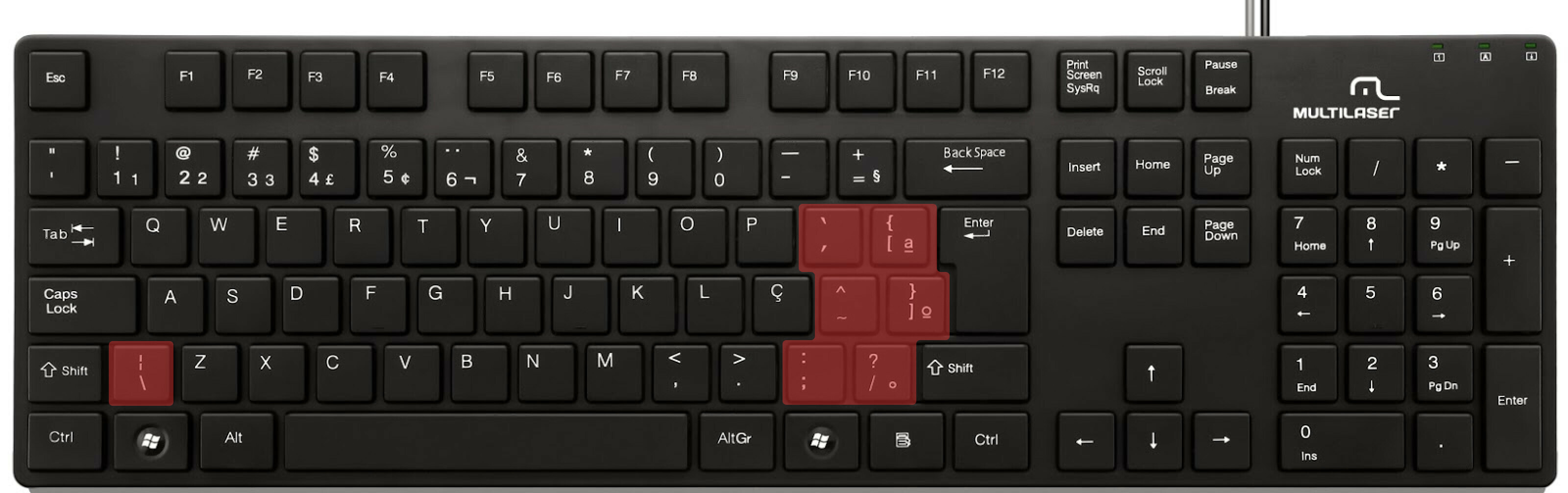

ABNT2 layout (Brazil).

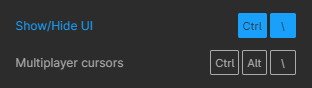
And here’s an example of confusing shortcuts:
image

Although this problem could be solved by just rebinding the shortcuts to the actual character and not the location on the keyboard, I’ve noticed there are some other issues concerning key bindings.

On this forum post, a member of the community asked for help on backing one layer level with a different shortcut from what Figma has right now. This makes the user adapt their workflow to the tool, and not the other way around — and that hinders efficiency. It would be nice if the tool itself provided some sort of customization on this regard.

Although being a workaround, Mac users can customize keyboard shortcuts by application, but it is a bit limited. It’s also not a possibility for Windows users.

I think this could be a game-changer, as i’ve seen people who refused to migrate from other tools to Figma because they couldn’t customize shortcuts. It would also give the user more control over the tool and their workflow.

What do you guys think about it?

203 replies

Joep
September 28, 2023

Same @Matthew_Schwartz, this is the only key I’d like to change, the other ones are fine

Drew_Andersen
October 2, 2023

Naming in automation really means nothing to the Automater. Or any code. You have to specify inputs as variables, then store that input in the variable for sending to the action to use as context.

Drew_Andersen
October 2, 2023

thats the reason? ha. I mean… its cmd+] front and cmd+[ to send back.

Tobias_Weger
October 9, 2023

When I want to enter fullscreen on Chrome on Mac, I normally press “Shift + Cmd + F”.
In Figma, this opens the search.

October 17, 2023

Same here. Happy If I can only adjust this one short key… It’s driving me nuts.

Thomas_Hallgren
November 10, 2023

Our dev team follows the prototype link-lines to find destination pages in Figma.

Action: they choose a button with a link, and manually scroll across the document, following the ptototype link line, to locate the destination page. It works, but could be better.

Request: a Zoom method (i.e., a shift-option-2 method) to zoom to the destination view of a selected link.

Screenshot 2023-11-10 at 11.51.43 AM

Kristaps_Stikuts
Active Member
December 13, 2023

Worst shortcut: cmd+B.
This has messed up so many designs for me.
When copying or pasting something, I would accidentally click the shortcut and miss it and then way later I would notice that a lot of design texts are broken.

December 14, 2023

I feel that this is by design, I am not sure what purpose it serves having a fixed set of shortcuts since it is an established standard in most editing software by now.
And I don’t think it will take much effort to create such a feature.
Mehhh

Joep
December 14, 2023

It would most certainly help with accessibility

Ricardo_Desirat
New Participant
December 14, 2023

This is an absolut must have.
One of the best examples is After Effects. Not only you can change a shortcut pretty easily, but you can also see what certain keys do as you press them.
Super user friendly!