

leopechansky
January 26, 2021

Customizable shortcuts

  • January 26, 2021
  • 203 replies
  • 51011 views

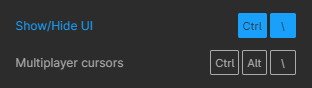
The main source of inspiration for this idea was to match the keyboard shortcuts themselves to different keyboard layouts. Right now, users who don’t use US keyboards have to memorize the location of the keys, rather than to use the actual character location to be able to use the shortcuts. Those involving this region are primarily the case:
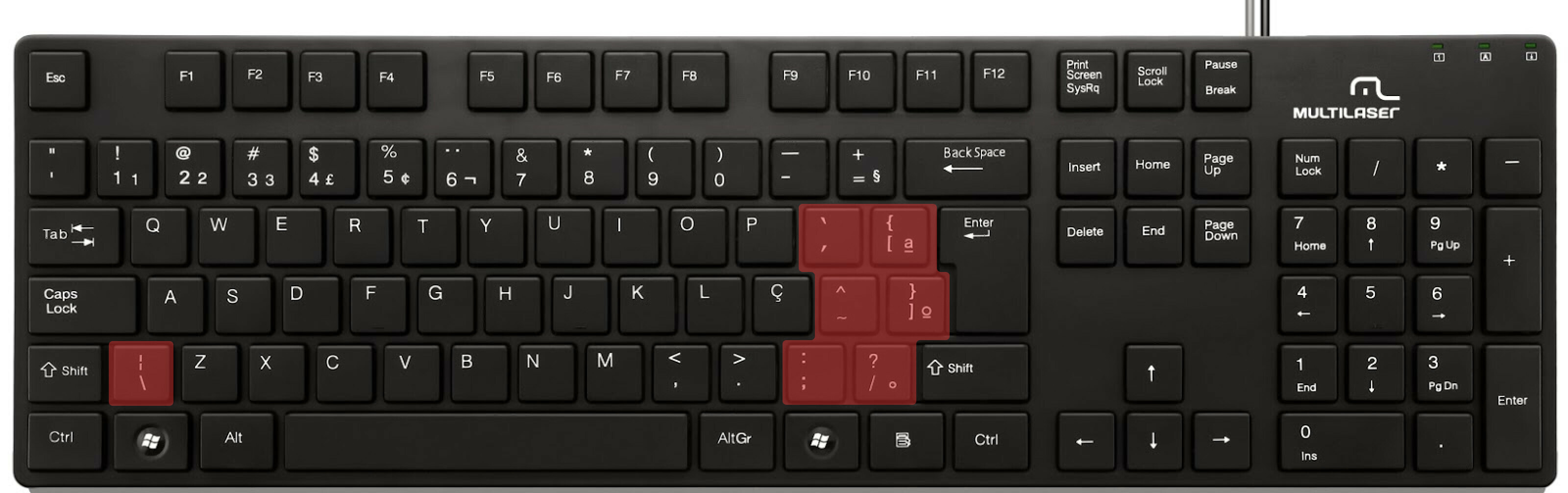

ABNT2 layout (Brazil).

And here’s an example of confusing shortcuts:
image

Although this problem could be solved by just rebinding the shortcuts to the actual character and not the location on the keyboard, I’ve noticed there are some other issues concerning key bindings.

On this forum post, a member of the community asked for help on backing one layer level with a different shortcut from what Figma has right now. This makes the user adapt their workflow to the tool, and not the other way around — and that hinders efficiency. It would be nice if the tool itself provided some sort of customization on this regard.

Although being a workaround, Mac users can customize keyboard shortcuts by application, but it is a bit limited. It’s also not a possibility for Windows users.

I think this could be a game-changer, as i’ve seen people who refused to migrate from other tools to Figma because they couldn’t customize shortcuts. It would also give the user more control over the tool and their workflow.

What do you guys think about it?

203 replies

Robson_Carvalho
July 26, 2023

Oh this one just makes me rage-quit Figma every time… so anoying

RaphG
July 28, 2023

Here’s an idea:

A native way to manage all the shortcuts in the app and customize them. The shortcut manager would have access to ALL the menu bar and command-/ shortcut actions so that you don’t have to use the OSX system shortcut system which sucks pretty bad.

The shortcut panel is cool, but you’d want to have access to everything and be able to override them all.

RaphG
July 28, 2023

By the way, this standard functionality in all the CAD apps out there.

Ron_Frank
Active Member
July 28, 2023

While the OSX system shortcut is not ideal, it at least works well enough. And all the Adobe apps (except XD!) have customizable shortcuts to varying degrees. InDesign’s is quite robust.

I think the root of the problem is that Figma has no true application, only a wrapper of some sort around their browser based application — that’s just my guess though.

Joep
August 10, 2023

Quite literally the only thing I need is changing the mousescroll zoom from ctrl to alt, since I have been using alt for the last 23 years

Joep
August 17, 2023

@Josh @admins I see this has been an ongoing issue since '21, has there been any movement on this topic?

Josh
Former Community Manager
August 17, 2023

Hey @joep, no major updates to share on this other than our team is actively working on adding the ability to create customizable shortcuts. As the project develops, we’ll do our best to keep the community updated here. Thanks! 😊

Roman_Roan1
September 14, 2023

As the project develops, we’ll do our best to keep the community updated here.

So modest, “as project develops”. If only Figma had Billions of dollars to attend problems that users been begging for years. oh wait…

Ron_Frank
Active Member
September 14, 2023

The problem has been around, I believe, since Figma’s inception. It just gets closed and reopened.

Matthew_Schwartz
September 27, 2023

Pleeeease allow me to change the mousewheel zoom key from CTRL to ALT
My muscle memory from Adobe (Photoshop) to Figma keeps messing me up when I switch back and forth