
Haowei
March 7, 2023
Question

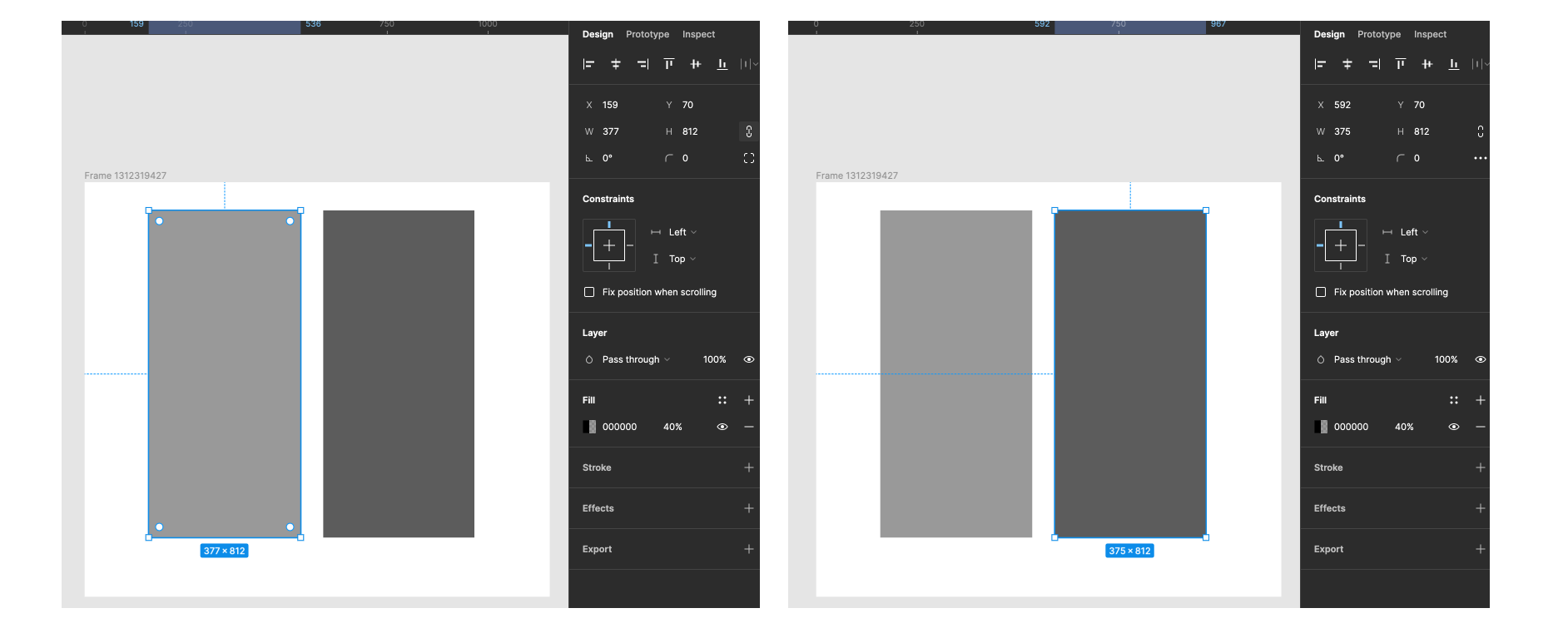
Error: Two rectangles with same property but look different

  • March 7, 2023
  • 5 replies
  • 416 views

It seems that I have created two rectangles with exactly the same style property, but they look different. Even copying & pasting the style can’t solve this problem.

This topic has been closed for replies.

5 replies

tank666
March 7, 2023

Make sure there isn’t another rectangle below the right rectangle.

UX/UI designer. Figma expert. Creator and developer of plugins and widgets for Figma and FigJam. Check out my resources in Figma Community: figma.com/@tank
Haowei
HaoweiAuthor
March 7, 2023

Sure, only 2 rectangles in the frame.

Stephane_Popout
March 7, 2023

This is incredible😂

Can you log the rectangle fills from the plugin console ? Are they really the same ?
What happens if you change the color and set it back ? Or if you duplicate one of them ?

steventraaan
New Participant
March 7, 2023

Are both of the inspected css styles the same for both of the rectangles?

It’s interesting because the rectangle on the right looks exactly like if you had 2 rectangles with 40% opacity stacked right on top of each other.

Haowei
HaoweiAuthor
March 8, 2023

I’m not sure what happened to my poor rectangles, but they do look same in Inspect Mode.