
Jul 10, 2023 7:20 PM UTC
Solved

Prominent top app bar scroll behaviour

Is there anyway to prototype this behaviour shown in Material Design App Bars Top?
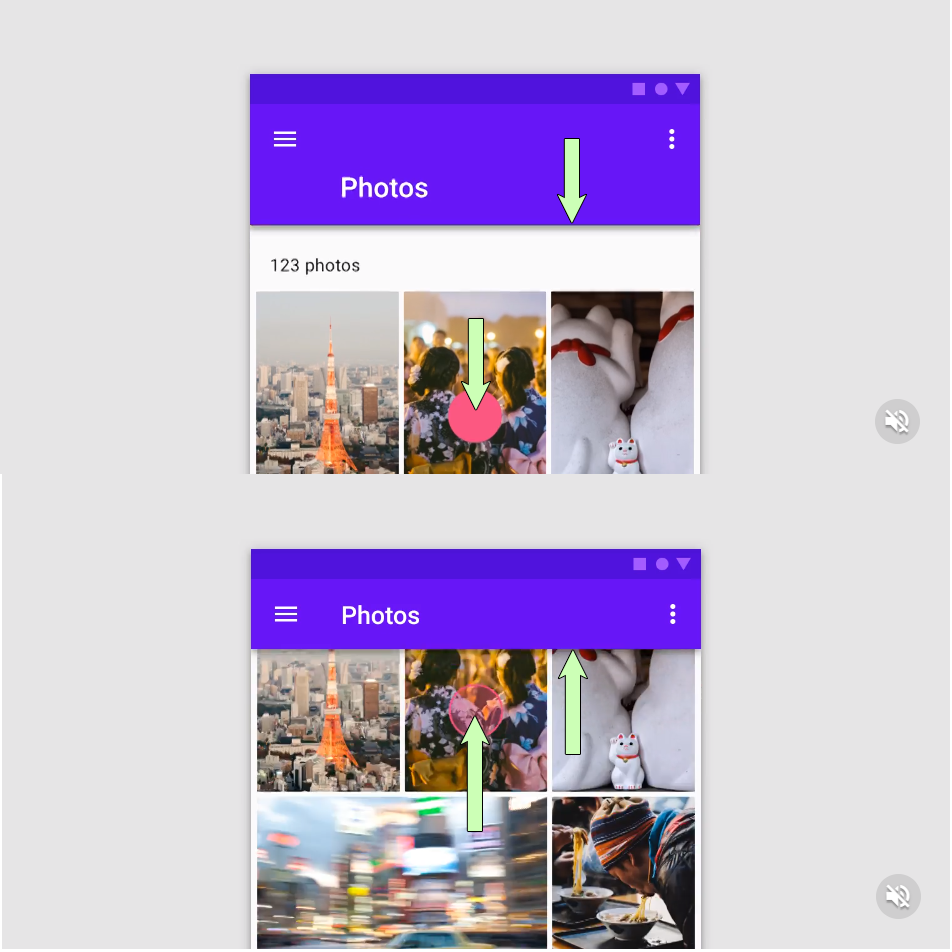
When scrolling up, prominent top app bars using imagery can transform into normal top app bars. They should not return to prominent mode until the user scrolls back to the top of the page.

It seems like it should be possible, as it’s such a common feature on apps and web, but have so far not been able to find a way.

*Disclaimer - fairly new to Figma 🙂

Many thanks in advance

This topic has been closed for replies.
Avokadomos
AvokadomosSolution
Figma Ambassador
Jul 11, 2023 8:33 AM UTC

Here’s a way to do it using sticky positioning. Note that the header is taller than the sticky container in order to achieve this effect. You can open up the file and inspect the design yourself.

Disclosure: I’m part of Figma’s Forum Ambassador program.

4 replies

Avokadomos
Figma Ambassador
AvokadomosSolution
Figma Ambassador
Jul 11, 2023 8:33 AM UTC

Here’s a way to do it using sticky positioning. Note that the header is taller than the sticky container in order to achieve this effect. You can open up the file and inspect the design yourself.

Disclosure: I’m part of Figma’s Forum Ambassador program.
GedAuthor
Jul 11, 2023 1:50 PM UTC

Thanks @Avokadomos

This certainly looks to be what I am looking for.

I will take a look later on and see if I can work out how you did it, and if I can replicate it on my designs.

Much appreciated

GedAuthor
Jul 11, 2023 7:33 PM UTC

Had the chance to test now and have successfully done something similar in my design using the same method.

Thanks for your help.

Avokadomos
Figma Ambassador
Figma Ambassador
Jul 12, 2023 7:19 AM UTC

You’re welcome! You can click the checkmark under my previous post to mark the post as resolved.

Disclosure: I’m part of Figma’s Forum Ambassador program.