

Facundo_Martin_Heredia
July 30, 2024
Solved

Nest buttons on prototype?

  • July 30, 2024
  • 4 replies
  • 112 views

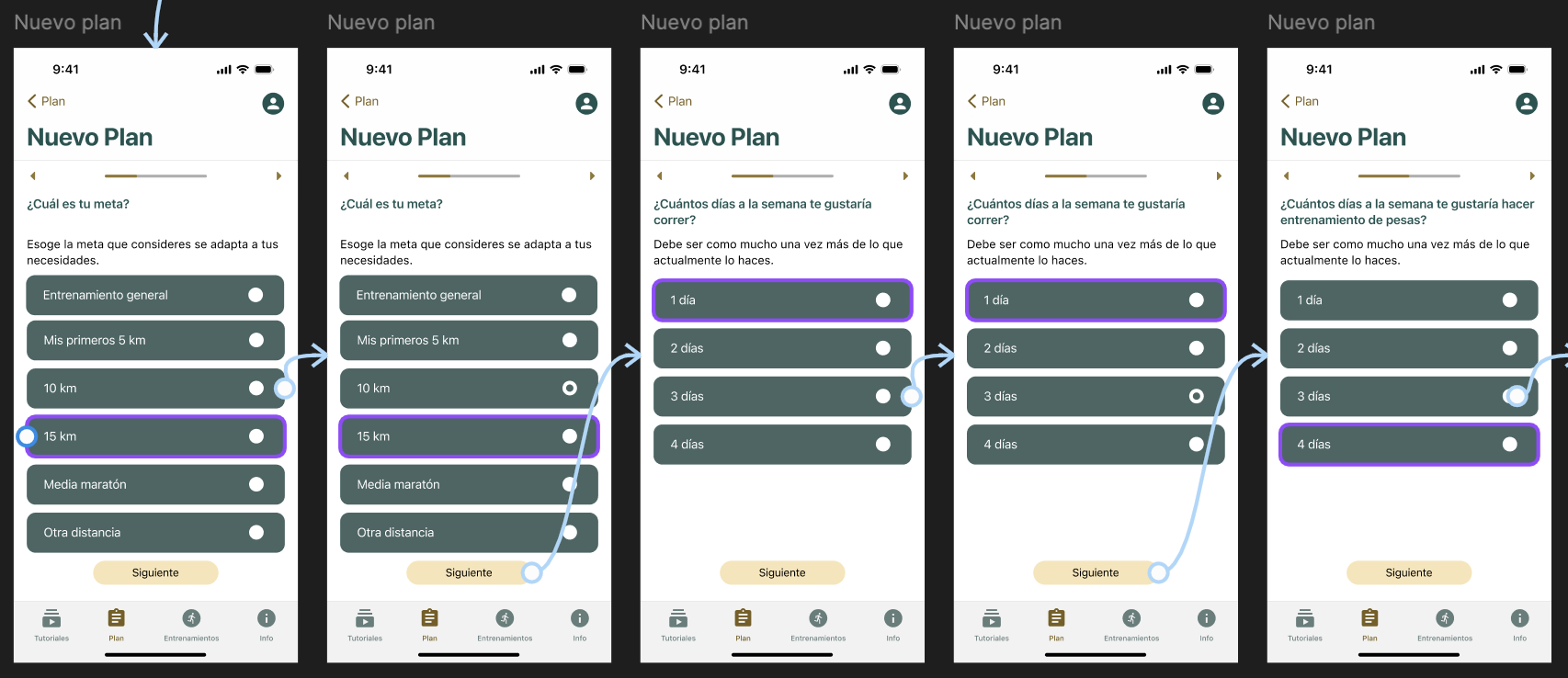
So I have this prototype where I’m supposed to click on a radio button to change it from unselected to selected, I made the animation but if I click on a button to select it, the second one is shown as also selected on another frame. I guess that violet square is showing me where I’m using the exact same button but it’s the first time I’ve seen this.

Can someone tell me why it’s this happening? The right thing would be to select one button on the first frame, and to select another button on the second frame and so one, they shouldn’t be already selected on every frame 😦

This topic has been closed for replies.
Best answer by Raphael_M

I have some questions:

  1. Are you using variables and you apply the same variable on different radio buttons?
  2. Are you reusing the component and didn’t change the layer name? (Preserve overrides)

4 replies

KennLucas
July 30, 2024

Are you using an instance of the same compoonent for each?

Can you post the Figma file? Or link to it for us?

Raphael_M
Raphael_MAnswer
Power Member
July 30, 2024

I have some questions:

  1. Are you using variables and you apply the same variable on different radio buttons?
  2. Are you reusing the component and didn’t change the layer name? (Preserve overrides)
Facundo_Martin_Heredia
July 30, 2024

That’s what happened. All the layers had the same name lol

Thanks!

Raphael_M
Power Member
July 31, 2024

Glad you’ve resolved it yourself 😅