Jarek
August 25, 2023
Solved

How to clear “Used variables” that don’t exist in the file anymore?

  • August 25, 2023
  • 102 replies
  • 14113 views

Hi folks!

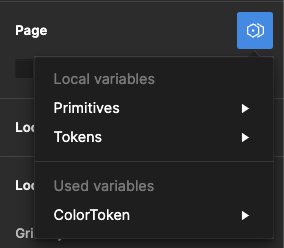
I used some components from other files in my project, and even though I removed them, I still see some Variables available in the “Page → Modes”. They are not available anywhere else. It doesn’t affect the project; when I select one, change the page, and then return to it, that mode is selected.

I checked my file, and nothing leads to the other file anymore – no styles, variables, components, etc.

It seems like a bug, and I see some variables pulled from another file, but can I remove it somehow?

image

Best answer by djv

Hey All, sorry for the continued trouble and frustration!

If the Detach deleted variables quick command does not work, the remaining ghost variables you’re seeing are still present because they’re still actively being used from collections within your design components and/or deleted color styles.

Be sure to review your file for variables that are being used across multiple pages. We understand how this can be confusing, especially when you have multiple collections with similar names and modes, making it difficult to differentiate between them.

Unfortunately, the team confirmed that we don’t have an automatic solution to fix this or a simple way to view which variables come from what collections. But in order to completely remove ghost variables, you’ll need to manually remove all instances of those variables from your file.

If you need help locating old variables that are still being referenced in nodes on the canvas and are able to share your file with us, please do so here: https://help.figma.com/hc/en-us/requests/new

Be sure to use your Figma account email, include a link to the file, share edit access with support-share@figma.com, and our Technical Quality team can help you locate and remove the old variables.


102 replies

Shoval_Ozeri
April 3, 2024

Same issue. Still waiting for someone from the Figma team to contact me

djv
Figmate
Community Support
April 3, 2024

Hey All, sorry to hear you’re still having trouble!

As stated above, please try using the quick command: Detach deleted variables to quickly get rid of any existing ghost variables as the 1st step:

twitter.com

Last November 2023, we rolled out a fix that should have addressed any other lingering issues, but if you’re still having issues after using the quick command, please submit a bug report to our support team directly via the form here.

matteogonzalez
June 13, 2024

Figma closed the subject even if it’s totaly not fixed, and no, using “detach deleted variables” with the command bar doesn’t fix this issue. So I open the subject again:

Here the original message:

Hi folks!

I used some components from other files in my project, and even though I removed them, I still see some Variables available in the “Page → Modes”. They are not available anywhere else. It doesn’t affect the project; when I select one, change the page, and then return to it, that mode is selected.

I checked my file, and nothing leads to the other file anymore – no styles, variables, components, etc.

It seems like a bug, and I see some variables pulled from another file, but can I remove it somehow?

image

matteogonzalez
June 13, 2024

This bug is very annoying, and is here since almost a year. Could be great to fix it ! 🙂

ksn
Figmate
Community Support
June 18, 2024

From the knowledge I have, I don’t feel confident enough to give you info that may be relevant, or confirm if this is a bug.

With specific instances like this, it’s best to have a review from our tech quality team – it could be a bug (Figma-wide or limited to your file), but it also could be something within your file that can be quickly adjusted.

Can you please do the following?

  1. Fill out this form – make sure to use the email associated with the Figma account your file is under: https://help.figma.com/hc/en-us/requests/new?ticket_form_id=360001744374
  1. Please share edit access to the file you’re mentioning in this topic with support-share@figma.com (you won’t be charged for this). If you can’t share this, they can still help you as best as they can.

Let me know if you complete the above.

matteogonzalez
June 19, 2024

Hello, thank you for your answer !
Sadly, I’m not the only one suffering of this problem. People shared this on the initial subject and it doesn’t seems to be isolated : How to clear “Used variables” that don’t exist in the file anymore?

I will fill the form, thank you

rollsmorr
New Member
June 21, 2024

This is legit insane, I just went through all of the history on this bug and have seen its been going on for a year, with zero fix from Figma. When do you plan on actually pushing a fix for a legitimate bug that probably over 150+ people have complained about in forums alone?

July 5, 2024

OMG please fix this 🙏

Viacheslav_Poliakov1
New Member
July 11, 2024

I’ve tried deleting everything from the file. All layers, styles, pages and variables. And the “ghosts” are still there.

Niki
New Participant
July 11, 2024

Hi, the fix by Miggi doesn’t work for variables from libraries. I created a file with variables and published it as a library. The library is saved in a project space. I also created another file, saved it to another project space and added the library with the variable collection. I applied some color variables to some rectangles and created an auto layout frame. Spacing variables are also applied on the frame. Then I went back to the library file, deleted all variables, published it. But there are no updates in the other file. I selected the elements and tried to detach the deleted variables. It didn’t work. My assumption: Detaching works with local variables. It doesn’t work with added libraries.

I think it’s not a problem of a corrupted file or related to a specific user flow. It’s simply a bug that needs to be resolved. Unless it worked as expected in your file with connected libraries.

The video starts after the variable collection has been deleted: