Jarek
August 25, 2023
Solved

How to clear “Used variables” that don’t exist in the file anymore?

  • August 25, 2023
  • 102 replies
  • 14114 views

Hi folks!

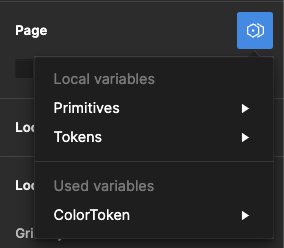
I used some components from other files in my project, and even though I removed them, I still see some Variables available in the “Page → Modes”. They are not available anywhere else. It doesn’t affect the project; when I select one, change the page, and then return to it, that mode is selected.

I checked my file, and nothing leads to the other file anymore – no styles, variables, components, etc.

It seems like a bug, and I see some variables pulled from another file, but can I remove it somehow?

image

Best answer by djv

Hey All, sorry for the continued trouble and frustration!

If the Detach deleted variables quick command does not work, the remaining ghost variables you’re seeing are still present because they’re still actively being used from collections within your design components and/or deleted color styles.

Be sure to review your file for variables that are being used across multiple pages. We understand how this can be confusing, especially when you have multiple collections with similar names and modes, making it difficult to differentiate between them.

Unfortunately, the team confirmed that we don’t have an automatic solution to fix this or a simple way to view which variables come from what collections. But in order to completely remove ghost variables, you’ll need to manually remove all instances of those variables from your file.

If you need help locating old variables that are still being referenced in nodes on the canvas and are able to share your file with us, please do so here: https://help.figma.com/hc/en-us/requests/new

Be sure to use your Figma account email, include a link to the file, share edit access with support-share@figma.com, and our Technical Quality team can help you locate and remove the old variables.


102 replies

Niki
New Participant
July 11, 2024

I have also reported it to support.

Niki
New Participant
July 12, 2024

… It gets even worse if you’ve deleted a variable mode. If there are still deleted but attached variables in your file or library, then you also have to struggle with mode conflicts. In my case: I deleted a theming mode. After that I deleted a sizing variable collection (numbers). Since I’m not able to detach all deleted sizing variables – and these are applied to a lot of auto layout frames – I’m still seeing this kind of mode conflicts.

image

My workaround is now to check every component and replacing the deleted sizing variable placeholder with a raw value. Hopefully there will be an update in the near future.

Nouela
New Participant
July 12, 2024

FYI to folks combing through this massive thread looking for a solution: one does not exist. Ghost variables 4evah.

Josh22
Active Member
July 12, 2024

This is ridiculous. I can’t delete ghost variables from another file. The fact that I can apply a non-existing variable theme on a frame and it applies the styling changes to child components, despite zero connections between the 2 files, is a bug. It’s been a bug for a year, it needs to be resolved.

Example, I copy a component from one file to another. I remove all variables and references from the other file inside the component. The variable theme still shows up (e.g. light and dark mode). I can apply this theme to any frame despite it not being in the component I added.

EDIT: I found a workaround this time, to clear cache and restart the app. But, that means each component I copy over needs the ability to paste and remove variables at the same time. Otherwise every time I copy over a component requires me to clear cache and restart the app - which logs me out and resets all my preferences.

Niki
New Participant
July 20, 2024

Hi,

I reported the bug to Figma support.

They’ve replied that the variable detachment is limited to local variables in the file. They will discuss the issue and whether there is a need to extend the command to variables attached from added libraries.

So for the support it’s not a bug.

This seems a kind of odd to me. The more common case is that designers connect variables from added libraries, isn’t it? Especially when we are talking about design systems and (external) ui kits.

creative_evobi
August 7, 2024

Exact same issue. Just making sure this thread gets enough attention

Sam_Baber1
New Member
August 12, 2024

Nightmare, surely a simple fix? Needs prioritising!

August 13, 2024

A fix for this would be much appreciated. Bugs like this overcomplicate the design process for others involved with the project. Designers cannot pass their work on with confidence when the files aren’t clean. Any idea when we can expect a resolution?

Kengwei_Lu1
August 15, 2024

This issue has been really bugging me for 6 months. And I did “Detach deleted variable” commend.

It really polluted the design systems file.

Chris_Doner
August 15, 2024

This is still a problem. For us I believe what the biggest challenge is that we can’t really tell if a mode is a “ghost” ie truly a mode that has no variables being used, or if we really are still using variables from a deleted mode.

Has anyone found success with some sort of linter that can check for variables with deleted modes? Unfortunately we often have to delete / replace modes for a variety of limitations with the variable setup we have today.