
Gabriel30
Feb 2, 2024 6:02 PM UTC
Solved

Different alignment within a component

Hello,
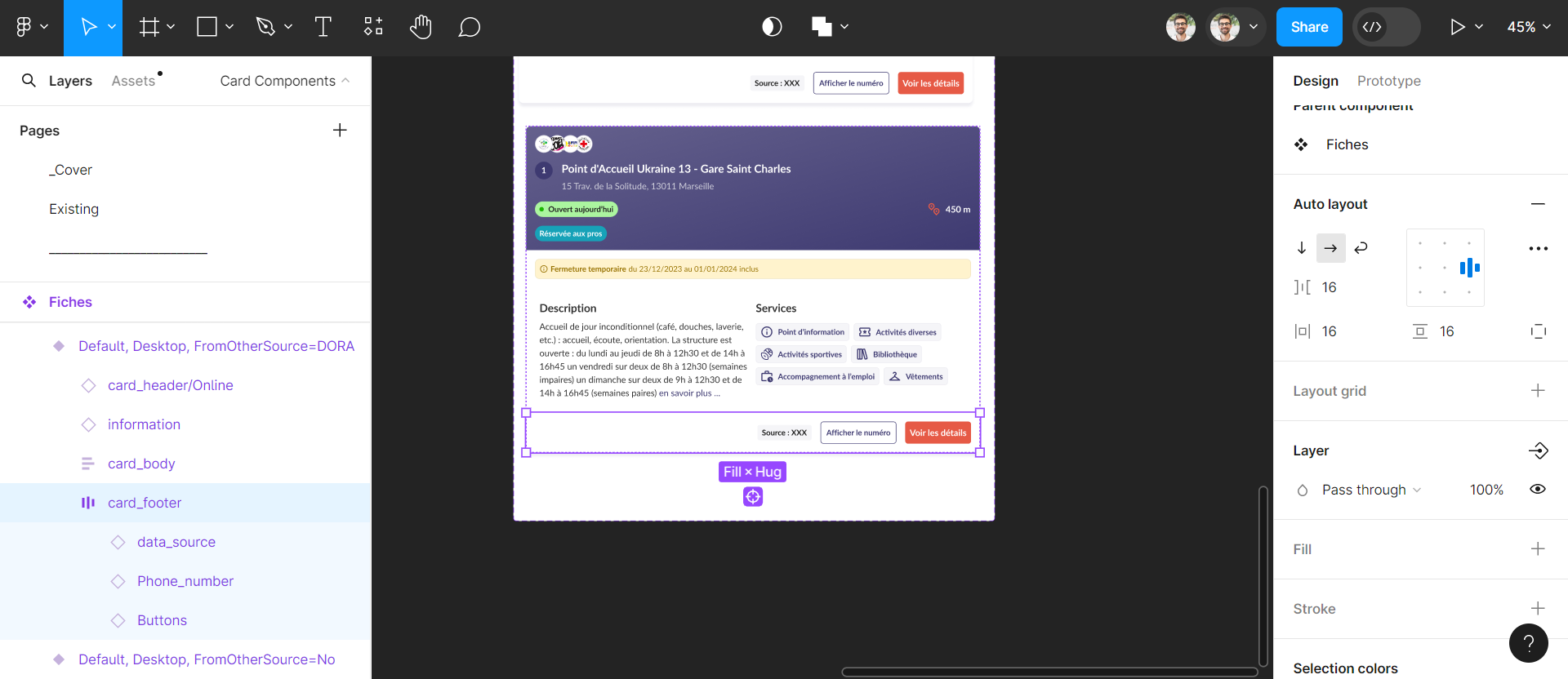
This might be a dummy question but I am new to Figma. I have a card footer containing 3 elements : a data source, a phone number and a button.
I would like the data source to be left aligned while I want the phone number and the button to be right aligned.
Do you have any idea of how to get this behavior ? Should I set something in the card footer element or in the children element ?
Thanks advance !

in

This topic has been closed for replies.
Raphael_M
Raphael_MSolution
Power Member
Feb 3, 2024 4:07 AM UTC

Hi, Gabriel.

Yes, you can do that with layout grid + constraints.

But since you are using auto-layout, what you need to do is wrap again the phone number and the button and then put the entire row-wrap’s gap to auto (space-between).

3 replies

Raphael_M
Raphael_MSolution
Power Member
Feb 3, 2024 4:07 AM UTC

Hi, Gabriel.

Yes, you can do that with layout grid + constraints.

But since you are using auto-layout, what you need to do is wrap again the phone number and the button and then put the entire row-wrap’s gap to auto (space-between).

Gabriel30
Gabriel30Author
Feb 4, 2024 8:16 AM UTC

Thanks a lot, it solves my issue !

Oct 23, 2024 1:26 PM UTC

I’ll try wrapping the phone number and button in a new auto-layout frame and set the gap to auto. That should help achieve the alignment I need!