Farzona
January 18, 2023
Solved

Changes published in library are not updating component instances in other files that use the library

  • January 18, 2023
  • 69 replies
  • 17581 views

Hi there,

We have a team library with components, and other project files using instances of these components. When publishing changes to the master component in the source file (library) we stopped receiving the “Review and accept library updates” notification in other project files and obviously component instances were not updating.

Yesterday (17.01.2023), this notification was appearing but the changes were still not applied in component instances in other files.

This is an important issue, as all our work relies on the libraries working properly. Urgent help would be appreciated.

Thanks.

UPDATE: I tried solution #3 from this thread and it is still not working.

This topic has been closed for replies.
Best answer by Manuela_Mesterhazy

UPDATE ⚠️

I spoke to Figma and they figured out what happend on my end, maybe it helps some of you.

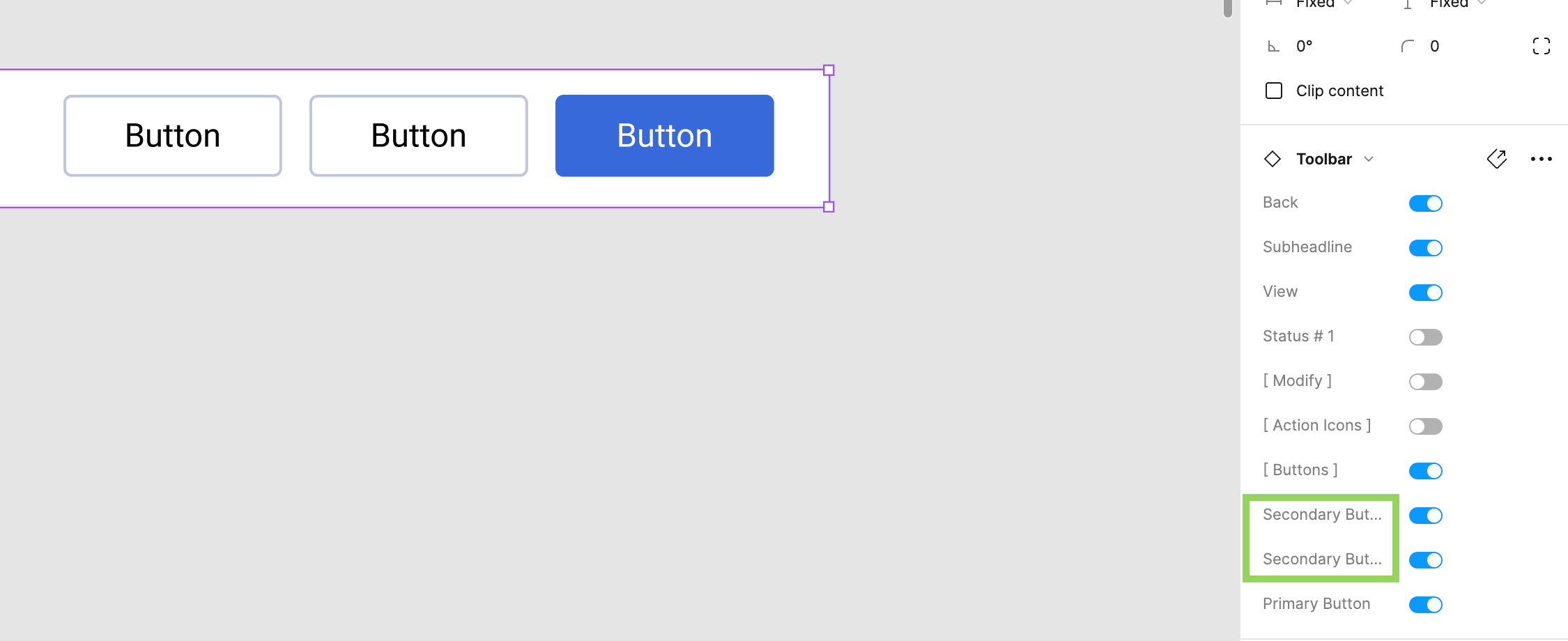
If you have variants applied to a library component, all labels must have a unique name. Figma displays a conflict error if variants have the same value, but if you have a library component and the setting labels are called the same, this conflict error is not displayed. The system recognizes it as a conflict and therefore it won’t update the component until it is fixed, so it will never show up in your updates, even if you think you have published it.

Make sure all labels in your settings are unique.

Here was my mistake to give you an example (see image attached). We have two secondary buttons in the toolbar library component. The value can be off/on, so no conflict there, but because there are two items called secondary button, the system cannot map it correctly and the “conflict” was never communicated to me, so I did not know this was the reason why my component would not update and be published.

69 replies

Hafsah
November 6, 2023

Thank you so much! this works

November 7, 2023

Having the same Issue – the Library Element only Updates If I manually add it again from the Assets Panel but that’s a big bummer and slow’s down the process tremendously.

I tried all Hacks and repairing connections but also making new Instances, relinking them, adding them as a new Component Instance and so on… just doesn’t work

Figma you seem to have a Problem here.

Pat5
New Participant
November 8, 2023

This is getting beyond a joke! Library updates will just not update in the design file. I can insert a new instance of a component and it will contain the updates from the LIbrary but all the instances that were in the design library will still not update.

From the library modal, if I go into Updates click on the component to review updates, the Preview is unavailable and on update instance I get the error - “An error occurred while retrieving the component or state group”.

I have tried repairing and nothing works.

I have been working with Figma for years and Sketch before then. In the last months there has been major issues with Figma. Its now to the point that it is having a huge impact on performance across the design team deliverables. So much so that we are considering switch to Sketch.

November 8, 2023

Same for me. It’s grinding my productivity down slowly. I have to restart Figma every time I need to pull updates into my design files from my library files. Its just not recognising there have been changes in my library files. It’s ben like this for almost a year. Please, please sort this. Figma is great, I really don’t want to have to switch tools … again

Isabella_U1
New Member
November 10, 2023

Would appreciate for Figma to resolve this.

I am publishing updates from a library quite frequently and am having to hack it by right clicking on the design file tab > reload tab every time I am in the design file in order to actually be able to update it.

It is frustrating because it usually starts off working and showing me the ‘Update Instance’ (almost like it has reached a quota… 🤔), then suddenly stops displaying after I publish the library.

Along with a plethora of other Figma Library issues that are slowing down work efficiency, when it’s all added up takes a fair bit of time to deal with throughout the day.

Adriana_Mandjarova
November 13, 2023

Same issue.
I’ve published a change in the library 15 minutes ago and the notification “Review and accept library updates” is not appearing in the master file. Please fix.

**Edit: Restarting Figma did not help.

Pat5
New Participant
November 14, 2023

I would appreciate if Figma can just respond that this is an issue.

It seems to be getting worse. Now when i publish the new components are not showing up in the shared library. I have to copy and paste from the library and only then will it show up in the design file!!!

Figma, please at least respond!

November 15, 2023

So as I have had this issue on some days and some days not, I personally assume that this might has something to do with Figma’s Server Ressources? I did not change anything on my file and early morning yesterday everything was quite smooth… today during daytime it’s not working properly anymore. Feels just as if the Updates take very long due to maybe heavy traffic on the servers as everything is in the cloud? Would be cool anyway to get some Input by Figma as this thread has thousands of views already! @Figma_Moderation

Pat5
New Participant
November 21, 2023

Does Figma support exist?

Pat5
New Participant
November 23, 2023

Here’s a new issue I haven’t had before. I have lost access to all Colour Variables and Colour styles in the design file. 🤦‍♂️ I can have access to components in that library but colours are no where to be seen.