

Dmytro-N
Oct 1, 2024 2:24 PM UTC
Question

Can't save a plugin in UI3
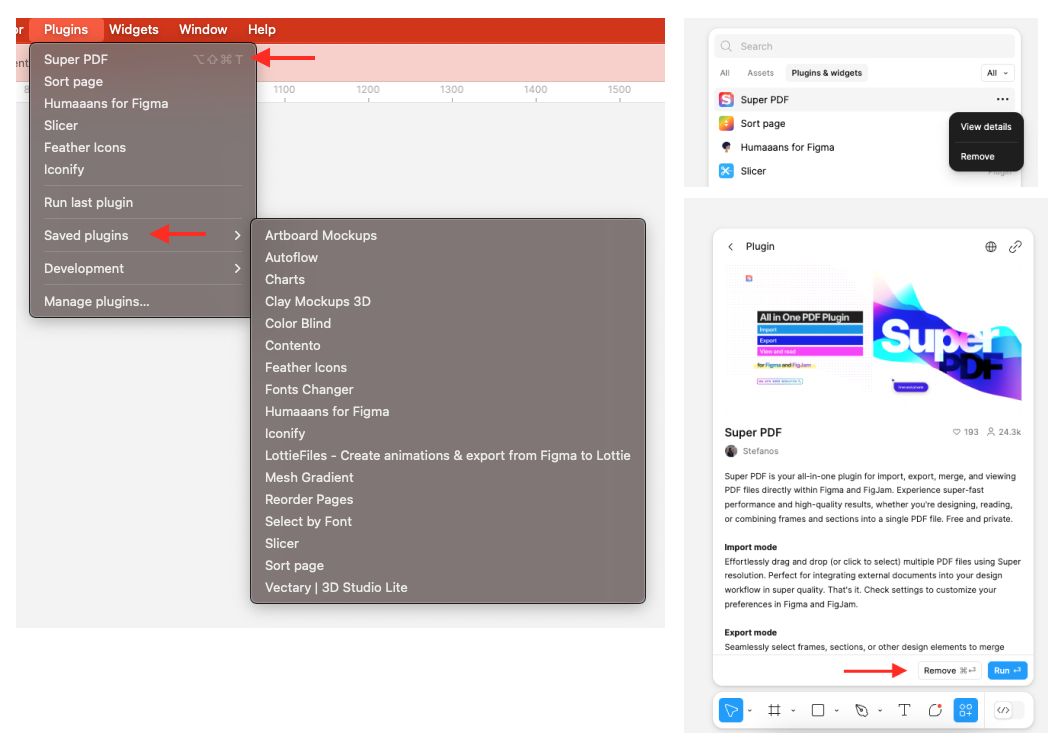

Looks like in UI3 Figma skipped the ability to save plugins to a separate “folder” in a menu. So I can’t use the keyboard shortcut to launch the plugin when it disappears from the “recently used” list. There used to be an option to save the plugin, but now there isn’t. Do I miss something?

This topic has been closed for replies.

8 replies

y_toku
Figmate
Community Support
Oct 2, 2024 3:03 AM UTC

Hi there,

Thanks for reaching out. I’m checking with our internal team. I will get back to you when I have anything I can share with you.

Thanks for your patience.
Toku

y_toku
Figmate
Community Support
Oct 3, 2024 5:49 AM UTC

Thank you for your patience. I checked with our internal team, and this is considered expected behavior. In the Actions menu, the top list displays your saved or recently used plugins. If you have a recently used plugin, such as Super PDF, the only option is to remove it.

That said, we’ve heard your feedback for future improvements.

Thanks,
Toku

Dmytro-N
Dmytro-NAuthor
Oct 3, 2024 6:04 AM UTC

Hi @y_toku, thank you for your response!
This is the weirdest thing. There is a list of saved plugins, but I can’t add anything to it now. I can’t use a keyboard shortcut for a plugin if it’s gone from the list. Very upset.
Thank you for your time!

y_toku
Figmate
Community Support
Oct 3, 2024 6:11 AM UTC

It seems unusual if you’re unable to add plugins since I could add that via a keyboard shortcut. Could you please try the troubleshooting steps below?

  • Close any Figma tabs you’re not using
  • Browser : Force-quit and open Figma in a new browser window.
  • Desktop App: Force-quit the Figma Desktop app and restart it. If the issue persists, try clearing the cache.

If the issue still continues, could you submit a bug report detailing the steps that led to this issue? You can do so by following the link:

Figma Learn - Help Center

Thanks,
Toku

Dmytro-N
Dmytro-NAuthor
Oct 3, 2024 5:33 PM UTC

It’s not a bug. It’s how plugins work now, without “saving” ability.

  1. Set a shortcut for a specific plugin.
  2. Run different plugins 6 times.
  3. Your plugin shortcut doesn’t work anymore, because it goes away from the “resent used” list. You can’t save it in a menu, that MacOS can find it.
Micaela_Brody
New Member
Nov 10, 2024 11:53 PM UTC

you can save a plugin by clicking the ribbon on the community page (next to “open in”). it’s not very intuitive imo!

Dmytro-N
Dmytro-NAuthor
Nov 19, 2024 5:16 PM UTC

Yep! It works! It looks like “leftovers” from cuted UI 😃

Habib_Gilang_Maulana
New Member
May 3, 2025 3:16 AM UTC
They could just add a new dropdown item for “saved/bookmarked plugins” here tho