
Thomas_Nabelek
New Member
February 27, 2024

Use inverse of Boolean variable to show/hide layer

  • February 27, 2024
  • 53 replies
  • 6314 views

This has been mentioned here:

I am looking for the availability to HIDE a layer when a Boolean variable is TRUE and SHOW it when it is FALSE. So, the inverse of the default/current behavior. I want to do this without using components.

Use case: When a variable is true, show one frame. When that same variable is false, show a different frame.

I can get basically this by using two different variables:
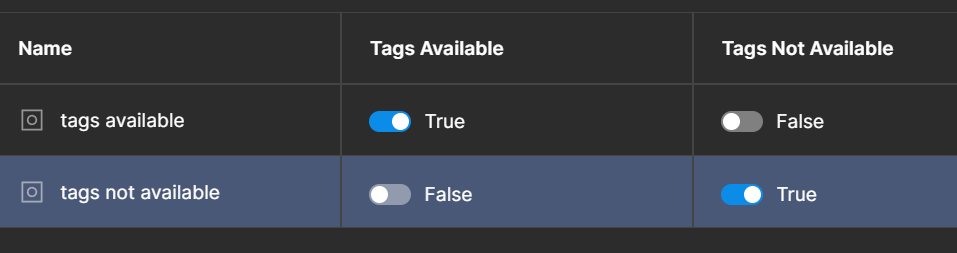

but it would be more convenient to be able to do it with just one. Just give me a Boolean toggle when the variable is used to say if the variable should be inverted or not.

53 replies

Aryk Grosz
New Member
January 14, 2026

+1 

Christian_Franck
New Participant
January 18, 2026

Also need this...

Cory Chung
New Member
January 21, 2026

+1

Still need this as of 2026...

Mark_Chitty
New Member
February 10, 2026

+1 Still need this. Being able to set a variable value to an expression would suffice.

Enrique_Herrero
New Member
February 20, 2026

+1 This would simplify a lot of conditional designs hugely.

artichokes
New Member
February 23, 2026

+1


It’s currently nothing more than a show/hide layer toggle. I want to control more, for example buttons that are icon only. Now I need 2 booleans for 1 function.

Art_Klepchukov
New Participant
March 12, 2026

After 2 years (!), is this enough feedback Figma?

cc: ​@y_toku 

DJPat
New Member
April 23, 2026

+1

dsp
New Participant
May 13, 2026

This is the biggest blocker in our orgs design workflow right now. I don’t need AI features, I need this.

Smith_Samuel_D
Active Member
May 20, 2026

Tying other posts with the same request into this: