
Thomas_Nabelek
New Member
February 27, 2024

Use inverse of Boolean variable to show/hide layer

  • February 27, 2024
  • 53 replies
  • 6313 views

This has been mentioned here:

I am looking for the availability to HIDE a layer when a Boolean variable is TRUE and SHOW it when it is FALSE. So, the inverse of the default/current behavior. I want to do this without using components.

Use case: When a variable is true, show one frame. When that same variable is false, show a different frame.

I can get basically this by using two different variables:
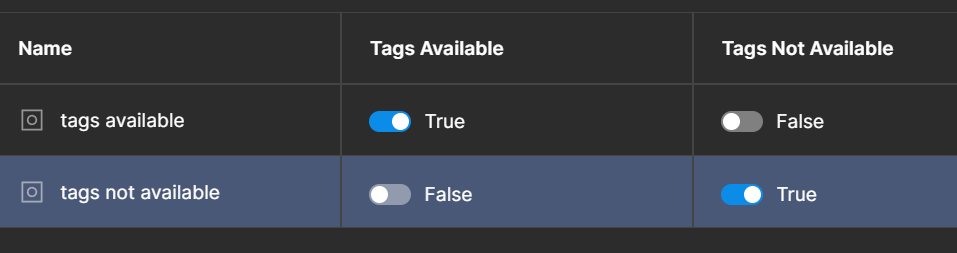

but it would be more convenient to be able to do it with just one. Just give me a Boolean toggle when the variable is used to say if the variable should be inverted or not.

53 replies

Simon Rogers
New Member
September 10, 2025

It’s insane that it wasn’t designed like this to begin with.

This is how variables work and are used in programming languages, and by Figma’s own UI – e.g. I toggle the visibility button on a layer to false, I expect it to hide, and I expect the Figma UI to update the visibility icon to display the closed eye – having two variables for this state in web development would be absurd, and is just as absurd in a design context. 

I am learning Figma variables at the moment and this was my reaction when I saw how they are currently setup: 

It is very hard to defend the current design logic if I were to say to a designer I work with that ‘Figma is easy’.

Michael Reedy
New Member
September 26, 2025

I still have hope for this feature.

dariocorsi
New Member
October 6, 2025

+1 to this. Conditional logic would clean up my components. The necessity for `isVisible` and `isHidden` vars doubles the lift for designers.

Sofie_Katan1
New Participant
October 22, 2025

+1000 would be so useful

Illes_Nagy
New Member
November 5, 2025

+1 

pretty please! 🙏

A simple use case for example on a product card:

I just want to use one boolean (e.g. IsSoldOut)
When it’s true, I want to hide the CTA, BUT show the “sold out message”. 

At this moment, the possible workorounds:

A) create ShowSoldOutMessage and HideCTA boolean (Not optimal, as it does not reflect the component real behavior - as both cannot be true or false at the same time)
B) create separate component which holds the CTA and sold out message (NOT optimal as 1) it creates maintenance overhead 2) in case layers are in different sections / containers - it just won’t work)

Thanks! :)

Ivo_Ruijters
New Member
November 25, 2025

I really need this.
(Real example: I have a block that I would like to HIDE when a variable is set to TRUE. Currently it’s only possible to show an element when a variable is set to TRUE)

Kimberly Koh
New Member
December 2, 2025

+1

hefler
New Participant
December 14, 2025

+1

Bring it to reality!

Dan Mironenko
New Member
December 15, 2025

+1!
 

  1. Expressions MUST be available for usage as a variable value
  2. Expressions SHOULD be available as element property value. Could be achieved with help of the first item.
Oleg Khalikov
New Member
December 15, 2025

+1 

Very important.