
Thomas_Nabelek
New Member
Feb 27, 2024 5:56 PM UTC

Use inverse of Boolean variable to show/hide layer

This has been mentioned here:

I am looking for the availability to HIDE a layer when a Boolean variable is TRUE and SHOW it when it is FALSE. So, the inverse of the default/current behavior. I want to do this without using components.

Use case: When a variable is true, show one frame. When that same variable is false, show a different frame.

I can get basically this by using two different variables:
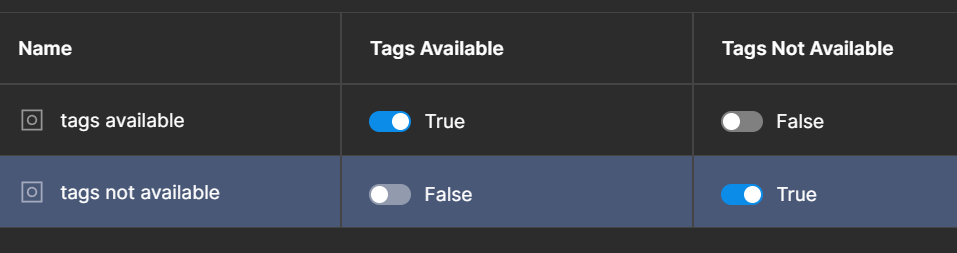

but it would be more convenient to be able to do it with just one. Just give me a Boolean toggle when the variable is used to say if the variable should be inverted or not.

54 replies

AndrinS
New Member
Jul 21, 2026 6:50 PM UTC

+1

Tascha
Active Member
Sep 8, 2026 11:58 AM UTC

We need this PLEASE 🙏

AndresG09
New Member
Sep 14, 2026 3:26 AM UTC

Two years later and we still dont have this functionality. Figma could improve a lot its prototyping capacity by integrating conditional rendering based on booleans. Currently everytime im working on a prototype that needs conditional rendering i have to duplicate a single boolean so that each one affects one layer by its own, and it is a real headache that makes us work slower.

ianh
New Member
Oct 28, 2026 7:33 PM UTC

Chiming in to express a need for this, but more specifically for properties on a component, not necessarily as a true “variable”.

My use case: “entangling inverse states of layers via boolean”
e.g. “Copy Block” layer paired with “Copy” Boolean.

When “Copy” boolean = TRUE, “Copy Block” is visible. 
At that same moment, I need “Logo” to be toggled off/invisible.

I’m essentially entangling layers together so they can not exist together. The Boolean drives that.
So “Copy” means “no logo”, and “No copy” means “logo”.

Enabling this feature unlocks a lot more versatility without having to make individual variants for all these situations.

- Production Systems Designer | Disney