
Thomas_Nabelek
New Member
February 27, 2024

Use inverse of Boolean variable to show/hide layer

  • February 27, 2024
  • 53 replies
  • 6313 views

This has been mentioned here:

I am looking for the availability to HIDE a layer when a Boolean variable is TRUE and SHOW it when it is FALSE. So, the inverse of the default/current behavior. I want to do this without using components.

Use case: When a variable is true, show one frame. When that same variable is false, show a different frame.

I can get basically this by using two different variables:
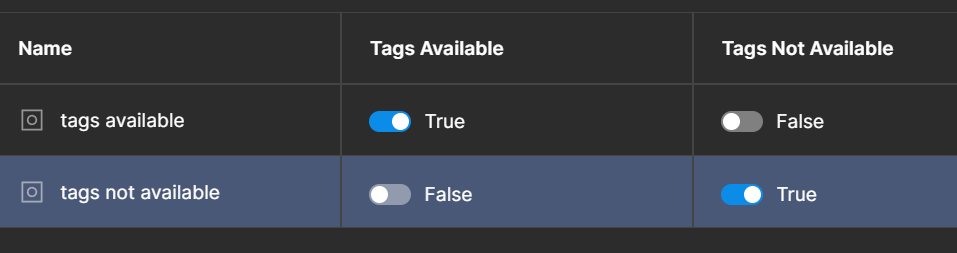

but it would be more convenient to be able to do it with just one. Just give me a Boolean toggle when the variable is used to say if the variable should be inverted or not.

53 replies

Chas_Barton
New Member
February 20, 2025

100% an intuitive need for us as designers. 

Expectation:
Because the object is visible as I create the property and set the toggle to Off, I would expect Off to = Visible.

Reality:
Instead, I get surprised when I click Create. The object now becomes invisible. Not my intention. In order to accomplish my goal of a component variable where I can essentially click a toggle On to get a simplified version of the component, I have to use a normal dropdown variant selection instead of a simple boolean.

@Figma, here’s my workflow where I expect it to work:

  1. Select currently visible object within component. 
  2. Click Apply Variable Property > +New
  3. Name variable (i.e. Hide Text) and set the toggle value to Off. 
Eric Gmutza
New Member
March 7, 2025

Crazy that we still don’t have this feature.

Yuanrui_Li
New Participant
May 12, 2025

Need the same feature from a year ago, but it’s still missing -_-

Pendar Yousefi
New Member
June 12, 2025

+1, I need this too. 

Robot
July 1, 2025

+1 

Very important.

Xavier Olland
New Member
July 2, 2025

This just force me to create unnecessary component versions.

I don’t understand such a basic thing isnot offered but we have an AI tool integrated to add images...

Barry Hood
New Member
July 2, 2025

I just encountered this (after only a short while with the product).  Yes, Visibility of a layer should allow the specification of an expression.  So, ‘Item Selected’ variable can be referenced as ‘Item Selected’, ‘!(Item Selection)’, or any number of other more complex expressions.  Please add this functionality soon so that we don’t have to duplicate all booleans and define (and set) a negated value alongside every boolean.

jkdn
New Member
July 15, 2025

+1

Please add this, it would save a lot of effort and reduce confusion from redundant variables.

Michael_Mabale
New Member
August 6, 2025

+100

There is so much bloat and unnecessary complexity in both if/else logic and creating variants to achieve this.

dsp
New Participant
August 7, 2025

A hack I use is to set a conditional instead of connection lines and then use true/false statements in there