Use inverse of Boolean variable to show/hide layer

  • February 27, 2024
  • 44 replies
  • 4843 views

Show first post

44 replies

Xavier Olland

This just force me to create unnecessary component versions.

I don’t understand such a basic thing isnot offered but we have an AI tool integrated to add images...


Barry Hood
  • New Member
  • July 2, 2025

I just encountered this (after only a short while with the product).  Yes, Visibility of a layer should allow the specification of an expression.  So, ‘Item Selected’ variable can be referenced as ‘Item Selected’, ‘!(Item Selection)’, or any number of other more complex expressions.  Please add this functionality soon so that we don’t have to duplicate all booleans and define (and set) a negated value alongside every boolean.


jkdn
  • New Member
  • July 15, 2025

+1

Please add this, it would save a lot of effort and reduce confusion from redundant variables.


Michael_Mabale

+100

There is so much bloat and unnecessary complexity in both if/else logic and creating variants to achieve this.


dsp
  • New Participant
  • August 7, 2025

A hack I use is to set a conditional instead of connection lines and then use true/false statements in there


Simon Rogers
  • New Member
  • September 10, 2025

It’s insane that it wasn’t designed like this to begin with.

This is how variables work and are used in programming languages, and by Figma’s own UI – e.g. I toggle the visibility button on a layer to false, I expect it to hide, and I expect the Figma UI to update the visibility icon to display the closed eye – having two variables for this state in web development would be absurd, and is just as absurd in a design context. 

I am learning Figma variables at the moment and this was my reaction when I saw how they are currently setup: 

It is very hard to defend the current design logic if I were to say to a designer I work with that ‘Figma is easy’.


Michael Reedy
  • New Member
  • September 26, 2025

I still have hope for this feature.


dariocorsi
  • New Member
  • October 6, 2025

+1 to this. Conditional logic would clean up my components. The necessity for `isVisible` and `isHidden` vars doubles the lift for designers.


Sofie_Katan1
  • New Participant
  • October 22, 2025

+1000 would be so useful


Illes_Nagy
  • New Member
  • November 5, 2025

+1 

pretty please! 🙏

A simple use case for example on a product card:

I just want to use one boolean (e.g. IsSoldOut)
When it’s true, I want to hide the CTA, BUT show the “sold out message”. 

At this moment, the possible workorounds:

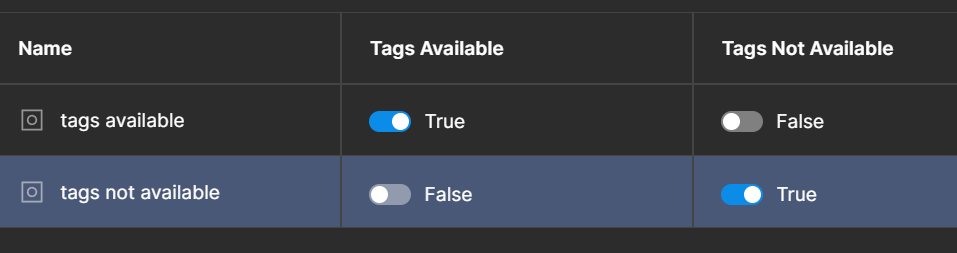
A) create ShowSoldOutMessage and HideCTA boolean (Not optimal, as it does not reflect the component real behavior - as both cannot be true or false at the same time)
B) create separate component which holds the CTA and sold out message (NOT optimal as 1) it creates maintenance overhead 2) in case layers are in different sections / containers - it just won’t work)

Thanks! :)


Ivo_Ruijters
  • New Member
  • November 25, 2025

I really need this.
(Real example: I have a block that I would like to HIDE when a variable is set to TRUE. Currently it’s only possible to show an element when a variable is set to TRUE)


Kimberly Koh
  • New Member
  • December 2, 2025

+1


hefler
  • New Participant
  • December 14, 2025

+1

Bring it to reality!


Dan Mironenko
  • New Member
  • December 15, 2025

+1!
 

  1. Expressions MUST be available for usage as a variable value
  2. Expressions SHOULD be available as element property value. Could be achieved with help of the first item.

Oleg Khalikov
  • New Member
  • December 15, 2025

+1 

Very important.


Aryk Grosz
  • New Member
  • January 14, 2026

+1 


Christian_Franck

Also need this...


Cory Chung
  • New Member
  • January 21, 2026

+1

Still need this as of 2026...


Mark_Chitty
  • New Member
  • February 10, 2026

+1 Still need this. Being able to set a variable value to an expression would suffice.