Shelene_Lee
February 24, 2021

Show Font Weight in Inspect panel

  • February 24, 2021
  • 94 replies
  • 26847 views

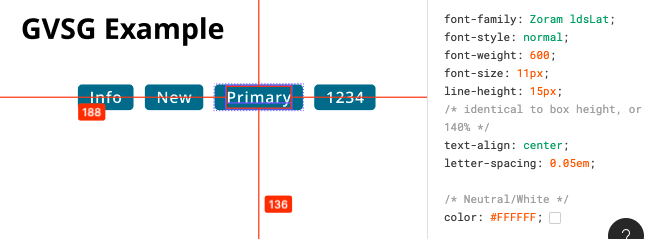
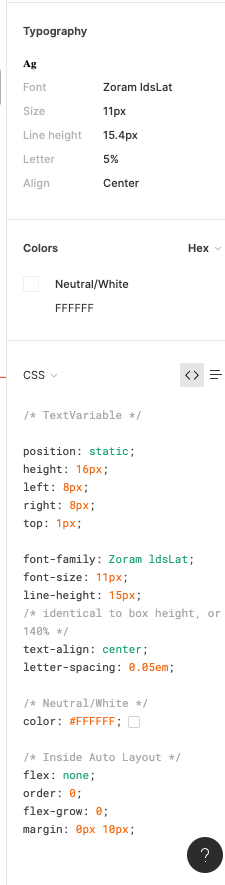
When inspecting the following component, I can click on the font to see the font weight and style in the inspect panel. When my dev clicks on the same item, he does not have all the CSS information that I have in the inspect panel, specifically he is missing font weight and font style. He does not have the ability to see the different font weights, which is unacceptable. Is there some way to fix this?

Component with my inspect panel:
Screen Shot 2021-02-24 at 10.12.33 AM

My (designer) Inspect panel:

Developer Inspect Panel:

✏️ Note from the moderator

There is a way to see the actual font weight, but it’s hidden and inconvenient: Show Font Weight in Inspect panel - #5 by Gleb

94 replies

dennsi
Active Member
June 30, 2023

This has been a pain in the b**t since we started working with Figma two years ago.
Automatic detection of font-weights might be prone to errors to begin with since many fonts might not have corresponding font-weight numbers embedded? Figma how about you give designers the ability to define corresponding font-weights manually that show up in Dev-Mode / inspect panel?

hfu
New Participant
July 20, 2023

It’s been two years already, and we really need this to be fixed! @Figma_Support

August 3, 2023

Same issue here! 😕

Anni_V
New Member
August 25, 2023

Bumping because seems like with the introduction of Dev mode the Table View was removed. 🙃 So this workaround no longer works.

tank666
August 25, 2023

We always show font-style, line-height, and font-weight in code snippets.
Dev Mode fast follows: 200+ new features and fixes | Figma Blog.

You can inspect values not only through code snippets, but also as Figma properties.
Dev Mode fast follows: 200+ new features and fixes | Figma Blog.

UX/UI designer. Figma expert. Creator and developer of plugins and widgets for Figma and FigJam. Check out my resources in Figma Community: figma.com/@tank
Anni_V
New Member
August 25, 2023

Thanks for the heads up! Personally this didn’t do what I needed it to (attached is what I expected, and how I told my devs to look for correct font-weight in the past), but in all fairness we probably need to look into how our font files are set up in the code. 😅

September 27, 2023

Not sure if anyone ever actually reported this as a “bug” instead of an idea - but I just did and I hope it will maybe be fixed after 2 years because it’s causing issues for us as well.

Lea_Alcantara
February 16, 2024

2024, post Dev Mode becoming a paid product, this issue still persists. Has anyone found a workaround like before (table view that disappeared) that somehow is solved in Dev Mode? Or some other workaround?

Rogie_King
Figmate
Designer Advocate
February 20, 2024

Thanks for your feedback, Lea. The team is looking into this now!

February 23, 2024

This is an issue for our company as well where Adobe Creative Cloud fonts are not displaying the correct font weight in dev mode.

Our only option to combat this is to put the correct font weight into the name of the element as well as documenting the issue. The issue is we are instructing our developers to use dev mode, but also telling them to ignore/replace some of the code in dev mode… this is not ideal.

@Rogie_King I know you said the team is looking into this issue so any update would be helpful.