Shelene_Lee
February 24, 2021

Show Font Weight in Inspect panel

  • February 24, 2021
  • 94 replies
  • 26847 views

When inspecting the following component, I can click on the font to see the font weight and style in the inspect panel. When my dev clicks on the same item, he does not have all the CSS information that I have in the inspect panel, specifically he is missing font weight and font style. He does not have the ability to see the different font weights, which is unacceptable. Is there some way to fix this?

Component with my inspect panel:
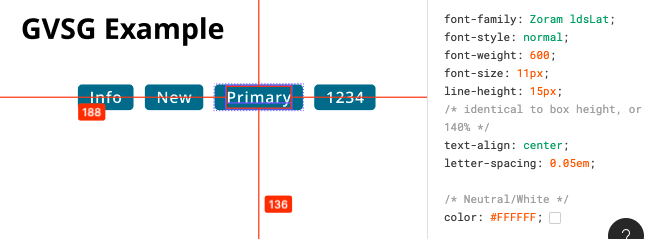
Screen Shot 2021-02-24 at 10.12.33 AM

My (designer) Inspect panel:

Developer Inspect Panel:
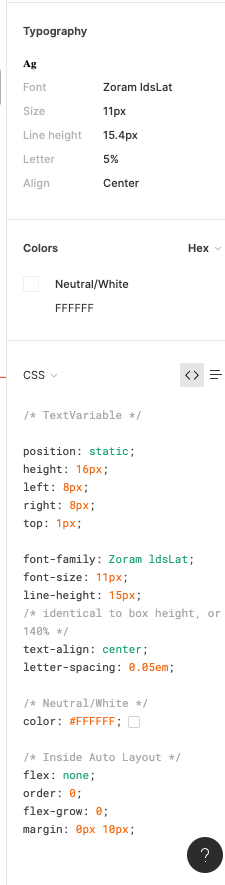

✏️ Note from the moderator

There is a way to see the actual font weight, but it’s hidden and inconvenient: Show Font Weight in Inspect panel - #5 by Gleb

94 replies

Caitlin5
New Member
June 7, 2024

Also receiving this issue! 😢

Nicolas_Combes
New Member
July 9, 2024

Same issue for our large, multi-brand Design System: font-weight for our Book styles is shown as 450 in Dev Mode although it actually is 400. This creates confusion and leads to wrong implementations.

@Rogie_King Thanks for working on fixing this bug, feel free to get in touch for testing / more info.

CLAIRE_MOUNIER
July 25, 2024

This is just crazy, this topic begins in 2021… And still no fix? I’m using Zeroheight linked with our Design System on Figma and we can’t have the good overview of our textstyles, this is a big problem for us… 😅 We have a heading style with font-weight “Book” and Figma doesn’t display the right weight… Our developers are also very confusing. Please you have to fix this.

Jonathan_METZ
New Participant
August 30, 2024

Same in my case: we use Sofia Pro, Figma dev mode generates badly under 300 !