Shelene_Lee
February 24, 2021

Show Font Weight in Inspect panel

  • February 24, 2021
  • 94 replies
  • 26847 views

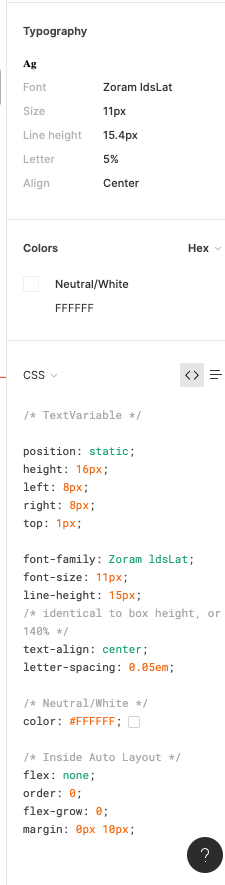
When inspecting the following component, I can click on the font to see the font weight and style in the inspect panel. When my dev clicks on the same item, he does not have all the CSS information that I have in the inspect panel, specifically he is missing font weight and font style. He does not have the ability to see the different font weights, which is unacceptable. Is there some way to fix this?

Component with my inspect panel:
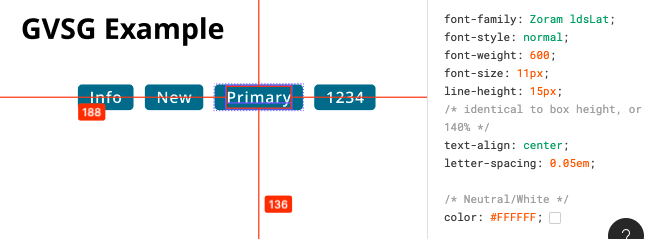
Screen Shot 2021-02-24 at 10.12.33 AM

My (designer) Inspect panel:

Developer Inspect Panel:

✏️ Note from the moderator

There is a way to see the actual font weight, but it’s hidden and inconvenient: Show Font Weight in Inspect panel - #5 by Gleb

94 replies

Anni_V
New Member
November 8, 2022

Bump. This has been a pain in our handover process for a while and only now I’ve understood the root of the cause. This needs to be fixed.

Johannes_van_Mierlo
November 22, 2022

Same issue here! 😕

dennsi
Active Member
November 22, 2022

Bump… please fix this Figma or give us the ability to declare font-weight overrides for the Inspect Panel

Soledad_Mari2
New Member
December 6, 2022

+1
this issue is causing handoff delays and misreporting of bugs in our team. is the solution in the works? it’s been consistently reported for almost two years now…

Julie_Turgeon
January 3, 2023

Same issue here.

Maxime10
January 10, 2023

Please fix this. My devs will kill me soon.

March 3, 2023

Just sharing another instance of this bug. Brandon Grotesque (Adobe Typekit font) is being used at the weights 400, 500, and 700 in this project, but Figma displays the weights as 390, 420, and 450 respectively. I’m really not sure what the deal is here, but this bug has thrown a wrench into pretty much every design/dev handoff for every project I’ve worked on in the last few years. Our designers specify elsewhere what the weights need to be for a project, but inspecting other components requires us to translate the erroneous values in your head to the real weights.
image
In screenshot, the selected text box should show 700 as the weight.

Sharon_Taylor
New Member
March 22, 2023

We just had the same issue, our devs noticed that the weight was shown as 400 in figma when it should be 700.

April 20, 2023

Any fix for the font style showing incorrectly in inspect? We updated font styles and the inspect panel is showing the old styles. Super obnoxious as the old style showing is different than the new styles so stuff is being built incorrectly on their side.

June 30, 2023

Hi, I’m currently facing the same problem as OP, especially after the introduction of Dev mode.

This is really frustrating to deal with as it slows down development and creating style sheets that specify every detail of each text style is time-consuming 🤬 😡 😡 😡