Shelene_Lee
February 24, 2021

Show Font Weight in Inspect panel

  • February 24, 2021
  • 94 replies
  • 26847 views

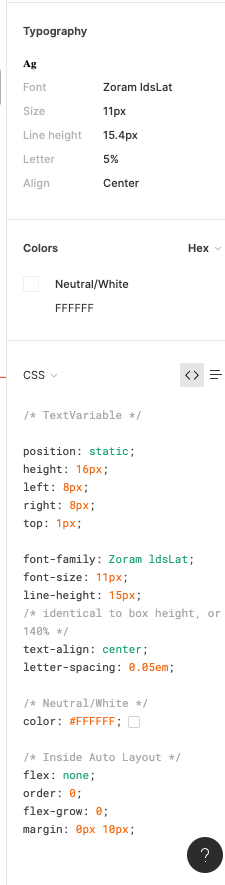
When inspecting the following component, I can click on the font to see the font weight and style in the inspect panel. When my dev clicks on the same item, he does not have all the CSS information that I have in the inspect panel, specifically he is missing font weight and font style. He does not have the ability to see the different font weights, which is unacceptable. Is there some way to fix this?

Component with my inspect panel:
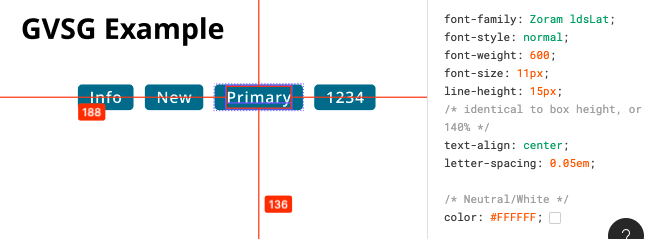
Screen Shot 2021-02-24 at 10.12.33 AM

My (designer) Inspect panel:

Developer Inspect Panel:

✏️ Note from the moderator

There is a way to see the actual font weight, but it’s hidden and inconvenient: Show Font Weight in Inspect panel - #5 by Gleb

94 replies

Denis_Lyaskovskiy
January 12, 2022

+++++ Same problem 😦

Constantine_Zuev
January 15, 2022

I guess the issue here is in how fonts work on web.

Old school fonts per se do not have ‘weight’ or ‘style’. They were just a collection of font files, each containing set of glyphs. When you declare your fonts in CSS you specify what each file means. So Roboto-100-italic.ttf becomes “Roboto” with weight 100 or “thin” and style “italic”. Roboto-700-regular.ttf becomes “bold” etc. etc. Then when you specify ‘font-weight’: 200; the browser knows what file to use, or picks whatever is closest. There are some conventions on how to translate ‘normal-bold’ into numbers, however this is entirely up to you and developer to follow them.

Now new variable fonts (which sadly Figma is not supporting) have can have weight, width, slant, italic, optical size, and even custom properties specified in font itself. Each of those can be 1-1000 if supported by font face, all in one file. Yet again, you might not need all of them and map specific weight and width to ‘normal’ and ‘bold’ in CSS.

So my guess is if you don’t have fonts available locally Figma is unable to get those numbers because the web engine not letting it.

Omar_Puig
January 29, 2022

When using the inspector feature in Figma I realized the details for the type used in the button component was incorrect. The font is a medium size with a weight that should be at 500. The inspect tool shows the font weight as 400. I have attached a screen shot of the Figma type details. I also attached a screen shot of the type run throught FontDrop which shows the font weight set at 500.


Uploading: Screen Shot 2022-01-29 at 1.01.32 PM.png…

Phil_Larsen
Active Member
February 2, 2022

Running into the same issue with the font Poppins. I first checked to see if I had any version installed on my machine but that isn’t the case. The Regular and Medium Font-Styles are both registering as 400 weight. It should be 400 and 500 as shown on Google Fonts.

–

The Font Style is correct in the list view as mentioned by @Gleb , but the Typography section shows the incorrect values.

Adam29
February 8, 2022

Same here and I would love to see that fixed.
The testers in my team have found the issue, so I run some test. I don’t know if it’s the same for all fonts but it looks that there are no problems with thicker fonts.
For Montserrat Black (900), Extra Bold (800), Bold (700) and SemiBold (600) are displayed as it should. But all other weights (Medium, Regular, Light, Extra Light and Thin) show as 400 (where Medium is 500 and Regular is 400).
It’s similar with other fonts I’ve tested (but some thicker fonts have some errors too).

Admin_Account_Mattthew
February 15, 2022

+1, I have the same issue

Emile_Swain
February 16, 2022

Below is the nightmare i’m having because seemingly Figma thinks certain named weights are actually different numbered weights.

In the middle you can see the flutter font weights i’m able to leverage. And i have to configured my Flutter project to use these values. I can’t use for example 350. But thats fine, thats a Flutter problem.

To the left you can see the figma reported weights for the different named font weights.
i.e. Gotham Bold is reported as 400 which is clearly wrong in anyones world.
Gotham Thin is reported as 250

As such i’m having to manually convert these values in my application code, which means developers looking at figma will have to ignore the reported weights because they are not correct.

This is a bug.

It looks like your trying to guess the weights from either information from the font file, which is fair enough, but given the standard for font weights loosely prescribes certain weights to certain name style, (thin, medium, bold, etc) it should at least adhere to that or warn the user.

It could be that you could provide an alternative setting where by the font weights are prescribe by settings in the file.

Who knows. But whatever you have now, is waisted significant amounts of my time trying to work out why the font weights are wrong and implementation doesn’t match creative. And that really is Figmas issue to fix otherwise your product isn’t fit for purpose.

seeo.kim
February 18, 2022

Same here.

I reported this issue to figma yesterday, and they said “It’s a bug we definitely want to fix but unfortunately it’ll take some time. Meaning this will likely be addressed by a long term update rather than a quick fix.”.

And they recommended me “giving the developer edit access to the file” but you know It’s paid. The worst thing is this way is the only cheat-key we have now.

I think this is a serious issue.

Brendan_Patterson
February 23, 2022

Same issue here - our extra light, light, regular etc all reporting as font-weight:400 and causing issues with development. Sad to see this is 1yr+ with so many people having this issue and it’s not being addressed.

Doan
February 25, 2022

I came here for help because our devs are facing tremdous problems. And because of this we are spending too much time with communicating back and forth, design to dev.
And the client wonder how incompetent we are because the live sites look like shit.
I am a little astonished how figma comes up with cool features but cannot solve this essential issue for over a year after first request has approached you.