Shelene_Lee
February 24, 2021

Show Font Weight in Inspect panel

  • February 24, 2021
  • 94 replies
  • 26847 views

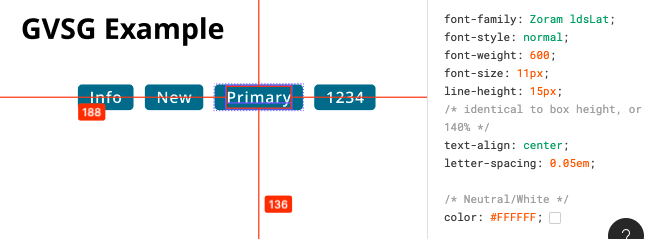
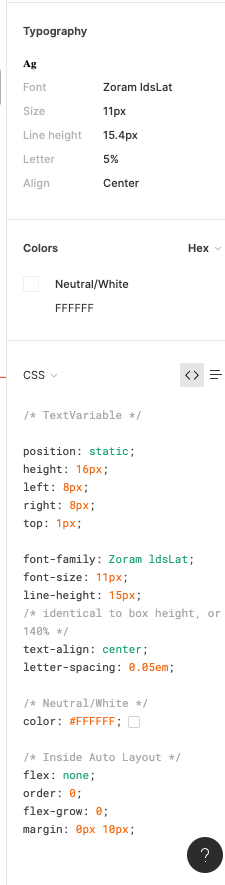
When inspecting the following component, I can click on the font to see the font weight and style in the inspect panel. When my dev clicks on the same item, he does not have all the CSS information that I have in the inspect panel, specifically he is missing font weight and font style. He does not have the ability to see the different font weights, which is unacceptable. Is there some way to fix this?

Component with my inspect panel:
Screen Shot 2021-02-24 at 10.12.33 AM

My (designer) Inspect panel:

Developer Inspect Panel:

✏️ Note from the moderator

There is a way to see the actual font weight, but it’s hidden and inconvenient: Show Font Weight in Inspect panel - #5 by Gleb

94 replies

Augusto1
March 22, 2022

Same issue here! Surprised that this has not been solved yet.

Dan_Shiran
March 24, 2022

Wow, one year after that and I have the same issue here!

Rahul_Gajjar
March 26, 2022

I am facing the same issue. I have raised a ticket for the bug. Explained all the details. I am also a font engineer, would love if Figma fixes this issue. Browsing this thread, it looks like Figma is not giving it enough attention.

Figma developers, you can reach out to me if you need any assistance. It is a simple fix, there is a particular property for font-weight in the font data file. Figma is not reading it correctly.

Meredith_McNeill
April 1, 2022

Agree that this is a huge problem. One of the selling points of using Figma is smooth developer handoffs without needing to use an additional add on product or tool (i.e. InVision, Zepelin). This bug is creating unnecessary friction in the development process and needs to be remedied. This particular bug is causing me to reconsider the set of tools my team is using - we need to have smooth handoffs with our development team - it’s better for productivity, morale, and our cross functional team relationships not to mention meeting launch deadlines.

sascha_bnqt
April 12, 2022

Same issue here! Would like to see this bug fixed.

Ian_VanSchooten
April 12, 2022

We had this same issue using an Adobe font, and installing it locally into our font books “solved” the issue. So, it seems like one workaround is to have developers all install the font on their machines. Free webfonts do not seem to suffer from this problem (Inter is handled correctly for us, for example).

bear
April 14, 2022


Also having the same issue where while using the desktop app on Mac, the font Gotham, Medium shows as font-weight: 400 in the Inspect panel.

The font is installed locally, so that has not solved the problem as it has for some others. I really hope this is a high priority bug to fix, b/c this adds way too much friction to the handoff process. We also do not have the resources to just buy Editor seats for all our devs—a major selling point for Figma was that it supposedly allowed for better collaboration without needing to do that. 👀

Luke_Manimala
April 18, 2022

Upvote, this and does anyone know if there is a bug out there to fix this? This is causing issues for my UI devs.

Lucas_Colusso
April 21, 2022

Upvote! This is causing unnecessary friction in our team.

Sarah_Kaiser
New Member
April 26, 2022

Likewise, same problem here.