

Namson
New Participant
October 28, 2021

"Return to instance" shortcut for Figma links

  • October 28, 2021
  • 21 replies
  • 3820 views

Hi!

My team exclusively uses Figma as the source-of-truth for implementation across various verticals: product, design engineering… We heavily rely on deeplinks to cross-reference other relevant files, flows, screens or resources to make the hand-off files easier to navigate for engineers.

Our problem is, after clicking a link that leads to another frame in the same file, there’s no way to go back to the previous page: People need to manually navigate the file hierarchy and sections organisation to retrace their steps. Easy when you’re the person who came up with all these flows and know the file org by heart, but hard for anyone else. 😅
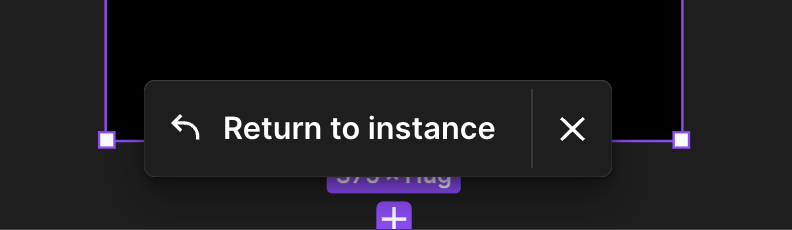
A floating action similar to the “Return to instance” button we have when shortcutting to a master component would be ideal. A keyboard shortcut to do that would be good enough. Any thoughts here?
21 replies

Martin_Kis
August 15, 2023

Shortcut to “Return to instance” would be really useful same way as shortcut to “GO to main component” which was already solved in this forum. Hopefully they add it as well…

ryan_chou
October 27, 2023

That’s awesome. I have searched for a while. BBT seems a good solution on it.

Patrick-Plaggenborg
Active Member
October 30, 2023

The latest version of BTT has a solid solution for this that works on any screen and Figma window size.

What works for me is setting the Mouse Position in BTT to:

  • Bottom Left of Active Window (which is the Figma window)
  • X axis: 50 % (to end up in the middle)
  • Y axis: 50 px (to end up 50 px up from the bottom, right in the middle of the button)

Background: Move mouse: "Relative to: bottom center of active window" - #7 by patrickplaggenborg - Feature Requests - BetterTouchTool Community

Rebekah
January 11, 2024

Would love to see this happen. We’ve had developers asking for this too. It’s easy as designer to return to previous selection but not for developers. It seems like the “Return to instance” button bar could be used the same way as is used currently when going to a main component.

CharlBrazle
January 31, 2024

Unless you link within a page you can press CTRL+Z so it goes back to previous Page. But yeah, I really want this feature too Return to source link 😍

Mantas2
New Member
May 13, 2024

I dont see a reason why this shouldn’t be included at least in the Menu bar, we could work with custom shortcuts. Please Figma!

Jesko
New Member
April 9, 2025

yes please! Shortcut or at least menu item for custom shortcut. That would be awesome!

joycekiddom
New Member
August 1, 2025

Sketch had this and I miss it!


Create many components (of our library components) and they’re scattered versions around as working through variations. Designing cells,tables and highly repetitive dense components means I have many components that I’m jumping between during heavy design time.


I need it to persist longer after I’ve clicked around, if the parent component is still in view and I am clicking around the [Return to instance] bubble should persist; at least until I navigate significantly away from that region. Finding the original component to click into to re-prompt the shortcut is friction inducing.

Lean_Scale
New Member
August 30, 2025

As a Figma tradition, we have to beg for something simple but very important. It’s been like this for years. For example, this simple task has been pending here for 3 years. This is exactly why monopolization by a company is terrible. If you are so helpless that you can’t even let users customize shortcut preferences in your own app, at least you could add the ‘return to instance’ function to the menu so that we Mac users could assign a shortcut to it. Waiting 3 years for something to be added to the menu is, no matter how you look at it, downright disrespectful by now.

Serkan_Zararsiz
New Participant
October 1, 2025

control + option + cmd + K should do the job, at least on Mac it works for me ✅