

Paul_Methot_Head2Head
May 14, 2021

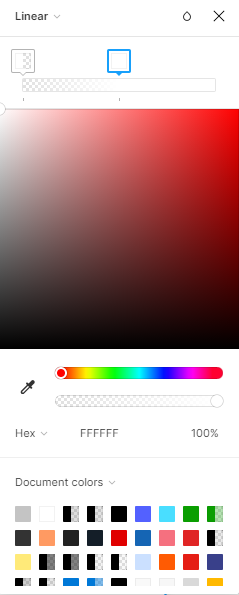
Linear Gradient Percentage Marker

  • May 14, 2021
  • 19 replies
  • 6220 views

Thought that I’d suggest adding a percentage indicator on the linear gradient colour selector. When I’m adjusting the colours in my linear gradient track, I’d like to know the precise location where my colours are on the track - a feature currently not included.

If the far left of that track is 0, the far right is 100, and I have a colour marker near the middle then I’d like to know if my middle marker is at 50, or 51, or 49. This allows me to be precise with my colours when creating new gradient templates that I can then use throughout my projects.

Thanks
19 replies

December 9, 2022

shame that this basic functionality is STILL not included. maybe adobe will actually fix it since all we want is the gradient controls from illustrator.

@admin combine some of the sundry posts asking for this feature?

June 24, 2023

2023 already annnd… nothing. I use the plugin “CSS Gradient for Figma” but It doesn’t work in Stroke, only for Fill.

August 17, 2023

Displaying gradient percentages is a fundamental function and an essential feature that must be incorporated into Figma.

Irina_Balaban
September 15, 2023

Hi all,

For anyone struggling with this just like myself, take a look at the Precise Gradients plugin.

Hope this helps!

Timj
New Participant
November 10, 2023

Thanks I was thinking there must be a plugin - but it’s annoying the core product relies on the good will of modders for baseline features.

dennsi
Active Member
December 15, 2023

Almost 2024 and using Gradients in Figma is still an awful experience.
There’s much room for upgrades like percentage input, stops count, direction change / rotation, using styles and variables etc etc etc.

Bob_Devitt
March 25, 2024

2024 and I cannot reposition a gradient I created because a position adjustment is non-existent.

It appears that the best way to do this is to create it in a 3rd party application and import it, since Figma cannot figure out how to do it.

Volodymyr_Bondaruk
March 25, 2024

Hi Bob, the Figma team made some improvements to the gradient tool on February 27, 2024. Here is the link to the details of the improvements: Figma product news & release notes. “Creating beautiful gradients in Figma just got easier. Now you can flip and rotate your gradient with new controls, enjoy smarter defaults, and simply hold Shift to snap.” I hope this helps.

Bob_Devitt
March 25, 2024

thanks. it wasn’t immediate obvious… but the adjustments are not in the gradient control box. they are displayed on the canvas itself when the gradient control box is open.