Mr.Biscuit
New Participant
January 23, 2021

LAUNCHED: True Aspect Ratio Lock

  • January 23, 2021
  • 214 replies
  • 31503 views

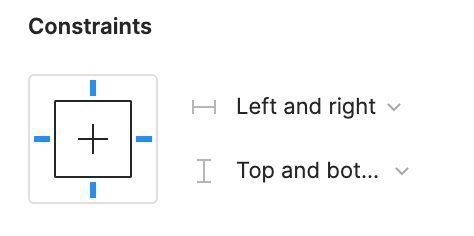
Can we get a true aspect ratio lock when the ‘Constrain Proportions’ is on?WX20210123-114719@2x A true aspect ratio lock means two things:
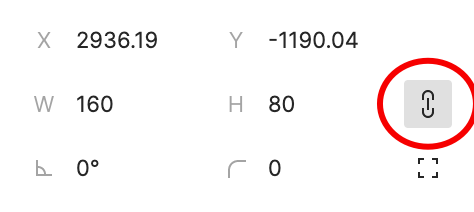
  1. When dragging on a node with ‘constrain proportions’, its width and height always stay in their original ratio no matter which direction you drag it.
  2. When resizing on the parent of a node with ‘constrain proportions’ that happens to be constrainedWX20210123-112532@2x, the node takes on the smallest of its supposed width and height, and calculates its ratio accordingly.

This would be so very helpful to polygon shapes that want to stay in that shape. Consider a spider chart. When you resize its parent, you don’t want the ‘spider net’ to squish squash; neither will you want a doughnut to turn into an oval.

*Resizing of the node’s parent layer is inevitable if you need responsive designs.

Pinned Reply By Celine_

Hey everyone, thanks for your patience! It’s fully rolled out now!

You can now lock the aspect ratio of almost any object in Figma – including frames, shapes, images, videos, vectors, and text – so that the proportions of that object are respected as you scale the object or its parent container.

 More info in the release notes here.

214 replies

Nichole1
New Member
October 12, 2023

I also am struggling with this. I want to anchor an image in the bottom right of a column grid, but have the image shrink proportionally with the column widths when I shrink the width of the frame. If I use a fill set to fit, I can get it to scale proportionally, but I can’t get it to stay anchored at the bottom. I’ve also tried content in frames set to fill, scale, and constrain left and right and top and bottom. I have not yet found any solutions that work and agree the constrain proportions chain tool does not work as expected and is making a simple task extremely frustrating. Holding down shift does work, but that isn’t an option when testing layouts for responsive design.

Martin53
October 13, 2023

This is something that would make it easier creating complex components for our design system. Big up!

matteogonzalez
October 18, 2023

Please Figma, add this feature ! 🙏

Josh_Klpa
October 19, 2023

We need this feature desperately - the whole of app design is moving towards web-based, and “aspect-ratio” has been a supported feature in CSS for years now - why can’t we have locked aspect ratios?

Mike_Hone
New Participant
October 19, 2023

When I create a square box (500x500px) and then click CONSTRAIN PROPORTIONS, and then drag the square nodes to the right. The constrain proportions does not respect the ratio. It just drags like a not box.

Mike_Hone
New Participant
October 19, 2023

It would also be nice to respect ratios have have options to size 16:9, 1:1 etc

11196
October 24, 2023

+1!!! I need this feature!

Chris_Gatland
New Participant
October 25, 2023

Agreed - this is so annoying. I have an icon that I want to scale with the parent frame. The parent frame could be any size or aspect ratio depending on context, hence the icon is getting stretched or squashed despite me enabling “constrain proportions” in the component.

If “constrain proportions” is only for a specific limited application, then why isn’t this referenced in the Figma UI itself? Like, the tooltip doesn’t give you any clue other than the name of the feature…

WHQ_Ep
October 25, 2023

Yes, please. Tired of using a work around for this.

MattRyan
November 13, 2023

Shocked this still doesn’t exist. Surely it’s not that hard to implement?

In what world does a designer want an image stretched outside of its aspect ratio as a default?

@figma can we get an update? Is this on anyones radar?