Mr.Biscuit
New Participant
January 23, 2021

LAUNCHED: True Aspect Ratio Lock

  • January 23, 2021
  • 214 replies
  • 31503 views

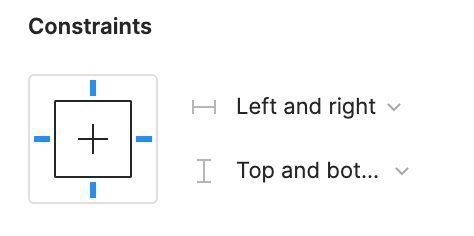
Can we get a true aspect ratio lock when the ‘Constrain Proportions’ is on?WX20210123-114719@2x A true aspect ratio lock means two things:
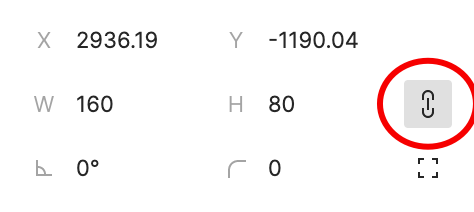
  1. When dragging on a node with ‘constrain proportions’, its width and height always stay in their original ratio no matter which direction you drag it.
  2. When resizing on the parent of a node with ‘constrain proportions’ that happens to be constrainedWX20210123-112532@2x, the node takes on the smallest of its supposed width and height, and calculates its ratio accordingly.

This would be so very helpful to polygon shapes that want to stay in that shape. Consider a spider chart. When you resize its parent, you don’t want the ‘spider net’ to squish squash; neither will you want a doughnut to turn into an oval.

*Resizing of the node’s parent layer is inevitable if you need responsive designs.

Pinned Reply By Celine_

Hey everyone, thanks for your patience! It’s fully rolled out now!

You can now lock the aspect ratio of almost any object in Figma – including frames, shapes, images, videos, vectors, and text – so that the proportions of that object are respected as you scale the object or its parent container.

 More info in the release notes here.

214 replies

Leigh4
New Participant
October 11, 2024

This is a basic design requirement and I can’t believe that this hasn’t been dealt with. Figma would rather move the chairs around on the UI than address fundamental design flaws. To the Figma representative that ‘just passes along the feedback’ - please pass it on again and ask why this design flaw is never addressed.

Dan_Shipley
October 11, 2024

Please release this and de-prioritize lame gen AI features

Geoff-Colbath
New Participant
October 16, 2024

This is an extraordinarily frustrating “feature”. It’s almost literally the dictionary picture of “It’s not a bug, it’s a feature!” It would seem that the word “constrain” is being used in some obscure way that only makes sense to someone within the Figma org. If I see the words “constrain proportions”, I expect:

  • If I drag to resize, it will do so proportionally, without the need to hold “Shift”
  • If I enter a numeric value in either the Width or Height fields in the right panel, the other dimension will scale accordingly (i.e.: proportionally)
  • If I use a variable to set one of the dimensions, the other dimension will scale accordingly (i.e.: proportionally)
  • If I have the object in an auto-layout frame, set to “Fill”, I expect the constrained object to scale proportionally as its parent’s width changes

This seems like a pretty basic feature/fix, here… what are we missing? Any updates on where this is on the backlog, @Figma_Product?

Tom_Auger1
New Participant
October 23, 2024

Thank you @Dan_Shipley for that. I appreciate your reminder that the Product team has lost their way.

We saw Adobe do this with Photoshop and 3D when their marketing department thought that would be the way to sell more subs. Now it seems Figma is prioritizing ridiculous gen-AI stuff over real tools that humans can use to (keep) doing their jobs more efficiently and effectively.

I really would like to see a software company maintain their integrity and just continue to refine and hone in on what made them excellent in the first place, not bow to the pressure of their VCs and hitch their little carts to whatever trendy horse Marketing tells them to.

Sorry for the rant. I’ve been posting way too much in the Figma forums and suggestions lately, and that’s a bad sign.

(I should add that I’m such a huge fan of this software and can sing its praises over AI, XD and yes even Sketch - for UX work - for days. I’m worked up because I have been having this fight for nearly 30 years with software companies that have amazing products and then just get lost and lose focus. Figma has been a fantastic tool, and just needed another year or two’s focus on their UX backlog and technical debt, but like the others, they are chasing the shiny new thing, while users just hunger for excellence and perfection of the existing features and toolset).

ahainen
Active Member
October 23, 2024

The year is 2067. Figma has overtaken Adobe as the premiere Galactic Design Lord Enterprise®. Figma stitches worlds and concepts and relationships together seamlessly in realtime. True Aspect Ratio Lock is a myth that gets talked about from time to time.

Culler_Jason
October 23, 2024

Celebrating 3 plus years of Googling “maintain aspect ratio Figma”. Bumping again for the community. I believe in you, Figma folks!

Tin_Le2
New Member
October 23, 2024

Wonder when Figma will take this on! Its been since 2021

ahainen
Active Member
October 29, 2024

The year is 2149. FIGMAX CORP. ENTERPRISES® has captured and enslaved over 3,000 planets in just this universe. The Figma software has been upgraded to Interdimensional FIGMAX® Multiverse™. Even in the new platform, making an image keep its aspect ratio is impossible. Only heretics dare speak of the evil concept.

KellyK
Active Member
November 8, 2024

I need this! I can’t use images in autolayout frames or components cause they don’t scale proportionally. I gotta break soooo many component instances to manually fix my image layers. I appreciate the community’s efforts in making plugins but I’m having a hard time getting them working and this is not something I have time to fight with regularly, it should be a native Figma feature. Even if it’s only for images, if the chain icon is clicked, it should maintain the aspect ratio even when resizing in an autolayout frame. Plz plz plz plz plz plz

Andrew_McIntosh
November 18, 2024

+1 No, +10! PLEASE. This gets me all too often. I really want things to scale up while in preview mode and maintain their ratio. I’m not sure why the ‘constrain proportions’ option doesn’t constrain the ratio when resizing in the work area, and when resizing during preview. (for some reason it only constrains when editing the numbers)… Feels like that could solve the basics of the issue. Then the addition features suggested above could come in shortly after.