Mr.Biscuit
New Participant
January 23, 2021

LAUNCHED: True Aspect Ratio Lock

  • January 23, 2021
  • 214 replies
  • 31503 views

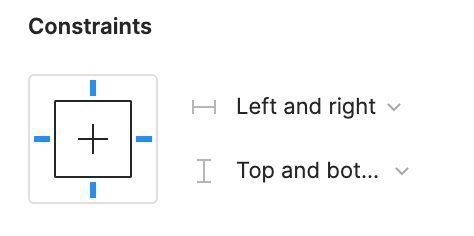
Can we get a true aspect ratio lock when the ‘Constrain Proportions’ is on?WX20210123-114719@2x A true aspect ratio lock means two things:
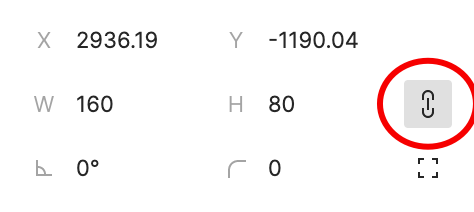
  1. When dragging on a node with ‘constrain proportions’, its width and height always stay in their original ratio no matter which direction you drag it.
  2. When resizing on the parent of a node with ‘constrain proportions’ that happens to be constrainedWX20210123-112532@2x, the node takes on the smallest of its supposed width and height, and calculates its ratio accordingly.

This would be so very helpful to polygon shapes that want to stay in that shape. Consider a spider chart. When you resize its parent, you don’t want the ‘spider net’ to squish squash; neither will you want a doughnut to turn into an oval.

*Resizing of the node’s parent layer is inevitable if you need responsive designs.

Pinned Reply By Celine_

Hey everyone, thanks for your patience! It’s fully rolled out now!

You can now lock the aspect ratio of almost any object in Figma – including frames, shapes, images, videos, vectors, and text – so that the proportions of that object are respected as you scale the object or its parent container.

 More info in the release notes here.

214 replies

September 5, 2024

Thank you!! Really appreciate the communication!

LXNDR
New Member
September 12, 2024

Hi Figma team,

I feel like this should’ve been a default feature considering the addition of the variables feature.

Sidenote, since I feel this may be relevant: Another strange exclusion from the variables feature is that there isn’t a way to have interactions between variables either which is kind of strange (e.g. A number “variable-1” = 100, and another number “variable-2” = #variable-1 + 40, resulting in variable-2 = 140), despite that the prototype interactions under “Conditional” allows for interactive variables and complex conditionals just like above. Is this just an oversight or are these in-development and unreleased?

This ‘locked aspect ratio’ feature doesn’t seem like it’d be too hard to implement since it would just be grabbing the unchanged value (e.g. if you’re stretching horizontally, the height would be unchanged) and scaling it proportionally to what % the changed value has differed by, only if the toggle for the feature was on. I feel like adoption rate would be rather high considering the actual need for it as expressed in this thread.

I suppose only few edge cases would be as follows:

  1. If you’re modifying two values at once, then it should just unlock the ‘locked aspect ratio’, since there would be no way of actually keeping the aspect ratio if both are modified at different % rates.

  2. If you’re modifying either dimension value (H/W) via the layers interaction, the value should also remain locked aspect unless both dimension values are modified simultaneously.

Looking forwards to developers creating features people actually need!

Ludwig_T
New Member
September 26, 2024

Here is a Hack I found on Medium, sharing in case it can help someone making components:
Felix’s article

Brian_K
New Participant
September 26, 2024

Am I a joke to you?

ahainen
Active Member
October 4, 2024

AI was prioritized over this. Got it.

Matthew_Ryan
Active Member
October 7, 2024

Another +1 for this. This is such basic functionality! There are lots of components, generally more imagery-oriented ones like icons, for which aspect ratio locking is critical. This is not something we should be relying on plugins or hacks to have.

Michael_Gaderer
New Member
October 8, 2024

I like your approach

Michael_Gaderer
New Member
October 8, 2024

@dvaliao It would be really great and much appreciated, if your dev team can prioritize this feature.

Thanks in advance

Tom_Souverain
October 9, 2024

Basic and much needed feature for responsive purpose. +1000

Alex_Nelson
October 9, 2024

Wild that the community has been begging for this for nearly 4 years now.