Mr.Biscuit
New Participant
January 23, 2021

LAUNCHED: True Aspect Ratio Lock

  • January 23, 2021
  • 214 replies
  • 31503 views

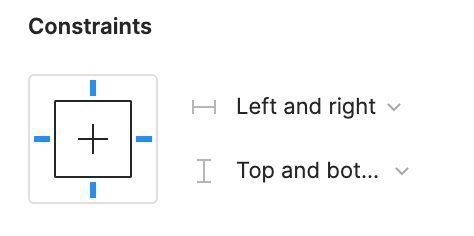
Can we get a true aspect ratio lock when the ‘Constrain Proportions’ is on?WX20210123-114719@2x A true aspect ratio lock means two things:
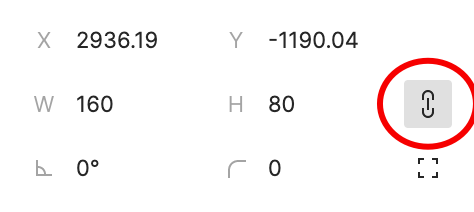
  1. When dragging on a node with ‘constrain proportions’, its width and height always stay in their original ratio no matter which direction you drag it.
  2. When resizing on the parent of a node with ‘constrain proportions’ that happens to be constrainedWX20210123-112532@2x, the node takes on the smallest of its supposed width and height, and calculates its ratio accordingly.

This would be so very helpful to polygon shapes that want to stay in that shape. Consider a spider chart. When you resize its parent, you don’t want the ‘spider net’ to squish squash; neither will you want a doughnut to turn into an oval.

*Resizing of the node’s parent layer is inevitable if you need responsive designs.

Pinned Reply By Celine_

Hey everyone, thanks for your patience! It’s fully rolled out now!

You can now lock the aspect ratio of almost any object in Figma – including frames, shapes, images, videos, vectors, and text – so that the proportions of that object are respected as you scale the object or its parent container.

 More info in the release notes here.

214 replies

Kelly_Hanner
November 19, 2024

Jeeeez, why has this STILL not been implemented!?!? Is it really so hard to prioritize given that users have been asking for aspect ratio scaling for years now!?!?

ahainen
Active Member
November 19, 2024

Figma is too busy with AI nonsense apparently.

Frank_Smit
November 20, 2024

Need this ASAP.

I’ve only been using Figma for a few days, I like it sure. But now I’ve moved on to making responsive layouts and properly using components etc.

And I cannot just freaking change my image responsively. That’s insane lol.

  1. Have a frame within an auto layout
  2. Fill frame width to container
  3. Constraint proportions on the frame
  4. Now the auto layout container changes in width, then I would expect the width of the frame to change AND the height proportionally.

Come on now.

Matthew_Ryan
Active Member
November 20, 2024

I’ve run into yet more cases where not being able to genuinely lock the aspect ratio of an element or component makes things impossible. At this point I wonder why the “lock” button even was implemented given it barely seems to do anything.

It is far, far, far past time for Figma to implement something that has been part of the responsive web design toolkit since the very beginning of RWD.

This should not be “it’s on our radar.” This should be “we are actively working on this and are committed to releasing it as a first priority” It’s entirely absurd the degree of workaround that is needed to implement the most basic responsive — or even fluid — web designs.

ahainen
Active Member
November 22, 2024

The year is 3103. Earth exploded. Then somehow AI brought it back. It was weird. AI was then queried to implement True Aspect Ratio Lock in an antiquated software called, “Figma.” The AI tried to, but in the old source code, the AI found a message from the Figma devs: “No.”

Uhl
Active Member
November 23, 2024

I had to temporarily return to Sketch for some icon work after a few years away, and it was so refreshing to use a proper aspect ratio lock again!

Screenshot 2024-11-23 at 09.07.07@2x

Frederic_Fornini
Active Member
November 24, 2024

Since Miggy has been posting about Figma aspect ratio on X a few days ago, which gives me hope, I’m bumping for this topic once again.

It has 700 votes, about to celebrate it’s 4th birthday. I suppose that if that feature is not there yet for something that seem so “basic”, i’ll give you the benefit of the doubt, it might be because it’s not so easy to implement and hopefully it will come with a few intelligent extra features.

But this silence, around a feature that is essential for many users, is astounding.
Common, can you at least communicate around it a bit more ?

combtmp_wlosl
November 25, 2024

I really feel like this feature is essential—it’s been a persistent challenge in my project, especially since I’m still relatively new to Figma.

I’ve come across some workarounds, like adding a line at an angle and using responsive layouts to adjust it. While these can get the job done in certain cases, they’re just that—workarounds. They come with limitations that make them far from ideal, especially when trying to achieve more complex or precise designs.

Having a built-in solution for this would make a world of difference, saving time and reducing frustration. It feels like something that should be a core feature in Figma, and I’m sure many others would benefit from it too.

Let’s hope this is something Figma considers adding soon!

Red3
November 25, 2024

Figma do you see this??? People are returning to your competitors.

Red3
November 25, 2024

Yeah, I can’t believe they spent the last 2 years developing AI tools they got sued over instead of a very very basic requirement.