

pinquitte
February 5, 2021

LAUNCHED: Horizontal scroll the layers panel

  • February 5, 2021
  • 311 replies
  • 21999 views

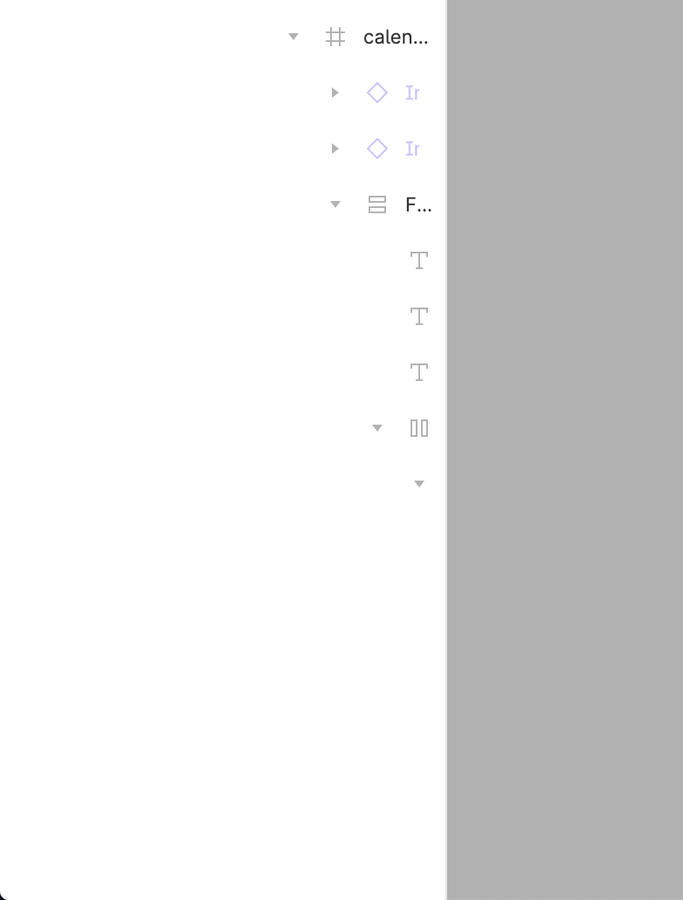
What do you think about having a horizontal scroll on the layers panel? I can’t see the name of the layers and usually widen the panel to be able to see, but since I use a 13", this makes the canvas smaller.
311 replies

Maria_Stafida
March 29, 2023

Hello,

I’m using a layout with multiple layers and want to select the deepest one and hide it or lock it or change the name. The width of the left column does not increase and there is no horizontal scroll bar either.

How do I edit these layers?

Indre_Mikaviciute
April 6, 2023

Figma interface has two really wide side panels, which is very problematic for smaller screens, like laptops. No working space left and you have to zoom out to be able to see wider layouts.
Figma side panels should be collapsable or adjustable.
Thanks!

Celine_
Figmate
Community Support
April 6, 2023
Stan5
New Participant
April 6, 2023

@Josh Did the dev team really had no second to work on such a basic QoL improvement in the past 2 years? It’s a software breaking issue. Aren’t Little Big Updates made for that?

djv
Figmate
Community Support
April 7, 2023

A post was merged into an existing topic: Instance layer names blank and uneditable

djv
Figmate
Community Support
April 12, 2023

A post was merged into an existing topic: Make Right Panels Larger for Typography & Color

djv
Figmate
Community Support
April 12, 2023

3 posts were merged into an existing topic: Make Right Panels Larger for Typography & Color

Val
April 13, 2023

What’s the deal with the bug that’s been around for two years now? It’s ridiculous that despite so many people reporting it, it still hasn’t been fixed.

This is a UX design app, and we can’t even see the layers – why can’t we horizontal scroll or stretch it to see all the layer names?

This isn’t just a feature request, it’s a legitimate bug that’s affecting our productivity and making the app frustrating to use. Please, can you fix it already?

aolko
April 13, 2023

These are top 10 ideas by votes, we can clearly see what interests people the most here

H_Scott_Finlayson
April 14, 2023

This does not solve the problem at all. It’s the same thing as collapsing the hierarchical expand/collapse widget… you’re just hiding the nested objects.

The issue (and it’s a big one), is if one uses dynamic nested layouts with “auto-layout” Frames in order to build dynamic mockups — where you can show/hide elements and the UI adjusts in real-time — the indentation grows deeper and deeper as you build your screens.

As illustrated in numerous screenshots above, you get to a point where you are unable to view the structure and/or names of elements in your project. You cannot drag elements through the hierarchical layers because you do not know what you are selecting and/or where you’re dragging & dropping… it is (literally) unusable when creating dynamic layouts using hierarchical auto-layout frames several layers deep.

PLEASE allow the left frame to scroll horizontally…!!!

Reposting this screenshot: