

Remi_Fayolle
March 8, 2021

Interaction between components

  • March 8, 2021
  • 46 replies
  • 16688 views

Hello

I would love that one component interaction can impact another component

Example : i’m working for a video communication tool. I would like that when i mute microphone, it changes variant of the stream to indicate that microphone is muted

I have two components : Stream and ToggleMicrophone. If i have microphone in state muted i would like that stream has muted indicator state
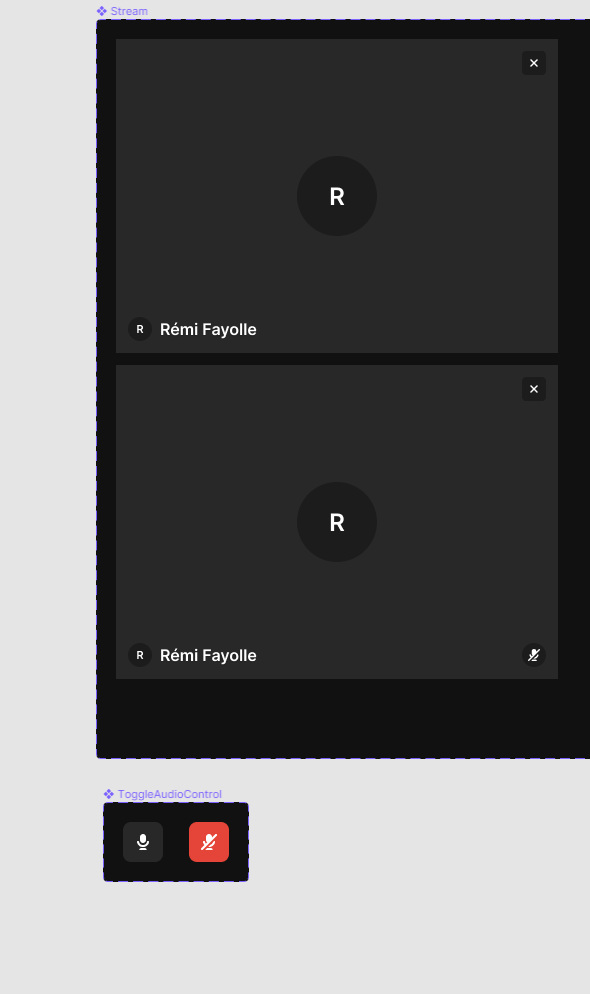
46 replies

Andrey_Denisov
March 24, 2023

It would be very helpful if Figma release such feature 🙏

Todd_Vachon
March 30, 2023

Agreed. I’m running into the same issue mentioned previously where I need a combobox menu selection to add or remove fields from a form. Being able to change the state of another component would really help simulate more complex interactions like that.

May 25, 2023

Here I was hoping this type of interaction was possible without making a whole new page. I’m new to Figma, but adding my voice here to say this feature would be a huge time saver.

Makroon
June 15, 2023

Voting this feature up as it is a ginormous must-have! Let’s get it in the air ASAP Figma! 🤓

It can be replicated by adding more frames/canvas, but darn… that is such a workaround!

fernandolins_cs
June 15, 2023

+1 for this, sometimes we need to protype interactions in which multiple parts of the UI have to be coordinated and it doesn’t make sense to have everything as a component variant

tank666
July 25, 2023

This became possible from June 21, 2023. I also answered you here: Change variant of a component from a different component - #2 by tank666.

Figma
UX/UI designer. Figma expert. Creator and developer of plugins and widgets for Figma and FigJam. Check out my resources in Figma Community: figma.com/@tank
August 8, 2023

The container components is great in some situation, however, when the first component set control a video play, that triggered by a play icon, and the video rectangle also hold a role of these variants. The other component set is the animation of timeline, which process after the play icon is clicked. I have no idea when they are in different components,

Amberto_Brasil
August 13, 2023

Fortunately we have variables now, and the patter I suggested is no longer needed.

Johan_Jenefeldt
September 1, 2023

That you actually can do right now.
You can create a boolean variable (true/false) and connect that buttons visability to that variable. Then you add a click event to the checkboxes that change the value of that same variable.

September 2, 2023

True, there are tons of prototype things that Figma can learn from Axure, Our team has been using Axure for a long time, and we recently want to change to Figma, so our docs, prototypes, and UI can be All-in-one. but sadly, Figma can’t prototype a lot of things! One of the very important reasons is it can’t interact between components!!!