

Remi_Fayolle
March 8, 2021

Interaction between components

  • March 8, 2021
  • 46 replies
  • 16688 views

Hello

I would love that one component interaction can impact another component

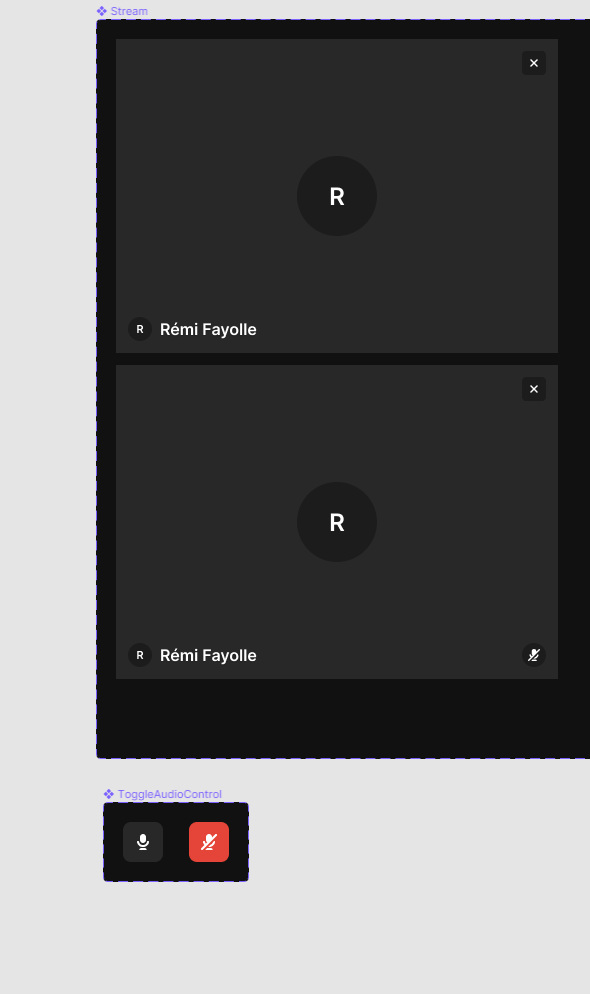
Example : i’m working for a video communication tool. I would like that when i mute microphone, it changes variant of the stream to indicate that microphone is muted

I have two components : Stream and ToggleMicrophone. If i have microphone in state muted i would like that stream has muted indicator state
46 replies

James_Wagstaff
New Member
November 29, 2022

We still need this. It’s something I need on every single prototype I build.

Sebastian_Mallol
December 13, 2022

This way of creating cross-interactions would be beneficial indeed. For example, I have an overall popup with multiple states that I would love to be able to control with another external to the overlay component.

borbs727
December 20, 2022

My current prototypes are very clunky and span tons of pages. I basically use “On click” and “Navigate to” exclusively to fake reactive updates to the a page.

I’d like to create a basic component prototype without having to jump across dozens of pages to feel how it’s working. Is there no way to make a complex self contained prototype? I’m finding it hard to do without creating a complex variant chain which just seems like a waste of time. Really need something like “if component A is clicked, change to “state=selected” on component B.”

borbs727
December 21, 2022

Sorry, I meant “span tons of *frames” I have about 20 frames, each with slight UI changes to mimic the UI updating when a button is clicked, or tab is selected.

Another point I’d like to make while I’m here is that the current prototyping workflow isn’t very fluent when it comes to design and testing. Currently, I have to structure components and variants in a way that isn’t applicable to the structure of the final application and makes iteration very complicated and time consuming.

During my process, I have to make very complicated nested components, so I don’t have to manually update every frame with a change. This requires me to bounce around a ton, instead of working within the context of the design.

Kate_Vander_Ploeg
January 25, 2023

I am looking for the same thing mentioned above where interacting with one component changes the variant of that component and also the variant of another component as well.

February 6, 2023

It’s my first day of using Figma and I have found my way to this thread… Disappointing

Magda_Zawadzka
February 15, 2023

Still very much needed feature!

Dominiku
February 27, 2023

This is definitely the first thing I think when comparing in my head Figma to Axure. This feature would change a lot in my daily workflow, where I am forced to duplicate screens to be able to simulate this effect. Would ❤️ love to have this thing in Figma 🙏

And on that occasion thank you Figma designers and devs for great, amazing, and stunning work!

March 8, 2023

I got very excited when I saw this thread started way back in March 2021, and very sad when I saw the last ask for this was 9 days ago 😦

Not sure if it’s helpful, but I’d certainly like to add my +1 for this functionality.

macaspac
New Member
March 22, 2023

Also adding my +1! I don’t want to have to fake the interaction by making a whole new canvas 🫣