

Remi_Fayolle
March 8, 2021

Interaction between components

  • March 8, 2021
  • 46 replies
  • 16688 views

Hello

I would love that one component interaction can impact another component

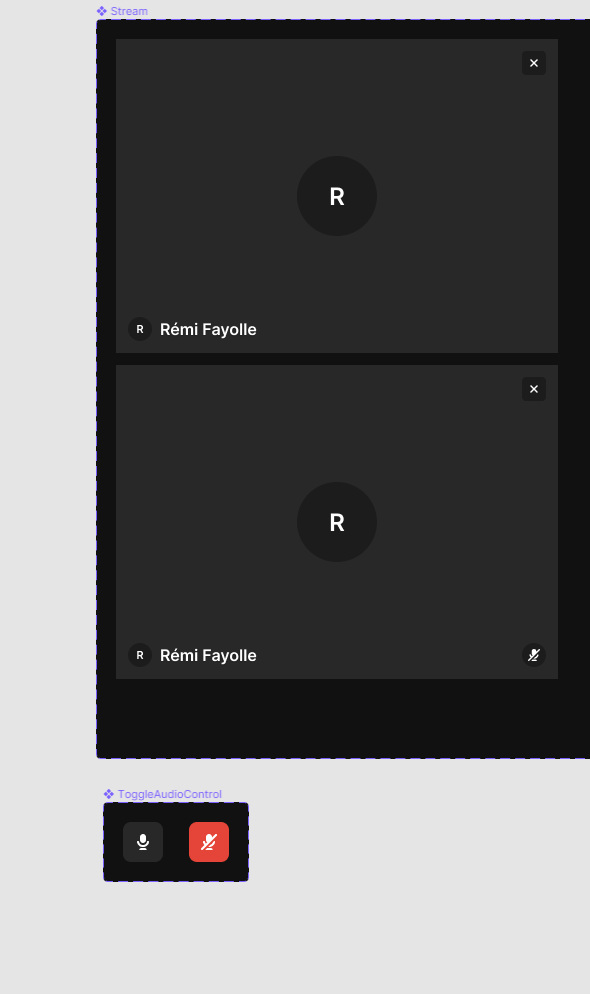
Example : i’m working for a video communication tool. I would like that when i mute microphone, it changes variant of the stream to indicate that microphone is muted

I have two components : Stream and ToggleMicrophone. If i have microphone in state muted i would like that stream has muted indicator state
46 replies

September 12, 2023

So, I don’t know if this will help anyone out, but something I figured out last night is that you can makeshift some component-to-other-component control by using the “Mouse enter” option on interactions. So the way that looks is that, on the frame where I have the page built out, I go to Prototype, add an Interaction, and select “Mouse enter”, which then gives me the ability to set a Conditional action.

So for example, for me, I was trying to build a dropdown field (as the only field on a multi-step form page) that had multiple options that could be checked on. Below the field was a Next Button. I wanted that button to be gray until they checked at least one option on that field. Once they selected one or more options, I wanted the button to become colored. I couldn’t find a way to conditionally change the variant without a “Click” action on the button itself. I wanted the variant on the BUTTON to change when the CHECKBOX was clicked on the field component. But that’s not really baked into the new functionality yet, it seems. So by having a “Mouse enter” interaction on the page, the conditional logic starts working immediately as soon as the page loads pretty much.

Hope that helps someone else out! And feel free to tell me if there’s an easier way to do what I’m saying.

Jerimy_Brown1
September 28, 2023

Changing states of components from any other component would give us so much prototyping flexibility and give us more legit coding like behavior. This is how OOP programing works, components can communicate with each other and change each others states.

Let’s say you are designing a simple game, you might have a score component, and a ship component, and an enemy component, then when the ship destroys an enemy, the score component gets updated. You wouldn’t have a giant game component that has every possible variation of destroyed enemies and scores.

Thomas62
October 2, 2023

Hey Brady 👋
I’ve the same exact problem than you and I found your comment really interesting! Is there a way for you to share a copy of your doc? I’m having a hard time reproduce what you’ve done… Thank you 🙏

October 2, 2023

For the time being, I’ll send you a direct message with a link to view it. I’ll create a modified version to publish to the Figma community at some point so that everyone can view it. But this was being done for a client, so I need to make it a bit more generic before I post the example to the public.

Thomas62
October 2, 2023

Thank you so much for your quick answer Brady 🙏

Iago_Barbosa2
November 4, 2024

I think this may be helpful. You can achieve it with variables.