

eokic-hexis
May 5, 2021

Figma prototype UI obscuring fixed website header

  • May 5, 2021
  • 162 replies
  • 17247 views
  1. Describe the problem your experiencing and how your idea helps solve this
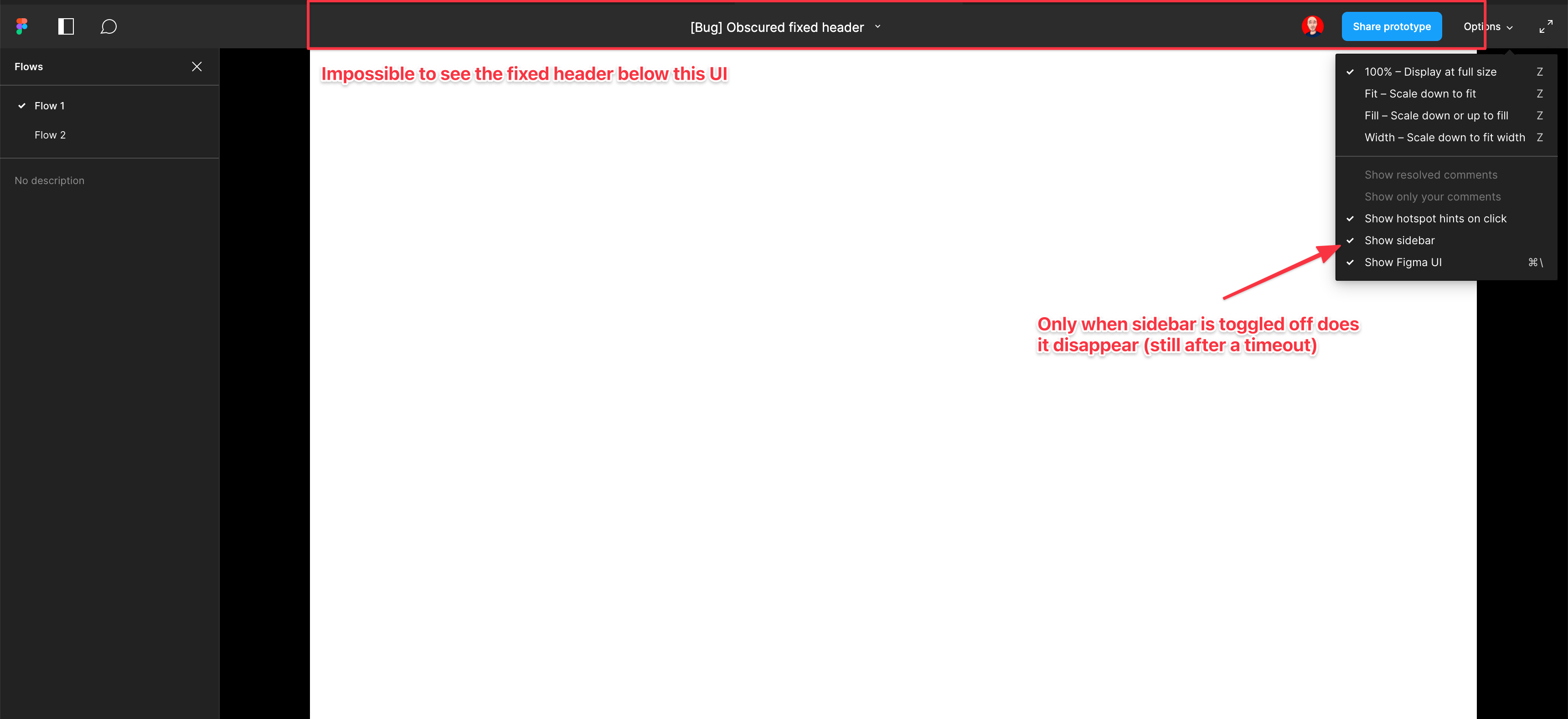
    Screenshot and sample file below. I’m using an iMac sized frame with extended height. This issue is exacerbated by the fact that this is the now the default view when using multiple flow starting points and is the only way to actually change the flow starting point. So you have a constant trade-off of whether you want to see the Figma controls or your prototype’s. Annoying as hell.

EDIT: When sidebar is hidden, the fixed header is visible but inaccessible. As soon as the cursor hovers near it, the Figma UI appears over the (clickable) website header. Wow…

  1. Add as much context as possible (screenshots, Figma files, mockups, etc.)
    https://www.figma.com/file/WlYbWyHwtBGEFZihdMt2az/Bug-Obscured-fixed-header?node-id=0%3A1
162 replies

Seung_Chong
September 6, 2022

Hiding the UI doesn’t work because I need the sidebar to move between flows. This is a huge pain and can’t believe it was designed to overlay the design in the first place 😤

Emer_Kelly
September 8, 2022

+1 for a fix for this! It’s ridiculous that it’s still an issue.

Kenneth_Kammersgaard
September 9, 2022

I have the same problem

dodojewski
September 9, 2022

easiest solution for figma would be, that the bar just pushes down the actual prototype and not overlay it… please fix this!

(also, would be cool, if the fit to screen/fit to width setting would be global, so that clients don’t have to change this, but i set it up for them)

Dieter_Desmet
September 9, 2022

Super annoying. It’s not a bug, just an annoying feature. Yes, there are workarounds, but having an overlay covering an area where 98% of all prototypes have hotspots is just plain evil.

Armin_Seltz
September 9, 2022

Great, the default shortcut to show the UI again (Cmd-Backslash) is also the default global shortcut for 1Password.

So if you have 1Password installed you basically can’t get back the UI, since it will always trigger 1Password first.

Just make the UI fixed. Make it hideable. Have a small icon you can click to bring it back. Don’t see the problem.

Arran_K
September 13, 2022

Unbelievable that a UX prototyping app would have such a ridiculously bad UX!

Having the prototype UI overlap the viewport content when most UIs have header navigation defies logic.

Why isn’t Figma doing something about this? It’s obvious they didn’t do any user testing on this feature before releasing it! Or didn’t test it with real users, i.e., stakeholders that aren’t Figma users, or even designers!

Mia_Holte
September 14, 2022

Please fix this!

Jeremy_Lind
September 22, 2022

Hiding the UI also doesn’t work when there is an interactive element in that area. As soon as the cursor approaches the area where the top bar is hidden, the top bar appears again, covering a portion of the design, including the interactive element the user was trying to move the cursor to! This is a straight up broken UX.

Kelly_Spitzley
September 29, 2022

Bump, please fix this!