

eokic-hexis
May 5, 2021

Figma prototype UI obscuring fixed website header

  • May 5, 2021
  • 162 replies
  • 17247 views
  1. Describe the problem your experiencing and how your idea helps solve this
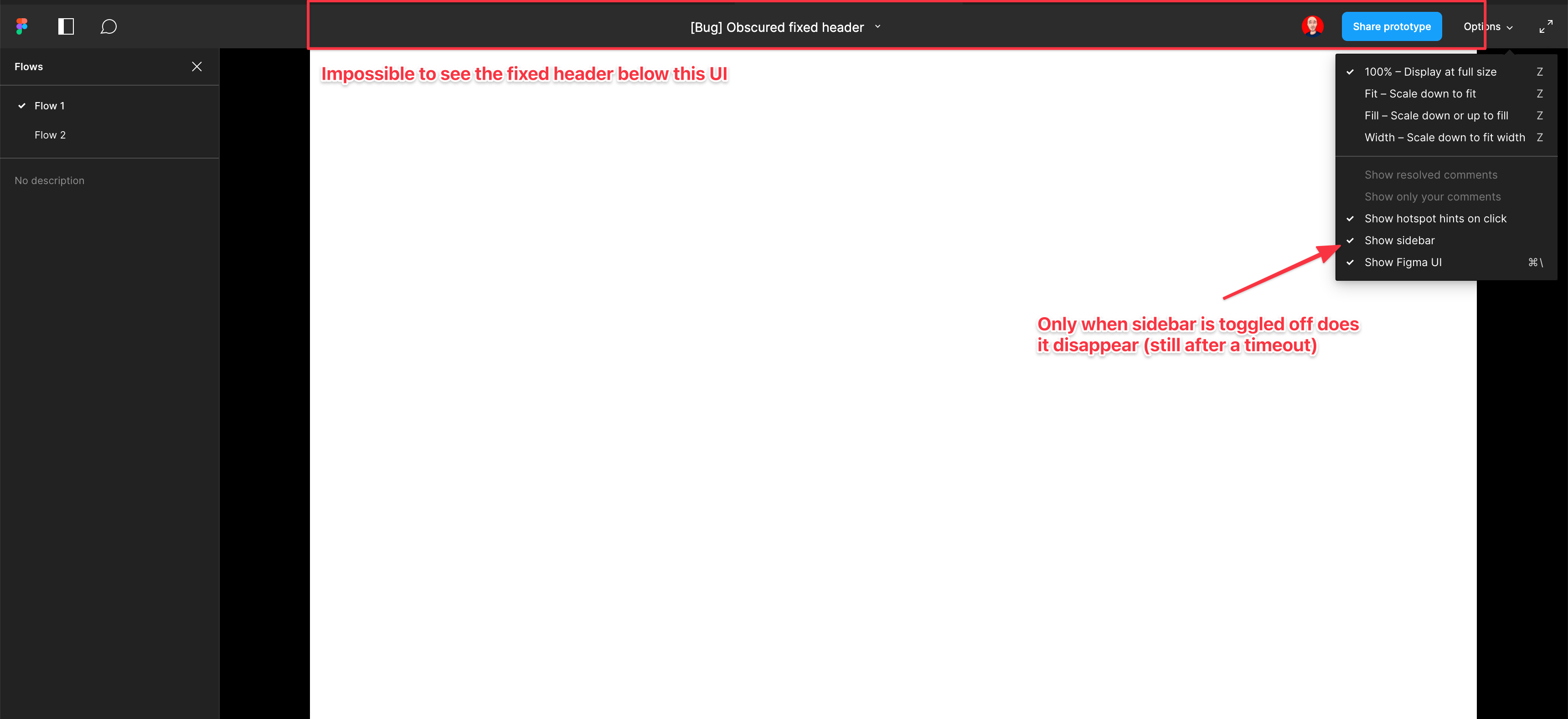
    Screenshot and sample file below. I’m using an iMac sized frame with extended height. This issue is exacerbated by the fact that this is the now the default view when using multiple flow starting points and is the only way to actually change the flow starting point. So you have a constant trade-off of whether you want to see the Figma controls or your prototype’s. Annoying as hell.

EDIT: When sidebar is hidden, the fixed header is visible but inaccessible. As soon as the cursor hovers near it, the Figma UI appears over the (clickable) website header. Wow…

  1. Add as much context as possible (screenshots, Figma files, mockups, etc.)
    https://www.figma.com/file/WlYbWyHwtBGEFZihdMt2az/Bug-Obscured-fixed-header?node-id=0%3A1
162 replies

Harding_Kerry
October 6, 2022

+1 please fix this

Steve_James
October 7, 2022

Fix this please Microsoft! Oh wait.

Charlie_Pratt
New Participant
October 10, 2022

Honestly, I can’t think of a single reason why the top bar needs to overlay the deisgn at all. It’s really painful.

Ryan_Brown1
New Participant
October 18, 2022

What if there were several view settings for the bar:

  1. where its completely hidden and activated by the key command,
  2. where it collapses down to a icon that floats, fixed, above the design in the lower corner of the page,
  3. where it’s the full bar, but the bar is no longer overlapping the design and simply above the design
Dylan2
October 31, 2022

Wait, this has been open since July 2021 with no resolution? Our clients should not have to show/hide the ui in order to navigate around and/or comment.

Markus_de_Ligt
November 11, 2022

Setting the prototype device size to custom 1920/1080 (as is my design) solves me a lot of troubles. The Figma UI still there but prototype fully visible. Then the CDM+ \ trick to hide the Figma UI and copying the link shown as ‘Copy sharing link’ at the bottom finally returns a link to a clean prototype with only a black border around.

Joost_developer_view
November 15, 2022

This is so frustrating, why isn’t there a fix yet?

Scott_Clark1
November 16, 2022

Why is this still an issue? Over a year and 73 complaints later for such an obvious problem. Please fix this!

Laura_Rodriguez1
November 18, 2022

As a hack, I ended up just adding a black rectangle at the very top of my frame (that matches the prototype background) to push the header down into view.

Stephanie12
November 18, 2022

I used that hack too until my dev coded the top rectangle into the design -_-
Pleaseeeee fix Figma!!