

eokic-hexis
May 5, 2021

Figma prototype UI obscuring fixed website header

  • May 5, 2021
  • 162 replies
  • 17246 views
  1. Describe the problem your experiencing and how your idea helps solve this
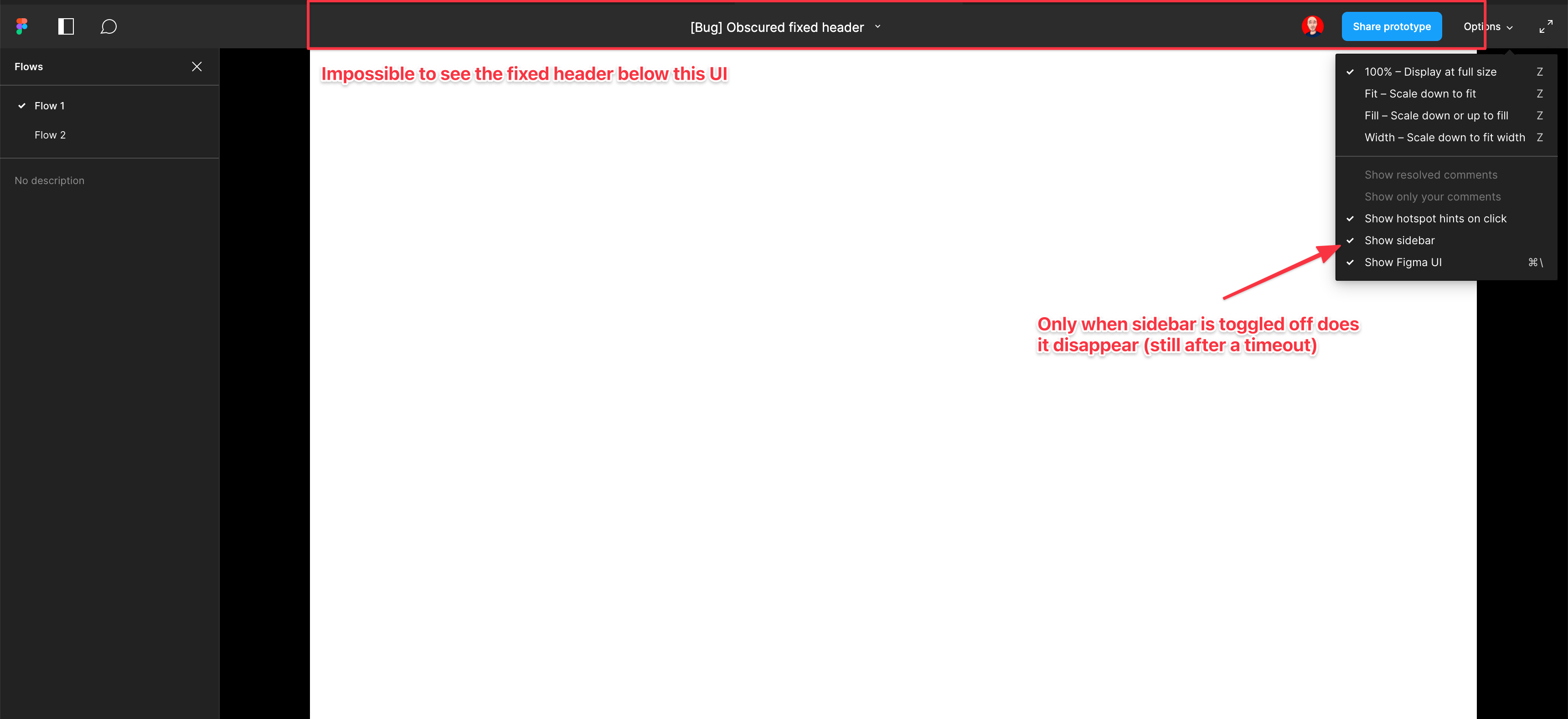
    Screenshot and sample file below. I’m using an iMac sized frame with extended height. This issue is exacerbated by the fact that this is the now the default view when using multiple flow starting points and is the only way to actually change the flow starting point. So you have a constant trade-off of whether you want to see the Figma controls or your prototype’s. Annoying as hell.

EDIT: When sidebar is hidden, the fixed header is visible but inaccessible. As soon as the cursor hovers near it, the Figma UI appears over the (clickable) website header. Wow…

  1. Add as much context as possible (screenshots, Figma files, mockups, etc.)
    https://www.figma.com/file/WlYbWyHwtBGEFZihdMt2az/Bug-Obscured-fixed-header?node-id=0%3A1
162 replies

Dennis_N
Power Member
July 13, 2022

Yes, we can hide the Figma UI, but why is it overlaying the design in the first place, instead of the prototype being displayed directly below it without being overlaid? I always need to explain my collegues and customers how to configure it properly to be able to use the prototype.

Seth_Bowers
July 28, 2022

This is still an issue. For all the reasons stated above. Please change how the menu is positioned.

Tricia_Bayne
August 1, 2022

Rachel_H… has the workaround!

append ‘&hide-ui=1’ to the URL to hide the UI

Pablo_Sara
New Participant
August 2, 2022

Clients don’t know about “hide Figma UI”, this totally kills the workflow and it annoying as hell. The UI overlaps the prototype navigation. Please find a solution for this!

John17
August 2, 2022

How is this still a problem? Does anyone at Figma use Figma?

The hide function is already there, just call it on page load. It will take seconds to fix.

Agustin_Ezequiel
August 2, 2022

Bumping this.
At least there should be an option in the ‘Share prototype settings’ pop up that hides the figma UI by default…

Maciej_Sawicki
August 5, 2022

+1 for this. Annoying issue. The top panel should not cover the prototype.

Maciej_Sawicki
August 5, 2022

Found a workaround. I added a custom prototype frame size. It forces Figma to never cover the prototype area.
Screenshot 2022-08-05 at 15.35.57

Maciej_Sawicki
August 5, 2022

Screenshot 2022-08-05 at 15.38.00

Kenneth_Runge
September 5, 2022

It works, but the shortcut was made with an English/US keyboard in mind meaning that on my Danish keyboard the short cut is actually “CMD” + “.”. This might vary for other non-english keyboard layouts.

But still not a 100% working solution because for some use cases I/we still need to have the Flows sidebar visible to navigate, but using the above shortcut also hides that…