

eokic-hexis
May 5, 2021

Figma prototype UI obscuring fixed website header

  • May 5, 2021
  • 162 replies
  • 17254 views
  1. Describe the problem your experiencing and how your idea helps solve this
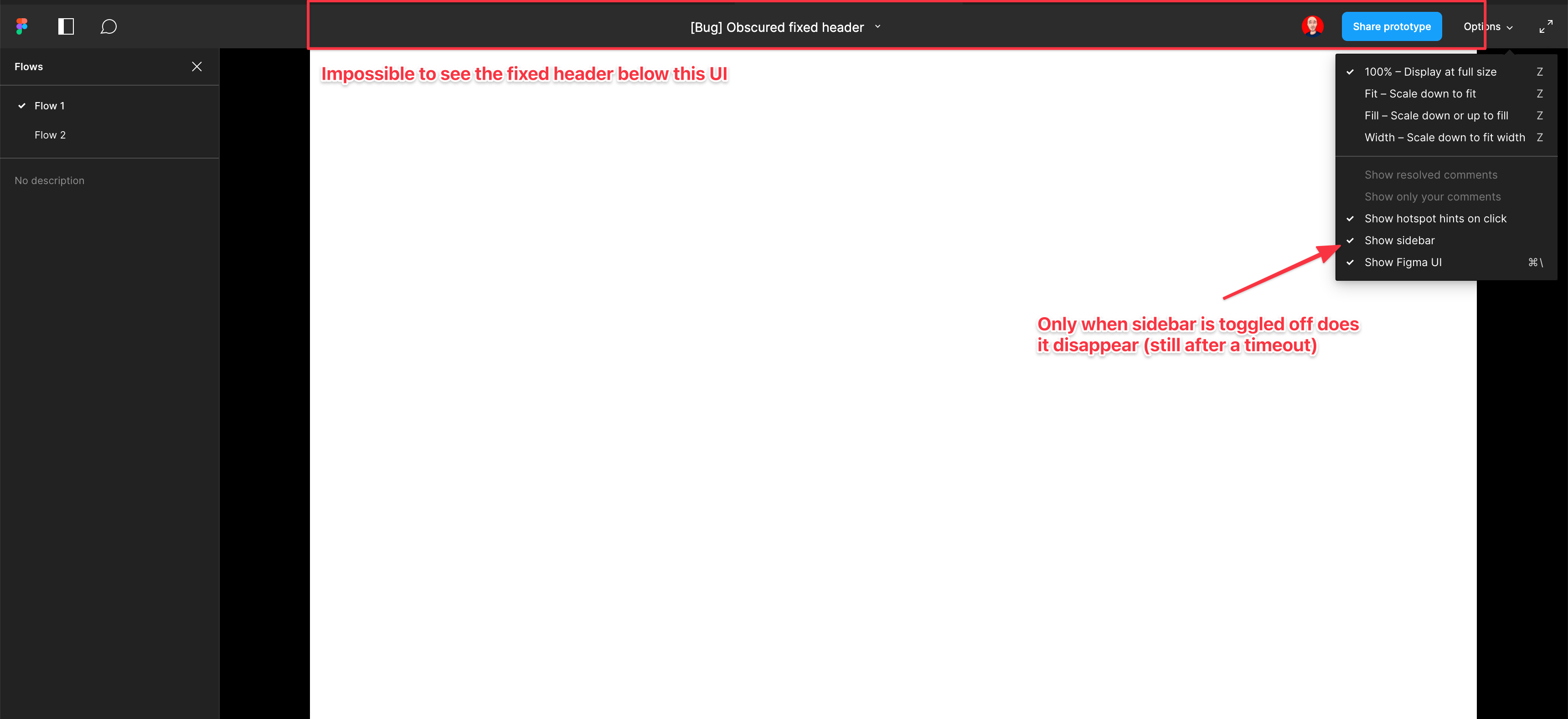
    Screenshot and sample file below. I’m using an iMac sized frame with extended height. This issue is exacerbated by the fact that this is the now the default view when using multiple flow starting points and is the only way to actually change the flow starting point. So you have a constant trade-off of whether you want to see the Figma controls or your prototype’s. Annoying as hell.

EDIT: When sidebar is hidden, the fixed header is visible but inaccessible. As soon as the cursor hovers near it, the Figma UI appears over the (clickable) website header. Wow…

  1. Add as much context as possible (screenshots, Figma files, mockups, etc.)
    https://www.figma.com/file/WlYbWyHwtBGEFZihdMt2az/Bug-Obscured-fixed-header?node-id=0%3A1
162 replies

Anika3
New Member
July 25, 2023

Totally agree. The topbar overlaying the screen is a real annoyance.

In addition to this I just spent 20 minutes to figure out how to hide it with view only access in a browser, because there is no blackslash on the german mac keyboard.

When I access the prototype view in editor mode, hiding the panel is so much easier with kust hitting the “^” key. Why not keep it consistent overall?

Anika3
New Member
July 25, 2023

Thanks @Kenneth_Runge ! Using cmd + “.” works on a german keyboard too.

Naveen_RaviKumar
July 25, 2023

Yikes… and I was (wrongly) touting Figma as the be all and end-all of User-focused tool development:(

Seeing this silly UI design from the Figma Team is unacceptable for a paid tool!

Naveen_RaviKumar
July 25, 2023

No, this topic has NOT been solved, Figma!

Naveen_RaviKumar
July 25, 2023

Josh
Former Community Manager
July 26, 2023

Hey all appreciate all the additional feedback here. I’ve shared this thread with our prototyping team and we’re looking at some improvements for this. I’ll be sure to keep this topic updated as I have more information. Thanks 😊

David_Saunders
August 1, 2023

Same issue for me. I need to be able to show prototypes in a full screen mode on the desktop app. The current solution of hitting Ctrl+Fn+\ to hide the Figma UI is not good enough. That simply hides the sidebar and share options bar but leaves the tabs bar at the top. If your design is fullscreen for example 1920 x 1080 anything that is 50px from the bottom of the screen is hidden below the fold and the user must scroll down to view it.

Charlie_Pratt
New Participant
August 10, 2023

Yo, Figma. For the LOVE, please fix this nonsense.

Lukas4
New Member
August 16, 2023

Please put this info wherever you want with an overlay. But not on the top where 99% of all layouts the navigation is placed.

Kara_Miekina1
September 28, 2023

Adding a comment so that this stays open for another 90 days and maybe it will get worked on!

It’s nice that is disappears but it’s kind of a pain if you have navigation up there you actually want testers to be able to see and use. And while the “hide Figma UI” option is a nice “quick fix”, often times the people you send prototypes to do not know how to use Figma (and sometimes don’t even know they are viewing something within the container of an app) so asking them to turn of the UI themselves just adds extra friction.