

eokic-hexis
May 5, 2021

Figma prototype UI obscuring fixed website header

  • May 5, 2021
  • 162 replies
  • 17256 views
  1. Describe the problem your experiencing and how your idea helps solve this
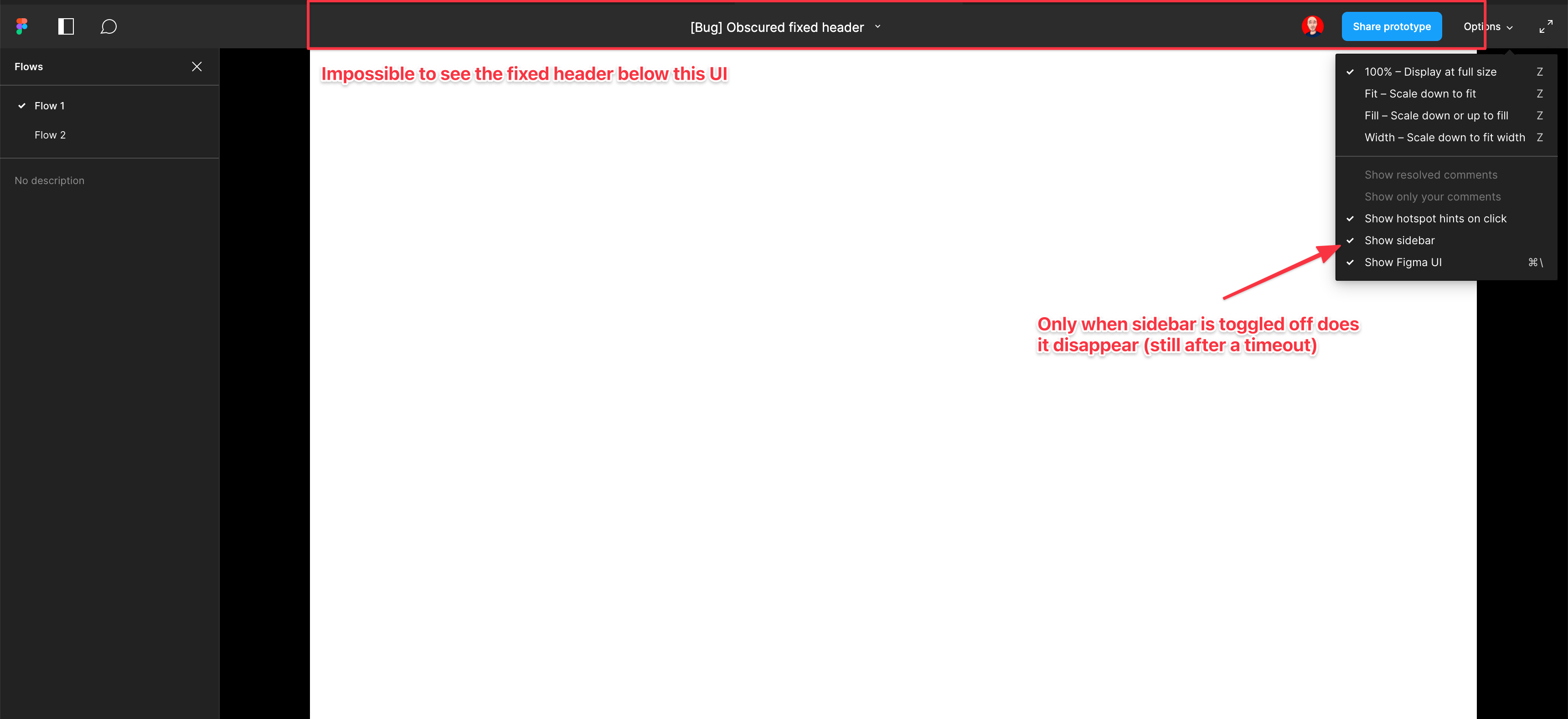
    Screenshot and sample file below. I’m using an iMac sized frame with extended height. This issue is exacerbated by the fact that this is the now the default view when using multiple flow starting points and is the only way to actually change the flow starting point. So you have a constant trade-off of whether you want to see the Figma controls or your prototype’s. Annoying as hell.

EDIT: When sidebar is hidden, the fixed header is visible but inaccessible. As soon as the cursor hovers near it, the Figma UI appears over the (clickable) website header. Wow…

  1. Add as much context as possible (screenshots, Figma files, mockups, etc.)
    https://www.figma.com/file/WlYbWyHwtBGEFZihdMt2az/Bug-Obscured-fixed-header?node-id=0%3A1
162 replies

James_Beardmore
October 13, 2023

Hey Figma, consider this:

I have been irritated by this feature for three years and today I finally came and said something. Every colleague or client I show a prototype to, or collaborate with, struggles to hide the UI that by default obscures the main navigation of many prototypes.

I bet for every person in this thread there’s another hundred who swear at your product every day for this obvious and unnecessary UI issue that undermines the core use of your product. Imagine how many will gladly leave Figma for a competitor as soon as it annoys them less than this does.

Your UI should not interfere with the content of a prototype by default! We’re UX designers! That’s a bad idea! By all means have an option for it to work this way but by default it should be above the design where it can’t get in the way.

Please listen to reason and fix it!

john-mainboard
Active Member
October 19, 2023

When you view a prototype in full screen mode with FILL on, then the very top of the design - often filled with icons or small menu items or hamburger menu icons - cannot be accessed by clients, because the FIGMA header bar starts to appear, not only visually blocking the top part out, but also preventing actual clicking on those elements.

Jason_LaRose
New Member
October 20, 2023

Figma, can you perhaps put some sort of toggle at least on the header bar? If you toggle it on, the header bar shows at all times and pushes the design down. If you toggle it off, the header bar is hidden and the design slides up.

The header bar overlapping the design is kind of a big deal for your users, and a pretty bad UI/UX practice.

john-mainboard
Active Member
November 2, 2023

Ok, I see the merged ticket now, but this doesn’t solve the problem. Clients still need to be able to change their view to see the design at 100% and switch back to full view (fit). This allows them to see the fonts at full size, even if their display doesn’t match the fit view (on a Macbook Air, the Macbook Pro screen is shrunk down significantly and shown in the tiny box in the middle, which is kind of weird in itself, so you can’t even make that fullscreen and share that, because if you copy the link with Full screen and UI off, you just get this tiny box in the middle with a huge black box around the design - this is really a lot of wasted space. there isn’t a way to share the prototype so that it fills the width and pretends that it’s a browser.

So even if I want to share these hidden UI, the client is then unable to switch to 100% and thinks this little box in the middle is their “website”.

This preview mode is really in need of some serious love.

Sameer_Chavan1
March 8, 2024

OMG… this issue is not yet solved after millions of people have shown frustration. Why is this being ignored for so long? The prototype should just start below that stupid overlay Figma UI. Or move that to the left panel in the menu.

Tara_Price2
Active Member
April 25, 2024

This is still a huge pain point. Either move the design down, or allow a HIDE FiGMA UI by default.

Ioan_Butiu
May 20, 2024

This issue has been bothering me since I started using Figma. It’s incredible that such an obvious UI flaw hasn’t been addressed despite years of complaints.

June 15, 2024

Huge pain point. Bump

Harry_Higgins
New Member
September 26, 2024

Bump, this is still an issue. I’m constantly annoyed by this thing covering the UI by default.

Nellya
Power Member
September 26, 2024

Just add &hide-ui=1 to the end of the prototype link and client won’t see UI bar