

eokic-hexis
May 5, 2021

Figma prototype UI obscuring fixed website header

  • May 5, 2021
  • 162 replies
  • 17252 views
  1. Describe the problem your experiencing and how your idea helps solve this
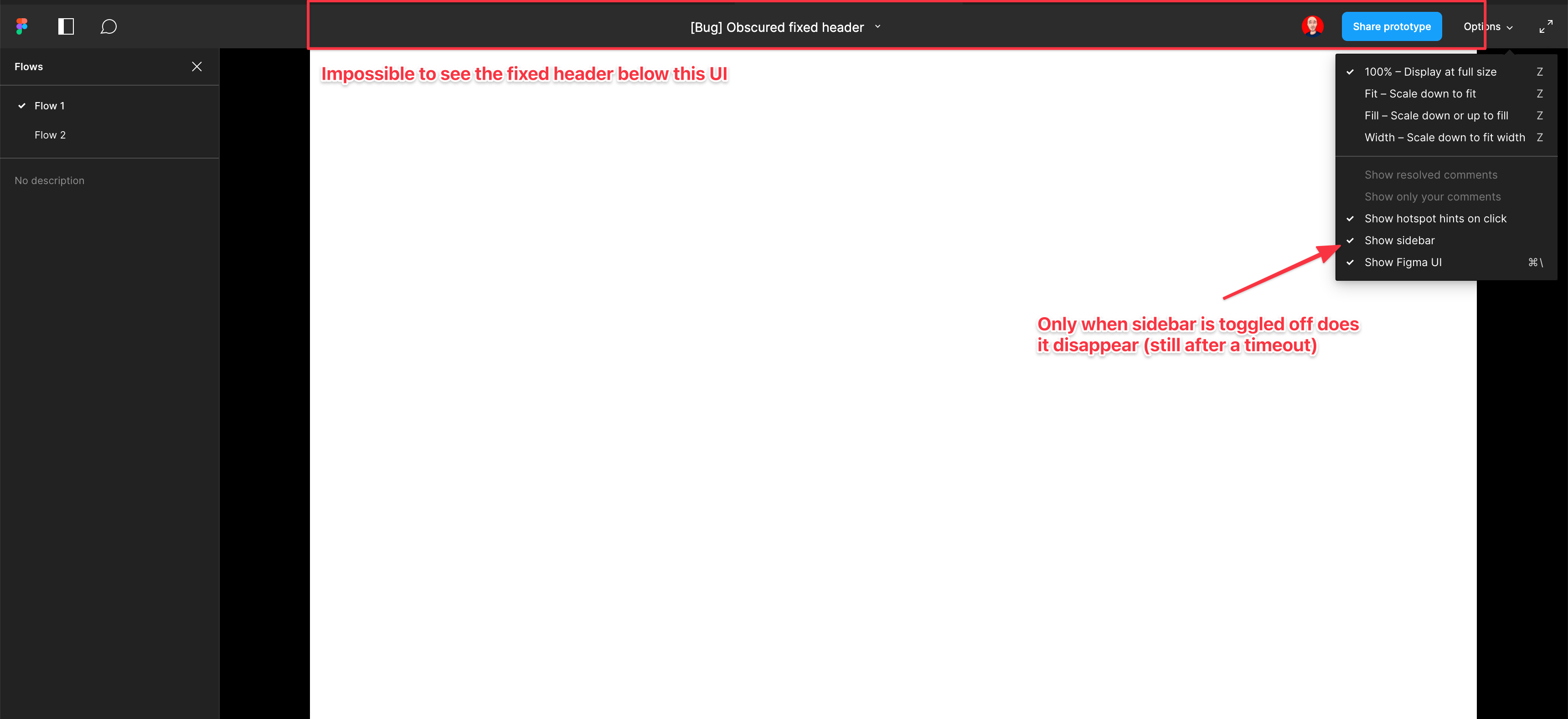
    Screenshot and sample file below. I’m using an iMac sized frame with extended height. This issue is exacerbated by the fact that this is the now the default view when using multiple flow starting points and is the only way to actually change the flow starting point. So you have a constant trade-off of whether you want to see the Figma controls or your prototype’s. Annoying as hell.

EDIT: When sidebar is hidden, the fixed header is visible but inaccessible. As soon as the cursor hovers near it, the Figma UI appears over the (clickable) website header. Wow…

  1. Add as much context as possible (screenshots, Figma files, mockups, etc.)
    https://www.figma.com/file/WlYbWyHwtBGEFZihdMt2az/Bug-Obscured-fixed-header?node-id=0%3A1
162 replies

eokic-hexis
May 4, 2023

Looks like a perfect example of poorly executed “data-driven” design. So enough people need to be frustrated to the point where they register to this community, somehow manage to find this topic and upvote it, before you even consider fixing it?

Why is this trivial-to-fix bug being dumped onto the same pile as potentially month-long efforts to develop new features?

djv
Figmate
Community Support
May 4, 2023

We hear you and agree 100%. The forums are primarily run by the community, and our team here is only for moderation and relaying feedback and top requested features, as needed.

While we wish we had more control, the teams (FigJam, Prototyping, Auto Layout, etc.) ultimately have full control over their focus. Feedback and votes can only do so much, but we’re doing our best to advocate on your behalf for a more transparent roadmap when it comes to future releases.

eokic-hexis
May 4, 2023

I appreciate your effort and transparency @dvaliao, and of course no one has gripes with the moderation team here. But, after two years I’ve personally resigned on the issue. Hopefully the number of comments and the contents themselves allow you to push this forward.

Nur_Furlong
May 9, 2023

Absolutely ridiculous that such a simple and obvious flaw in such crucial feature is ignored for years. I don’t want to hide the sidebar which is used to switch between different unlinked screens at times, I just don’t want figma UI overlapping the existing design. Drives me nuts and very sad that Figma’s team obviously knows about this clear flaw and simple don’t care.

I don’t believe the community moderators need to defend Figma at all, it just helps them more easily sweep such glaring faults in the product under the rug.

fernandolins_cs
May 9, 2023

Please, please make the navigation bar push the prototype down so we can see the whole prototype when the Figma UI is visible, and also add a way to hide the top bar but still see the side bar with the prototype links

May 18, 2023

@dvaliao I appreciate your transparency.

Even though I’m a UI/UX designer and programming developer, I feel hard to find the options to disable the overlapping option bar on top of the top nav design. When I think about my non-technical customers who review the design, are really really struggling to use the top nav of the design and to each and every customer I have to explain to them to disable the option every time.

Figma team should really understand this as a Major UX experience problem of Figma, prioritize this and fix this ASAP.

I think this could be the voice of all designers.

Rose_Devlin
June 9, 2023

It’s insane that this is still an issue. As multiple people have pointed out – the option to hide the Figma UI is not a solution as clients often still need to access the flow starting points – which means the annoying header pops back up blocking key information and navigation within the prototype.

Is the header even needed? It seems like it could be incorporated into the sidebar. Or just start the prototype below it.

Kevin_Thornbloom
June 12, 2023

Just another voice chiming in. If the UI is present, the top bar should push the prototype down, rather than float on top of it. This is a constant annoyance for our team.

June 14, 2023

It does not help. Audience struggle with this and waste time and effort during demos. With new audience, same story.

Why would this be allowed by Figma in first place? Beats me!

Aaaarrrrrrgggggghhhhh!!!

mark58
July 17, 2023

NOT A SOLUTION - the UI is very important for client interaction with the design.