

eokic-hexis
May 5, 2021

Figma prototype UI obscuring fixed website header

  • May 5, 2021
  • 162 replies
  • 17247 views
  1. Describe the problem your experiencing and how your idea helps solve this
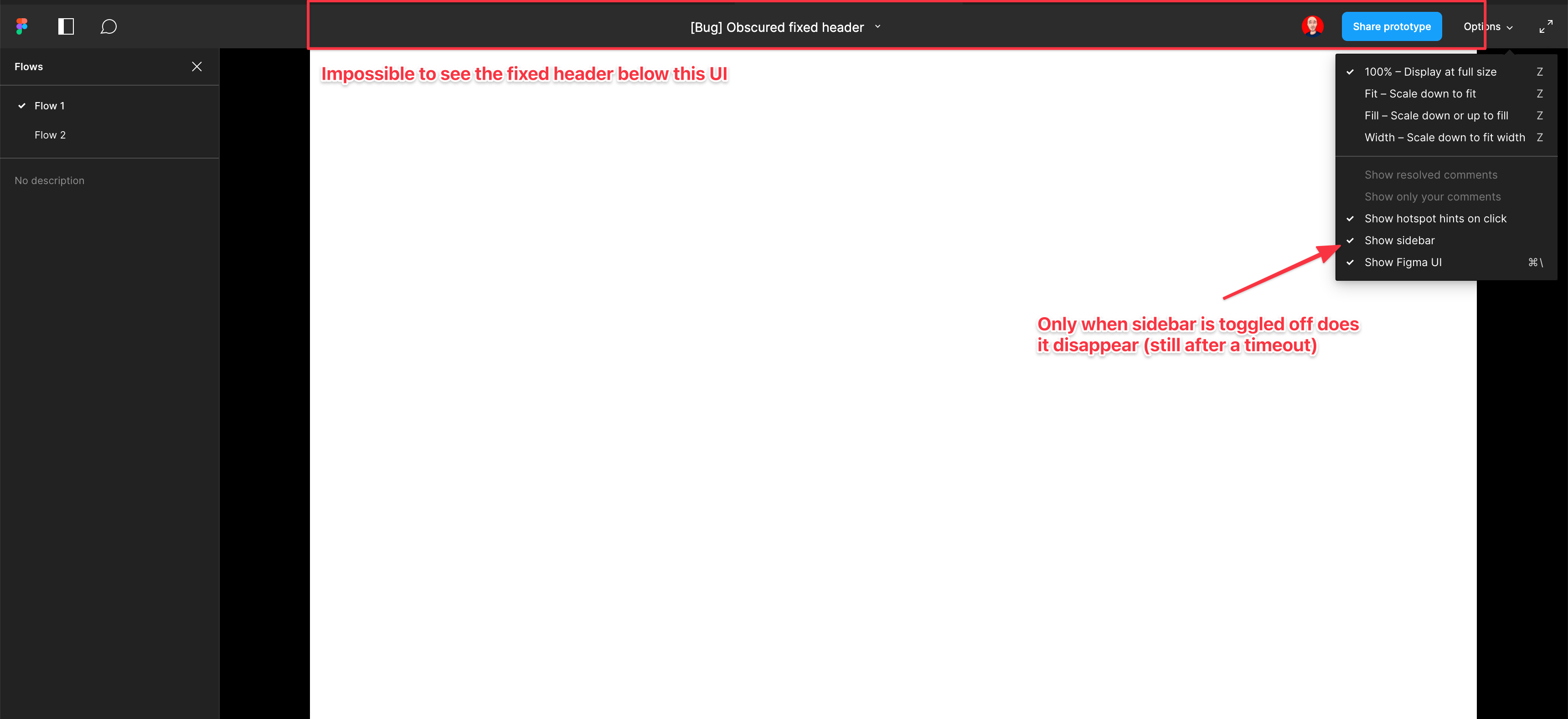
    Screenshot and sample file below. I’m using an iMac sized frame with extended height. This issue is exacerbated by the fact that this is the now the default view when using multiple flow starting points and is the only way to actually change the flow starting point. So you have a constant trade-off of whether you want to see the Figma controls or your prototype’s. Annoying as hell.

EDIT: When sidebar is hidden, the fixed header is visible but inaccessible. As soon as the cursor hovers near it, the Figma UI appears over the (clickable) website header. Wow…

  1. Add as much context as possible (screenshots, Figma files, mockups, etc.)
    https://www.figma.com/file/WlYbWyHwtBGEFZihdMt2az/Bug-Obscured-fixed-header?node-id=0%3A1
162 replies

p.o-donovan
New Participant
November 28, 2022

Speaking of hacks, here’s what I tried:

  1. From prototype, clicked Share, grabbed the embed code
  2. copied the target URL and opened it in Browser
  3. used the Browser Inspector to target the header. As it was already absolutely positioned, all I had to do to hide it was add :

top: -50px

Unfortunately I would have to do this every time I wanted to make a Figma Prototype presentation. Otherwise it overlaps my buttons at the top. Come on Figma!

p.o-donovan
New Participant
November 28, 2022

Probably good to specify which “below” we’re talking about. We mean the y axis (top to bottom), not the z (near to far - how it is currently). I wouldn’t be surprised if this language issue was the cause of this in the first place. I imagine this conversation in Figma team meetings:

top manager: The header/content should go above/below the content/header.
Then in another meeting, mid manager to UX designer / dev: why did you put the header over the content???
UX designer / dev: because top manager said “The header should go above the content”.

Or it could just be an email or vague task: “Put header above content”

Axel_Norvell
December 2, 2022

+1 on fixing this. It’s incredibly frustrating.

No part of the Figma UI should be obscuring and blocking the actual prototypes. Having to find workaround and fiddle with settings for every prototype share is pretty frustrating.

The obvious solution is changing the absolutely positioned Figma header UI to be in-flow and push the prototype content down instead of overlapping the prototype itself.

Bevers_Cherrie_CORP
New Member
December 6, 2022

FIGMA - Please fix this!!! 🤨

petersil_edwards
December 15, 2022

To get rid of the black bars on the side in preview:

If you’re using the desktop version just zoom in to fit with your browser settings. That’ll make it easier to compare to the website you are working on.

Henrik_Asteberg
New Participant
December 20, 2022

This issue really makes it difficult to share to design with clients. The top of the design is not visible due to the menu, but when I turn off “Show Figma UI” then the clients won’t be able to see the side panel which they need to easily jump between pages (I’ve made a new flow start point for each page so that they can easily jump around). Sharing designs with clients is an area where Figma unfortunately is weak.

Anne_Borremans1
January 19, 2023

I am having this same issue. I used to use cmd + \ to show/hide the Figma UI but now my company uses 1Password and that is the default key command to open that up, so I can no longer use it in Figma.

My workaround is opening each of my flows into separate browser tabs when presenting my work, which can be very stressful to navigate during a presentation. 😦

JD1
New Member
January 20, 2023

Its embarrassing that Figma has not resolved this in the past 2 years

Jessie2
New Participant
January 25, 2023

The “solution” did not hide the top black bar for me. The black bar is still obscuring the top maybe 200px of the design.

The solution that worked for me on mac was:
command . (period)

That hid the UI, but I had to hit it again in order to navigate through the flows, which is still frustrating. Please set the top bar to not overlap the design. 🙏

Aijan
February 4, 2023

figma i can’t share my prototype with people who don’t know how to use figma. i have a header and when you trying to click header that top bar pop up out and you simply can’t click anything. fix this please! HEEEEEEEEEEEEEELP