

adamlunn
March 23, 2021

Conditional Variant Properties

  • March 23, 2021
  • 27 replies
  • 14245 views

Variants have become one of the most important features I use within Figma. They are incredibly powerful! As they are so useful, I find myself looking for the ability to have properties show ONLY when another property is a certain value.

A quick example of what I mean is like this:

Let’s assume you have a button, and the top level of the properties are set up to be Primary and Secondary:

Let’s now assume I have an icon added to my buttons, but they are ONLY available to my Secondary button:
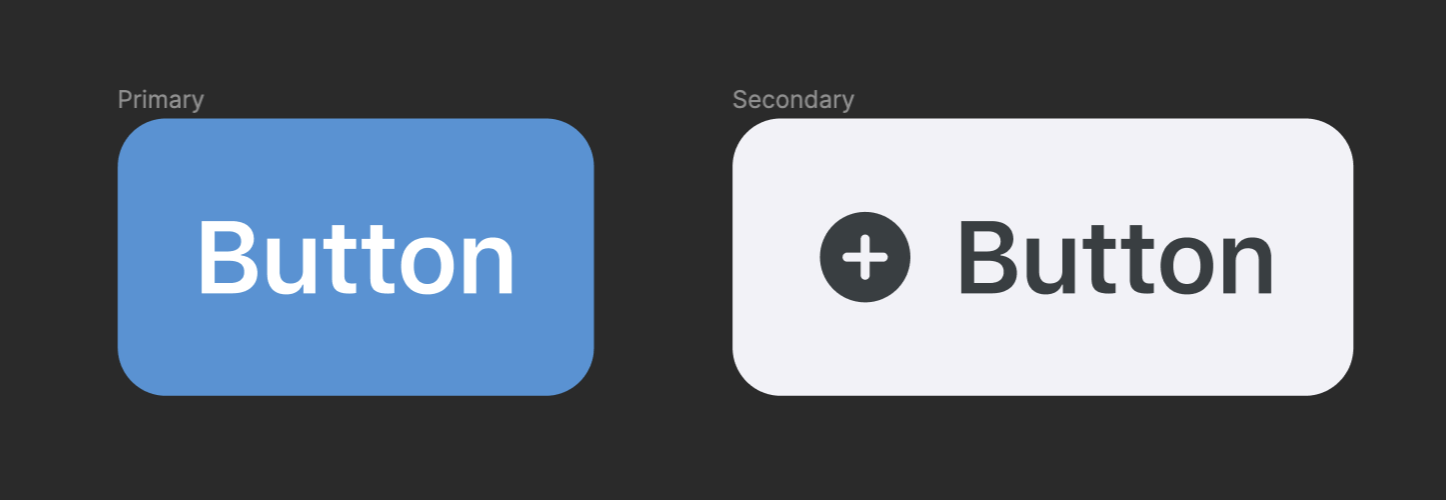
It would be so helpful here if this was possible:

  1. Select “Secondary” as my Property on the button variant.
  2. When “Secondary” is the active Property, I can then see ANOTHER Property where I can choose the icon for this example.
  3. That icon Property is only visible because I have said that it belongs to the “Secondary” Property.

Apologies if I have not explained this very well, but I think this could really be helpful when working with Variants.

27 replies

Maximilian_Hennebach
March 2, 2023

Also need this.

Aman_Goyal
March 29, 2023

Please help with this

Yehia
April 3, 2023

This is currently already possible using Layer boolean properties found in the property panel on the right side.

Here's an image of how it looks like. Click me!

image

Head to the Layers section>Apply booelan property>Create property… > Give it a name, and voila!

If you set it to any specific variant within a component, it will only show when that variant is picked from the list.

Antoine
Active Member
April 5, 2023

This really should not be marked as a solution. While true and a solution to OP’s issue, it doesn’t mean conditional properties are possible on other property types (namely, variant properties).

Yehia
April 6, 2023

@Antoine It would also work without using Boolean Layer Property.

If your second variant has a nested component, exposing it to the top would yield the same result: you will only see the nested component if you pick the second variant.

It is, however, not fully fledged. You cannot, for example, have multiple conditions. It would only work with one-to-one conditional logic, i.e. one variant property will only show one other variant. There lies the limitations.

SteffMueller
New Participant
August 18, 2023

Hello @Yehia
what Antoine meant is still something different.
And as I understood its not a solution to OPs problem.

I’m working on something similar rn and would love to see conditional variables / properties.

I want to have a specific variable-A set to x if another variable-B is set to y.

I can do that by applying logic to an initializing frame, but also would love to apply that logic to the variable itself. As understood Figma is working on it, called “code syntax”

My use case:
I’m building a prototype for switching user accounts. the active user is stored in a variable.
I want to highlight the active user in a list of given users.

Sam_J
New Member
August 22, 2023

I’m working on a (large) design system that uses variants and properties extensively, and I’m finding that I frequently wish for the ability to add conditions to certain variant properties that would hide or disable them when other conditions are set.

For example, I’m working on a promo that has 3 levels (low, medium and high) of visual prominence for the content type ‘live’, but only 2 for the content type ‘standard’ (low and high).
image

If one of our users changes the visual prominence to ‘medium’ when ‘standard’ is selected, currently Figma will force the component to change to ‘live’ - which is confusing if the user doesn’t understand that this combination of properties doesn’t exist.

I think it would be better, and much easier to understand, if this option was hidden or disabled.

Unless anyone has any ideas on a better way to do this within the current constraints?

Sam_J
New Member
August 22, 2023

I’ve created a new post which I think is talking about a similar thing as this one was closed - Conditional variant properties: disable certain options based on others

Carl_Papworth
August 24, 2023

Yes, this can be done, but it is really limited. As soon as you have components with non-bolean variants it’s really hard to use.
Forexample, say I have an [input] with two sizes. Normal & Large. In Normal I want to be able to “attatch” two different subcomponents two the left side using a property. I’ll call it “attatchment” with values “False/icon/button”. So I can either do [Input:small][icon] or [Input:small][button] but I don’t want to allow [Input:small][icon][button].

However in Large there can only be [input:Large] and I don’t want the property shown when Large is choosen. Now this can’t be done (at least I haven’t figured out how), without using nested components (but then one have to click into each sub-component to se it’s properties).

So in some cases this is a nice solution, but a proper conditional function would improve this a lot!

Karl_Mochel1
October 13, 2023

Same here. I would like the bars to have conditions so that the appropriate ones are removed when items are turned off - ie don’t have a bar on the end, always have bars inbetween. It’s not a prototyping interaction. It should happen when designer makes changes in right panel.