Solved

Frame without visible content issue

  • March 11, 2024
  • 9 replies
  • 912 views

As mentioned in closed topic https://forum.figma.com/t/bug-autolayout-resizes-incorrectly-when-it-contains-no-visible-frames/14619, Is anybody facing the same problem?

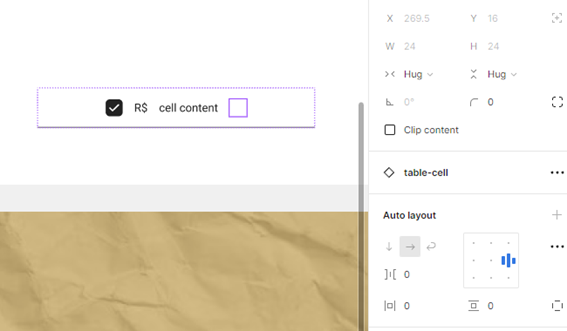
Imagem1
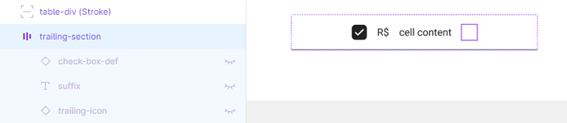
Imagem2

Even all contents inside “trailing-section” frame are invisible and frame resizing is set to “hug”, it still has 24 pixels of width.

Best answer by djv

Hey All, sorry for the lack of acknowledgement here!

Back in 2022, when the 1st topic was shared, the forum was primarily run by the community. With that being said, this a feature limitation at the moment, due to how a Frame keeps its size from a Main Component, once it no longer has any content within it. There is no guarantee on if or when the team will improve upon this behavior. 

There’s a bit of a workaround you can do with a Group, but it does cause issues where the Group isn’t taking up space like a Frame. But it will create the space between objects to be there.

In these types of situations, the only true workaround for this would be to add a Component Property that has the Frame hidden entirely, or depending on your design, you can make variants.

The workaround may vary depending on your file, so if this doesn’t help, please reach out to the support team directly via this form for help: https://help.figma.com/hc/en-us/requests/new

Be sure to use your Figma account email, include a link to your file, and share edit access with support-share@figma.com, so the team can take a closer look.

9 replies

Alamaki
  • March 12, 2024

The bug is still there. I think made a bug report about it way wack in 2022.
Your turn to scream into the void about it. 😀


fernandolins_cs

Frames with auto-layout inside of components will not change their sizes relative to their contents, only their parents will. You have to hide “trailing-section” and not its contents. Also please check that in the main component it is set to hug and not only on an instance.


Hi, Fernando! That´s main component. The alternative of hide “trailing section” doesn’t fit for me because each child element has its own boolean propertie.


Hi Alamaki! I had to open another topic because yours was closed with out responses. I hope this time this issue get more attention. 🙂


Diana_Tatarenko

Any updates on how to solve this?
I don’t want to hide the parent frame since it removes the option to toggle on the elements inside and reveal them.


djv
Figmate
  • Community Support
  • Answer
  • May 29, 2024

Hey All, sorry for the lack of acknowledgement here!

Back in 2022, when the 1st topic was shared, the forum was primarily run by the community. With that being said, this a feature limitation at the moment, due to how a Frame keeps its size from a Main Component, once it no longer has any content within it. There is no guarantee on if or when the team will improve upon this behavior. 

There’s a bit of a workaround you can do with a Group, but it does cause issues where the Group isn’t taking up space like a Frame. But it will create the space between objects to be there.

In these types of situations, the only true workaround for this would be to add a Component Property that has the Frame hidden entirely, or depending on your design, you can make variants.

The workaround may vary depending on your file, so if this doesn’t help, please reach out to the support team directly via this form for help: https://help.figma.com/hc/en-us/requests/new

Be sure to use your Figma account email, include a link to your file, and share edit access with support-share@figma.com, so the team can take a closer look.


Jess_Bellatti

Hi! Is this still a feature limitation? If so, how do we up-vote this??


David C
  • New Member
  • February 27, 2026

There is a longstanding bug (since 2022) regarding how containers resize if all of their contents are hidden. This has been reported before, but is still an active bug. The previous thread has been marked as resolved because there’s a workaround, but the workaround is not a solution to the underlying problem. The workaround has a significant downside. It adds extra properties to components that add clutter and negatively impact the designer experience.

With Slots coming in the near future, this bug is going to become even more problematic for designers. Designers need the ability to have optional slots that are appropriately hidden when they contain no content.

I am requesting that this bug be reevaluated so it can be properly fixed instead of asking designers to implement a clunky workaround. Thank you for your time and consideration.


Calvin_Kuo
  • New Participant
  • March 16, 2026

I agree the workaround does not work when we have to chain boolean logic in Auto Layout. We can only nest them. I do not consider this resolved.

Basically, “if A=yes, then if B” type visual, in Auto Layout -- to take advantage of automatically resizing content. 

Currently, “if A=yes, then if B=no”, there is a “ghost” placeholder taking up space where B would be. 

In one form list I am creating, the number of variants I will need as an alternative would be exponential… would be functionally unworkable.
