

Adam_Gordon
New Participant
May 3, 2024
Question

Typography/Size Variables: Styles don't respect applied mode for variables

  • May 3, 2024
  • 41 replies
  • 2379 views

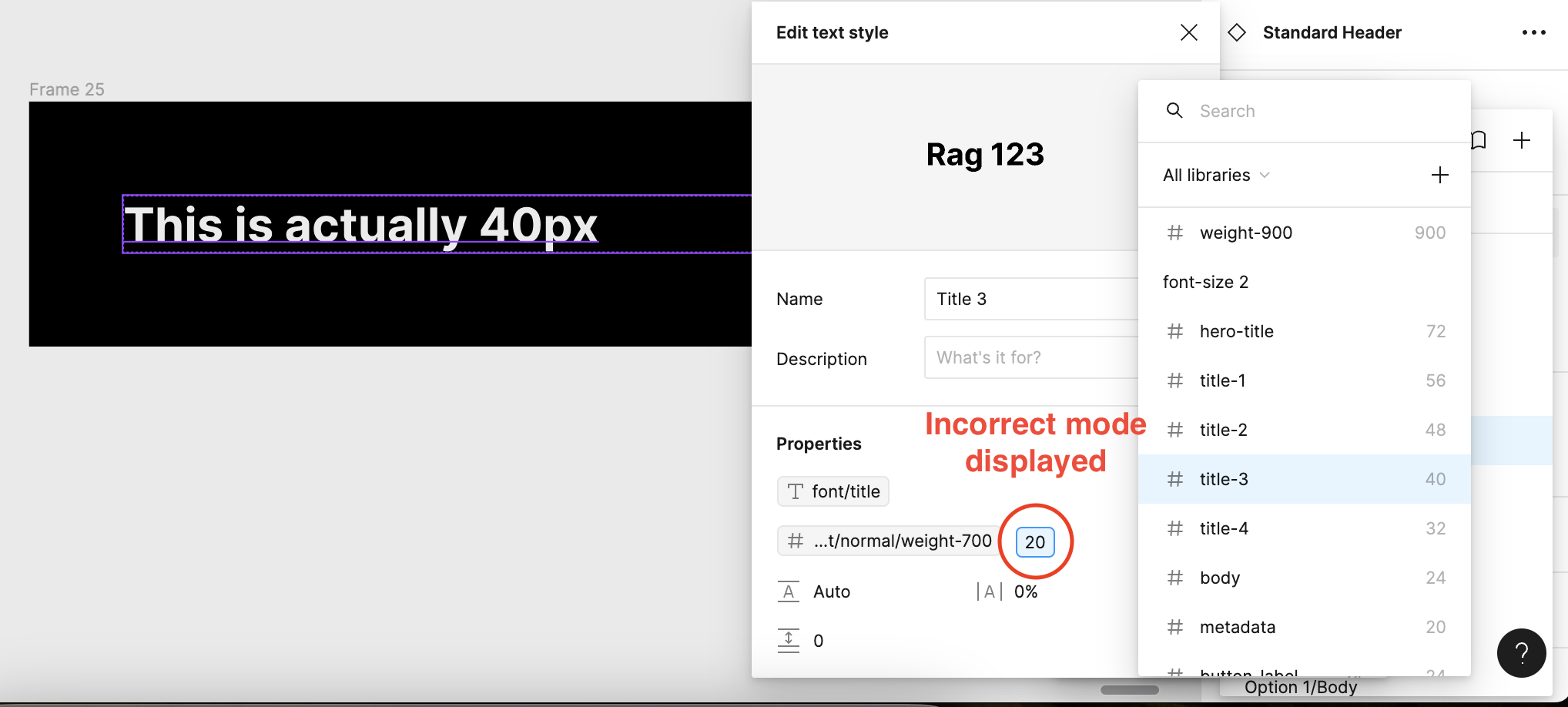
When applying text styles that have associated variables attached the values presented do not respect the applied mode. For instance I have a title that has a mode for Mobile (20px), and a mode for TV (40px), when i open up the style, the default mode (in this case mobile) is displayed instead of the TV mode size.
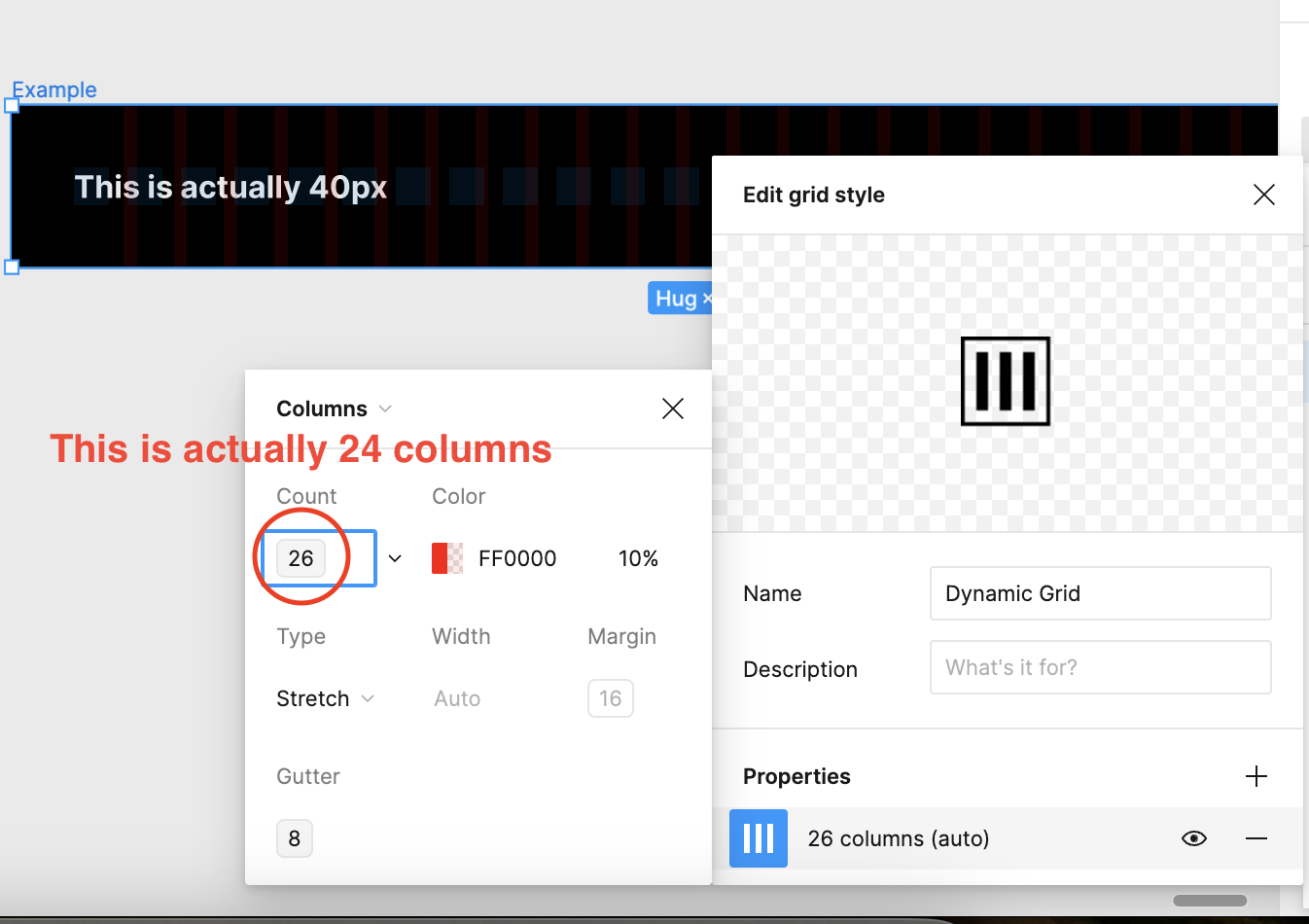
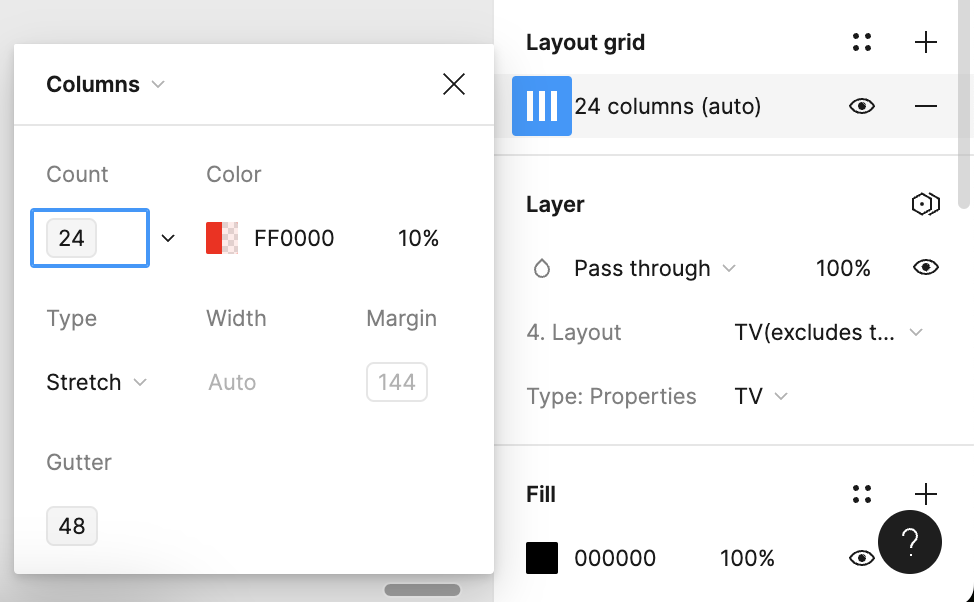
I have also observed this within grid layouts when applied it shows the default mode (26 columns). When in reality it is actually 24 columns, if you then detach the style it shows the correct number.
And when detached you can see it shows the correct value
Seems this was a major oversight, as it makes applying size variables pretty time consuming, as I have to check if I’ve chosen the correct size by clicking and opening up the variable list.

In short it seems to default to the first default mode, instead of respecting the chosen mode. It also only seems to affect styles.

Anyone else found this to be an issue?

41 replies

Adam_Gordon
New Participant
February 24, 2026

Hey ​@djv, hope you’re well. Just wanted to check in and see if there is a potential solution to this in the works? It’s been open for a while and seems to still be causing issues. 

Chanpory
New Member
February 27, 2026

We’re running into this issue as well. Bummed it's been over a year and not fixed yet. Any idea when it can get fixed?

Kira Moon
New Member
June 25, 2026

Hey ​@djv, hope you’re well. Just wanted to check in and see if there is a potential solution to this in the works? It’s been open for a while and seems to still be causing issues. 

@djv  Having the same issues and is causing a lot of frustration with our design system users. Would love to see any update on this please and thanks!

Cammy Hogg
New Participant
July 13, 2026

It’s still an issue! Please fix!

Especially annoying for colour variables...

Ya.yo
New Participant
August 18, 2026

Fix please, thats really painful to work with wrong numbers :/

Alex_Bueno
New Member
August 18, 2026

+1 To this topic, in a multibrand system this is causing confusion among designers about if they’re using the correct style/variable

Elena_gg
New Member
August 18, 2026

+1 it’s really confusing, please fix it!

Jaycee Lewis
Figmate
Figmate
August 20, 2026

Hey ​@Adam_Gordon  ​@Elena_gg  ​@Alex_Bueno ​@Ya.yo  (and everyone else who’s following along) 👋

This thread has picked up a lot of different symptoms over the years. Here's my version of what's happening as a mid-2026 snapshot, plus exact steps, so we're all describing the same thing.

Root issues: 

  • When a text style has variables bound to it, the value Figma *displays* resolves in the collection's default mode — not the mode applied to the layer or its parent frame. The canvas is fine; your text renders at the correct size. It's the number shown in the UI that's stale.
  • A style doesn't carry a mode context of its own. It can be applied anywhere, under any mode, so at the point the preview is generated there's no single correct mode to resolve against — and it falls back to the default.

Three things worth adding to how this has been described so far:

1. Not just font size. I reproduced it with line height too, and people here have reported the same for color, effects, and layout grid columns
2. It shows up in three places — the Typography pill in the right sidebar, the text style picker list, and the Edit text style modal
3. Apply the same variable directly to a layer instead of through a style and the displayed value is correct. That's the cleanest way to confirm you're hitting this and not something else in your setup

My repro steps:

  • New design file. In one variable collection, add two modes — Mobile (default) and Desktop
  • Create two number variables: font-size/body (Mobile 14, Desktop 48) and line-height/body (Mobile 20, Desktop 64). Big gaps make it obvious on screen
  • Create a text style called Body. Open Edit style and bind font-size/body to size and line-height/body to line height via Apply variable on each field
  • Draw a frame, put two text layers inside
  • Layer A: apply the Body style
  • Layer B: make sure no style is applied (detach it if one carried over — new text layers inherit your last-used style), then bind the same two variables directly to that layer's size and line height fields
  • Select the frame and set it to Desktop using the Change variable mode icon in the Appearance section

What I see:

  • Both layers render identically — each measures 64px tall, so both correctly resolve to 48/64
  • Layer B (direct binding) reports 48 / 64. (Correct)
  • Layer A (via the style) reports Body · 14/20. (Incorrect — the Mobile values)


Did I miss anything?: a property I didn't test, a case where the canvas itself renders wrong rather than just the label, or the mode-deletion behavior mentioned earlier in the thread? The workarounds already covered above still apply. No update to share, and I'm bundling this thread up with the repro to share internally.

Thanks for all the hard work and documenting so far. — Jaycee

New Member
August 28, 2026

Adding measured data from a large multi-brand system, plus a test result that clarifies the detach behaviour discussed earlier in this thread.


Setup

One variable collection with 9 brand modes. Font sizes are number variables, and text styles bind fontSize to them. Around 108,000 style insertions in the last 30 days across 7 product teams. The default (leftmost) mode is our first brand.


What we tested

1. Style picker preview. Shows the default mode's value regardless of the mode applied to the node or its ancestors. Confirms what has been reported here since 2024.

2. Rendered output. Correct. The canvas always renders the active mode's value. Nothing is actually broken.

3. Detaching the style. Reveals the correct value, as reported earlier in this thread. One detail nobody has mentioned: the variable binding survives the detach. We detached a node in one brand mode, switched the frame to another brand, and the size updated correctly. So detaching is not destructive to theming.

4. The alias chip on the detached node. This is the part that surprised us. It still previews the default-mode value.

That last point matters for scoping. This is not a style-picker problem. Any variable preview resolves in the default mode, whether the variable sits inside a style or is bound directly to the layer. The style picker is where it hurts most, but it is not the root of it.


What it costs us, measured

Detach rates from library analytics, against how much each token varies across our 9 modes:


Body/Large/Regular. Default 20. Differs in 5 of 8 modes. Detach rate 46.8%
Label/xLarge/Regular. Default 20. Differs in 6 of 8 modes. Detach rate 21.4%
Body/xLarge/Regular. Default 24. Differs in 5 of 8 modes. Detach rate 10.8%

Label/Large/Regular. Default 16. Differs in 1 of 8 modes. Detach rate 0.3%
Label/Medium/Regular. Default 14. Differs in 1 of 8 modes. Detach rate 0.05%
Label/Small/Regular. Default 12. Differs in 1 of 8 modes. Detach rate 0.01%
Caption/Small/Regular. Default 12. Differs in 1 of 8 modes. Detach rate 0%


Divergence is not the only factor, we have a mid-divergence token sitting at 0.4%, but the pattern holds at both ends: our three worst offenders are all high-divergence tokens, and every near-constant token sits at or near zero. Body/Large/Regular alone accounts for 230 detaches in 30 days against 491 instances.

We asked our designers why. The answer was unambiguous: they detach to find out the real size, because the panel and the canvas disagree. One of them put it as "it says 20 and it's 16, it says 12 and it's 14, I break it to find out which is true."

So these detaches are not misuse. They are people running a diagnostic the UI should not require. The cost is that those nodes drop out of the style layer. No future updates to weight, line height or family reach them, and they disappear from library analytics.


Why the description workaround does not scale

Putting the other modes' values into the style description works at 2 or 3 modes. At 9 it means 9 numbers in every description, hand-maintained, going stale the moment any brand changes a value. We have 25 size tokens, so that is 225 numbers to keep in sync by hand, to work around a preview.


What would help

Full fix: resolve style and variable previews in the active mode of the selected node, or of its nearest ancestor with an explicit mode.

Cheaper partial fix that would remove most of the pain: show the resolved value next to the style name in the Typography row when a node is selected, or mark the previewed number as coming from the default mode. Right now the UI gives no signal at all that the number belongs to a different mode. Just making the discrepancy visible would stop people from detaching to check.


This thread is two years old and the behaviour still ships. Happy to share an anonymised file with the 9-mode setup if it helps the report. :)

Natasha Kaweski
Jaycee Lewis
Figmate
Figmate
August 28, 2026

Hey ​@Nat Kaweski 🤩 Thank you very much for the detailed reply. Sharing that file would be very helpful. You can invite  support-share@figma.com  as a viewer. Adding support as a viewer won't affect your billing or take up a seat on your team. If you don’t want to post the link publicly, you can DM it to me here. I’ll let the team know it was shared and add your link when I post the updated feedback. I appreciate your help 🙌 — Jaycee