Jeandre
New Member
November 25, 2025
Question

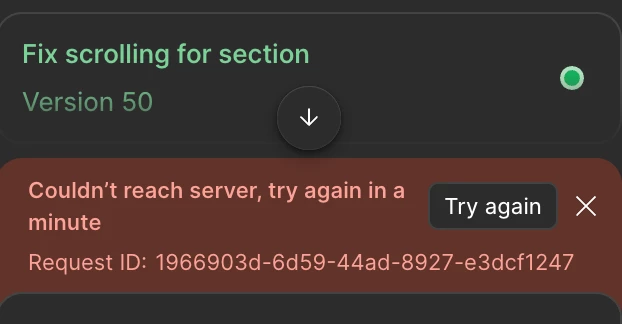
Couldn't reach server, try again in a Try again minute

  • November 25, 2025
  • 41 replies
  • 1977 views

Couldn't reach server, try again in a

Try again

minute

I am getting this error for the last hour is there anything down on Figma side?
 

41 replies

Andrew290
New Member
January 22, 2026

Hey ​@Andrew290, I’m really sorry for the delay you’ve experienced.

I’ve located your support tickets and have just escalated them internally so the team can investigate this as a priority.

Thank you for your patience and someone from the team should be in touch as shorty to review this! 

HI, Gayani_S.

Why is Figma ignoring me?

There have been a lot of bugs in the app lately.  

The AI-based technical support is useless. It doesn't offer solutions, it just creates useless support tickets. I created three tickets and didn't receive a single useful response in four days, just generic phrases. 

One support representative answered one question, gave me a text template to replace my email address with another, and left.

I encountered an error while exchanging emails. To replace my email address in the usual way, following the support representative's instructions, by clicking on the confirmation code from the new email, Figma simply created a new account for me, but I still didn't have a professional account. And I keep getting an error saying that the link has expired. 

I can't even delete this new account to try replacing my email address again because I get an error too.

You know what's funny about all this? Customer support responded to my request for a refund for my professional account faster than anything else. I was very surprised by this. I didn't think I would encounter such indifference.

Mistakes happen everywhere. But there is no support. I would like them to respond out of common courtesy.

I would be grateful, dear Gayani_S, if you could help me. Thanks

Gayani_S
Figmate
Community Support
January 26, 2026

Hey ​@Andrew290, I’m really sorry that you’re running into repeated errors and not getting clear, helpful responses back. That’s not the experience we want anyone to have.

I checked into your case and can see that your tickets were merged (#1694573), and I’ve re-escalated everything internally so it gets proper attention. I’ve also passed along your feedback to the team.

I understand how confusing it must’ve felt to see the refund request move faster than the actual issue blocking your work. I’m sorry about that, I’ll make sure to keep an eye on your ticket until it gets resolved! 

theodorelindholm
New Member
March 3, 2026

Have the same issue - 


Gayani_S
Figmate
Community Support
March 4, 2026

Hey ​@theodorelindholm! When you have a moment, could you share a bit more context?

  • What were you doing right before the error showed up?

  • Have you noticed any patterns (specific prompts or actions that seem to trigger it)?

  • About how many prompts were you submitting around that time?

  • Were the prompts short and simple, or longer and more detailed?

Any extra details you can provide will really help us narrow this down and escalate it to the right team quickly. 

Ria Scureman
New Participant
March 10, 2026

​@Gayani_S I’ll answer for everyone on these threads about this issue. We need you guys to fix it. That’s all. Asking these unordered list questions when you have dozens if not hundreds of support tix submitted and still no resolution to the problem, is useless. I can tell you the answers to the above unordered list of questions, for me: First bullet = Nothing. Second bullet = No, it doesn’t matter, because it happens for e v e r y t h i n g. Third bullet = One. Fourth Bullet = Yes. Please do something. Your subscribers pay you a LOT of money for this tool and you guys hype it so much but then it breaks and you not only don’t fix it, you make us do YOUR job for you when you should have internal troubleshooting teams who can see this after ONE support ticket and get it resolved. If you can’t, then at the very least do us all the courtesy of providing some kind of update or response with a timeline for when you expect to have your broken app fixed. Thanks from all of us here.

whiteandreana
New Member
March 10, 2026

I’m going crazy with this error. can’t do anything. i need to solve this ASAP!!

Any help?

Gayani_S
Figmate
Community Support
March 12, 2026

Hey ​@Ria Scureman, I understand that you just want this fixed- and I hear you! 


I did escalate this internally and spent time reviewing it with the team. What makes this issue especially difficult is that it doesn’t stem from a single root cause. 

The “Couldn’t reach server” error can be triggered by several different factors- some on our side, and in some cases may also be caused by issues on the customer’s side that are unfortunately outside of our direct control. Because of that, there isn’t a single catch-all fix we can push that resolves every instance at once.


That said, we absolutely are investigating reports as they come in. The team’s current recommendation is to switch the AI model used by Make to see if the issue persists across models. 

More info here: Select an AI model to use in Figma Make. If the error continues across multiple AI models, we’ll need to look at your specific setup more closely. You can reach them via the chatbot here: https://help.figma.com/hc/en-us/requests/new.


​@Ria Scureman, regarding your case specifically, the team is actively investigating it and has sent you an email.Please follow up so the team can continue working toward a resolution.


We really do appreciate you speaking up about this. The Community Support teams is actively working to make sure each report is properly investigated. I know it’s frustrating not to have an immediate, universal fix, but we are doing everything we can on our side to get to the bottom of it and help each affected user as quickly as possible.

henay
New Member
March 23, 2026

Three months of the problem and still no fix????

Gayani_S
Figmate
Community Support
March 23, 2026

Hey ​@henay, I’m really sorry this has been going on for so long!

I’ve created a support ticket on your behalf so the team can take a closer look at what’s happening here. Your ticket number is #1808694, for reference.

Someone from the team should reach out soon, really appreciate your patience while we get this sorted.

Nidhi Ranpura
New Member
April 23, 2026

I’m also facing the same issue of make - couldn’t reach server. This is very serious issue - we have buy some package and now we are not able to utilize our credits. Figma team should fix this ASAP and also think about adjusting credit loss each user facing due to this consistent error.
