This topic has been closed for replies.
Best answer by Celine_

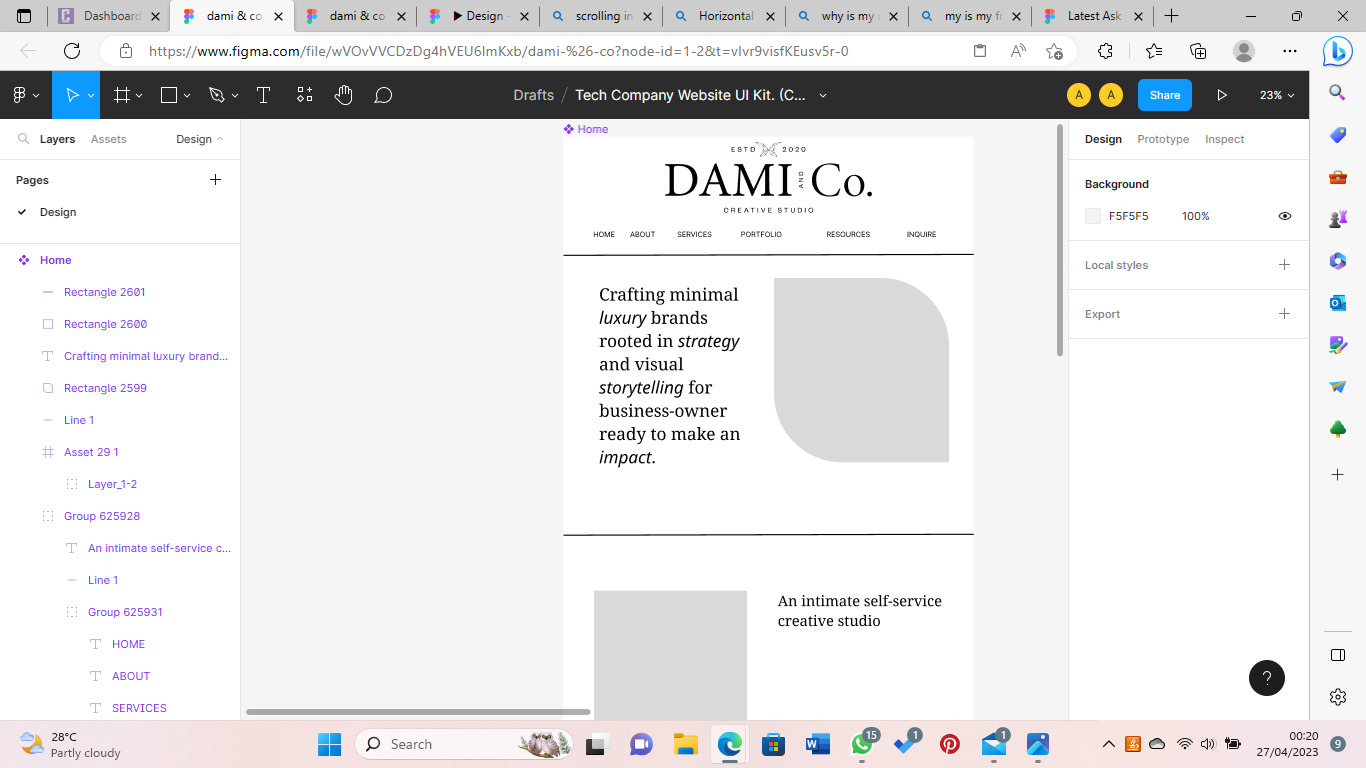
Hi @Almas_Hamzat ,
Your objects in your left side bar are in purple because they are under the Component
Capture d’écran 2023-04-28 à 16.07.02

4 replies

Celine_
Figmate
Celine_Solution
Community Support
April 28, 2023

Hi @Almas_Hamzat ,
Your objects in your left side bar are in purple because they are under the Component
Capture d’écran 2023-04-28 à 16.07.02

Shubh_Aggarwal
February 16, 2024

What does it mean being under the component?

February 26, 2024

To ungroup elements, you can select the group in the Layers panel and use the command “Ctrl + Cmd + G” on Mac or “Ctrl + Alt + G” on Windows. Alternatively, you can choose “Object” in the top menu and select “Ungroup.”

y_toku
Figmate
Community Support
February 27, 2024

Components are elements you can reuse across your designs. They help to create and manage consistent designs across projects.

You can create components from any layers or objects you’ve designed. These could be a whole range of things like buttons, icons, layouts, and more.

You can grasp overview of Components

Please check out the help center article:

Figma Learn - Help Center

Hope it helps!

Thanks,
Toku