

Jos_Pham
New Member
April 1, 2025
Solved

Why can’t I paste an image directly into an image component in Figma anymore?

  • April 1, 2025
  • 59 replies
  • 6722 views

Hi everyone,

I used to copy an image (Ctrl+C from browser or local folder) and then paste it (Ctrl+V) directly into an image component in Figma - like for cards or avatar images - and it would automatically replace the image.

But recently, this no longer works. When I try pasting, nothing happens. Now Figma only shows options like “Upload from computer” or “Make an image” (screenshot attached).

I’m wondering: is this a recent change or bug in Figma?
Is there still a way to paste an image directly into a component without having to upload it manually?

Thanks in advance!
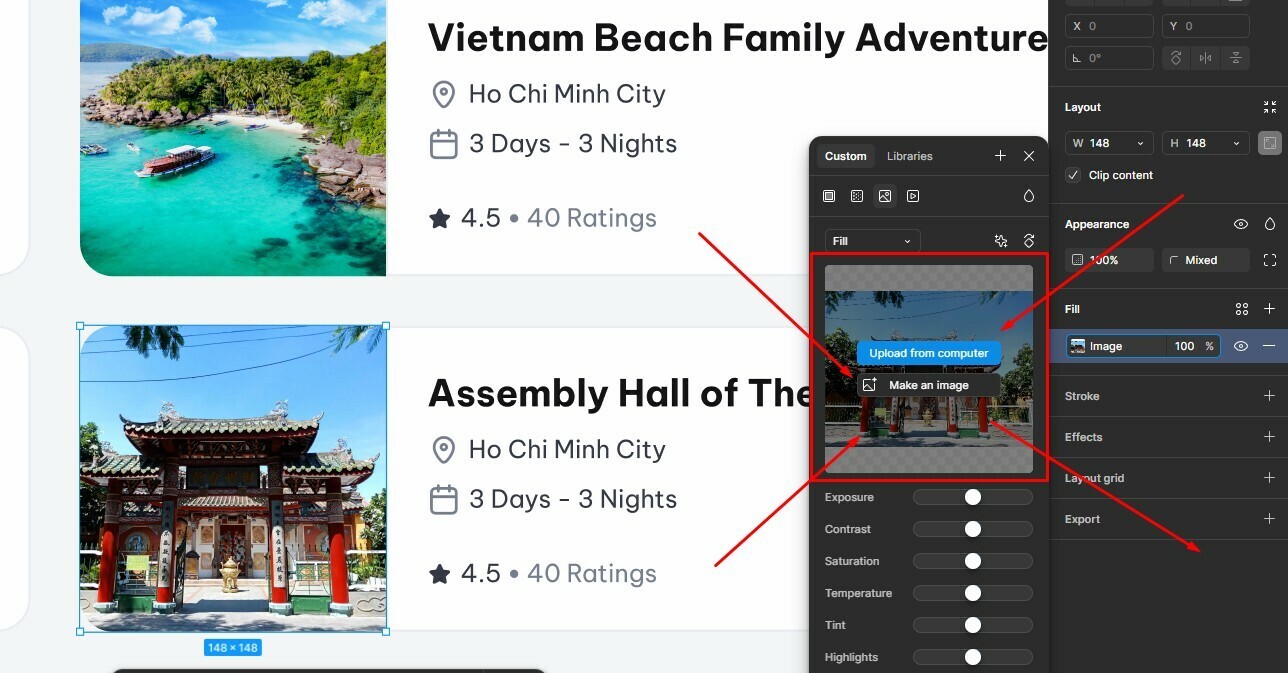


Best answer by Gayani_S

Hey everyone, quick update! The team has rolled out a fix for this 🎉

You should now be able to copy and paste images while the fill panel is open again. Please refresh Figma and give it a try.


Let me know if you’re still running into any issues!

59 replies

Gayani_S
Figmate
Community Support
September 4, 2025

Hey everyone, I completely hear your frustration on this, and I’m really sorry that you’re still running into the issue. I’ve flagged this again with the team and I’m actively pushing it on my side so they see the urgency. As soon as I hear back with any updates, I’ll share them here right away. Really appreciate your patience while we work on this.

Sky123
New Member
September 4, 2025

Hi ​@KelseyONeill and ​@Pieter_Beukman, thank you for taking the time to share your experiences! 

Our engineering team has already pushed a fix to production that should have resolved this, but since you’re still running into the issue, I’ve flagged your reports with them so we can dig in further. I’ll follow up here as soon as I hear back from the team.

Appreciate your patience in the meantime! 

Don’t think they have because it’s not working.

1

Sky123
New Member
September 4, 2025

Hey everyone, I completely hear your frustration on this, and I’m really sorry that you’re still running into the issue. I’ve flagged this again with the team and I’m actively pushing it on my side so they see the urgency. As soon as I hear back with any updates, I’ll share them here right away. Really appreciate your patience while we work on this.

sdf

Matthew_Pearson
New Participant
October 14, 2025

@Gayani_S 


I commented on this issue several months ago and at the time found a workaround clicking the image thumbnail area, not the thumbnail then pasting. This worked but was fiddly.

But then the fix came a few weeks back, and it’s not a fix. It is using the system clipboard very strangely. If I click the image fill thumbnail after I have copied an image (e.g. copied from a web page), ready to paste, I then return to Figma and paste nothing happens. So it ignores the image on the clipboard.

It only works if I copy the image after clicking the image fill thumbnail, opening the fill pop-out ….. I then have to find the image I want to paste outside of figma …. return to Figma with the pop-out still open, then paste. This works but it’s extremely clunky as I have to remove to open the fill pop-out each time before I pick an image.

Expected behaviour would be to click on the image thumbnail, then if my clipboard has an image in it I should be able to paste. This should update the image fill and close the pop-out. If I were to paste and no image was in my clipboard the pop-out should remain open and nothing should change; prompting me to go and copy and image somewhere.


I use many sample images in my designs, so this problem really slows me down and it’s just frustrating! I also never really comment on things online, but this is bothering me soooo much I had to!!

Matthew_Pearson
New Participant
October 14, 2025

I should have mentioned in my last post that the problem I describe is only when I’m copying images outside of Figma e.g. from a website or another application into Figma. 

Simon33
New Participant
February 2, 2026

And another one - the same problem here as of today. This is a massive problem for me. Can you please have a look and suggest a solution fast.


Troubleshooting so far: 
Detaching the component - won’t work. Tabs reloaded - no change. App closed and reopened - nothing. Computer restartetd - no change. Nothing helps.  


whitney_pratt
New Member
February 12, 2026

If you control click on the image in your file, select copy as PNG, then paste (cmdV) into the new place you want it to go, it works. You just can’t do the regular copy key command.

Michael_Cecetka
New Member
February 18, 2026

Solution that currently works for me:
1/ Cmd+Option+C for copying image
2/ Cmd+Option+V for pasting image

bradwrage
New Participant
March 27, 2026

I’m still having this issue. 

Dan S
New Member
March 31, 2026

I’ve been trying (for years) to figure out why this only sometimes works. Tuns out it’s been broken the whole time :)
