

Jos_Pham
New Member
April 1, 2025
Solved

Why can’t I paste an image directly into an image component in Figma anymore?

  • April 1, 2025
  • 59 replies
  • 6722 views

Hi everyone,

I used to copy an image (Ctrl+C from browser or local folder) and then paste it (Ctrl+V) directly into an image component in Figma - like for cards or avatar images - and it would automatically replace the image.

But recently, this no longer works. When I try pasting, nothing happens. Now Figma only shows options like “Upload from computer” or “Make an image” (screenshot attached).

I’m wondering: is this a recent change or bug in Figma?
Is there still a way to paste an image directly into a component without having to upload it manually?

Thanks in advance!
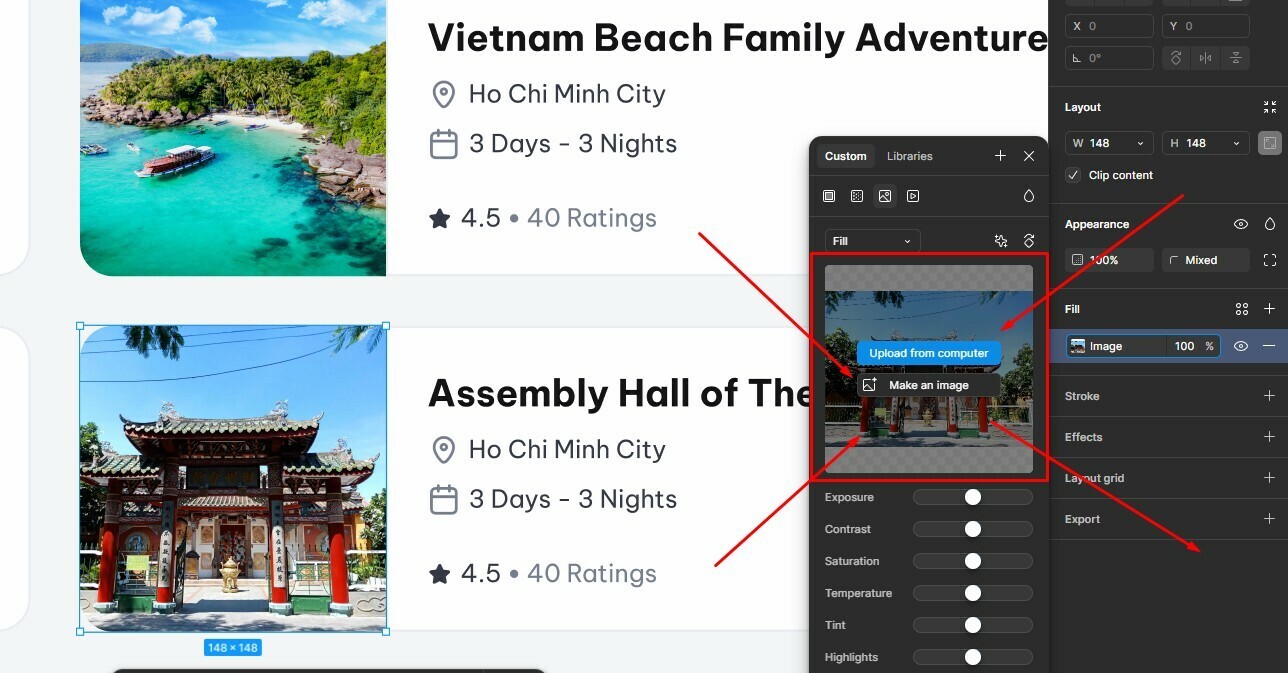


Best answer by Gayani_S

Hey everyone, quick update! The team has rolled out a fix for this 🎉

You should now be able to copy and paste images while the fill panel is open again. Please refresh Figma and give it a try.


Let me know if you’re still running into any issues!

59 replies

Tom Reem
Figmate
Figmate
August 5, 2025

Hi everyone, stepping in for ​@Gayani_S with a quick update from our side: Our engineering team pushed a fix to production that should resolve this issue. ✅

💡 If you haven’t already, try giving the tab you’re working in a quick refresh → copy/paste functionality should now behave as expected.

Thanks again for your patience while we worked to get this resolved. Let us know how it goes, and if any questions remain.

KelseyONeill
New Participant
August 6, 2025

I really hope this is a bug and not a “feature”. Hope it gets fixed soon, cause I hate it. I copy paste into frames so much.

Something I havnt seen others mention, is when I paste an image directly into figma from somewhere else, it puts in in a new frame, not in the frame I already have selected. I know selecting the thumbnail works, but I still have to paste the image in figma, copy the thumbnail from the new frame, then select the frame where I want it and paste there. 

Pieter_Beukman
New Member
August 9, 2025

A very frustrating issue was introduced here. This used to work so much better before.

I closed the Figma desktop app and reopened all my tabs as requested but the issue is still there.

I often start with a frame, apply an image to it, add rounded corners, outlines, shadow etc, duplicate it to then replace only frame fill with other images that I copy from the clipboard from the web. This flow doesn’t work anymore at all. Previously you could open the image fill pane, press command V and only the image would be replaced by the one in the clipboard. Does not work anymore. Now you need to paste the image into the canvas, hit copy style shortcut, click the new frame, hit paste style shortcut but that then overrides the rounded corners, outline etc. Such a simple timesaver ease-of-use action is now very frustrating.  

Gayani_S
Figmate
Community Support
August 14, 2025

Hi ​@KelseyONeill and ​@Pieter_Beukman, thank you for taking the time to share your experiences! 

Our engineering team has already pushed a fix to production that should have resolved this, but since you’re still running into the issue, I’ve flagged your reports with them so we can dig in further. I’ll follow up here as soon as I hear back from the team.

Appreciate your patience in the meantime! 

Pieter_Beukman
New Member
August 25, 2025

Hi ​@KelseyONeill and ​@Pieter_Beukman, thank you for taking the time to share your experiences! 

Our engineering team has already pushed a fix to production that should have resolved this, but since you’re still running into the issue, I’ve flagged your reports with them so we can dig in further. I’ll follow up here as soon as I hear back from the team.

Appreciate your patience in the meantime! 

Hi there. Any update on this ​@Gayani_S? I am still running into this workflow issue which makes it very very difficult to quickly input real images into existing UI frames. 

extrakerned
New Member
August 26, 2025

This broke again today.

Jaszkin-Man_Jakub
New Participant
August 27, 2025

It also does not work for our team.

I have an image in clipboard, copied from the web and pasting it into the frame (in the instance of card component) does nothing… 


I have to paste it somewhere on the canvas, then use the hack from above (click on the left side of image thumbnail → Cmd-C → select image in the instance → left side of the thumbnail → Cmd-V) and it is quite infuriating 😡

Jaszkin-Man_Jakub
New Participant
August 27, 2025

We’ve found a workaround which is quite absurd…

You can:
click on the image thumbnail → Upload from computer → Cancel → Cmd-V → voilà! 🤣


Jazz_Ernest
New Participant
August 27, 2025

Absolutely crazy that this is broken again, and is such a key workflow for so many of us

Olly_the_Designer
New Participant
September 3, 2025

Hi ​@KelseyONeill and ​@Pieter_Beukman, thank you for taking the time to share your experiences! 

Our engineering team has already pushed a fix to production that should have resolved this, but since you’re still running into the issue, I’ve flagged your reports with them so we can dig in further. I’ll follow up here as soon as I hear back from the team.

Appreciate your patience in the meantime! 

Don’t think they have because it’s not working.
