

Jos_Pham
New Member
April 1, 2025
Solved

Why can’t I paste an image directly into an image component in Figma anymore?

  • April 1, 2025
  • 59 replies
  • 6722 views

Hi everyone,

I used to copy an image (Ctrl+C from browser or local folder) and then paste it (Ctrl+V) directly into an image component in Figma - like for cards or avatar images - and it would automatically replace the image.

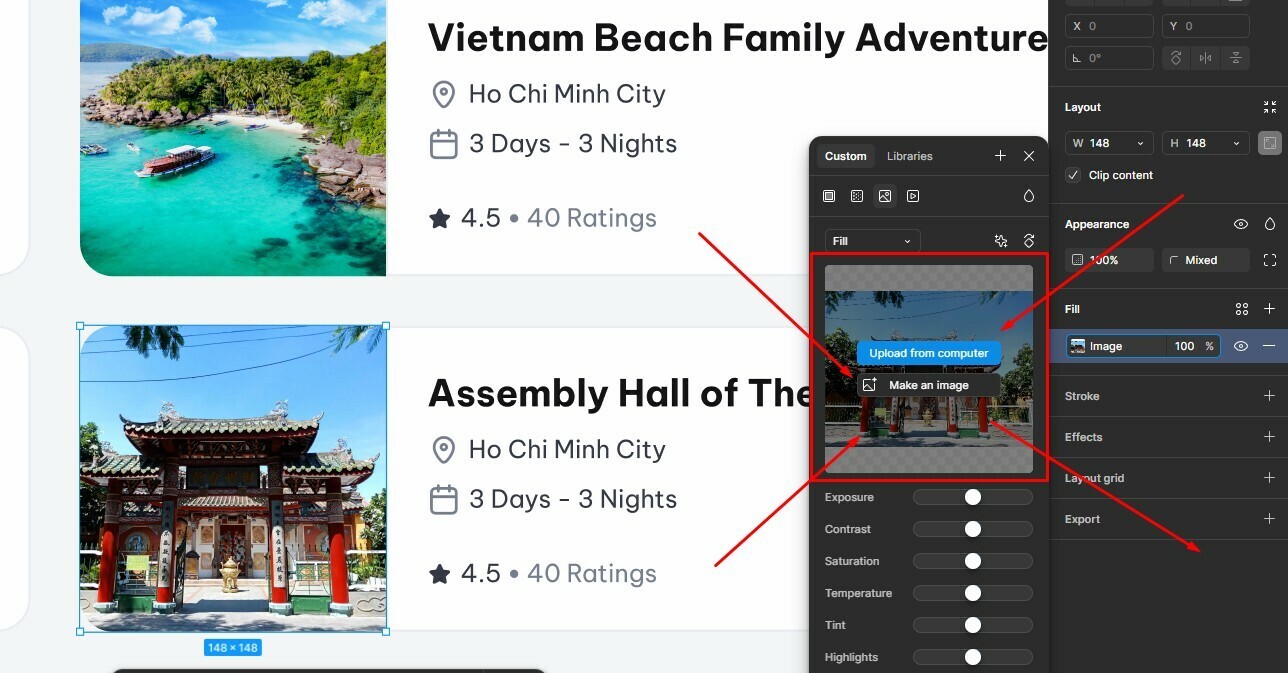
But recently, this no longer works. When I try pasting, nothing happens. Now Figma only shows options like “Upload from computer” or “Make an image” (screenshot attached).

I’m wondering: is this a recent change or bug in Figma?
Is there still a way to paste an image directly into a component without having to upload it manually?

Thanks in advance!


Best answer by Gayani_S

Hey everyone, quick update! The team has rolled out a fix for this 🎉

You should now be able to copy and paste images while the fill panel is open again. Please refresh Figma and give it a try.


Let me know if you’re still running into any issues!

59 replies

bradwrage
New Participant
March 31, 2026

@Dylan & figma team can you please fix???

Gayani_S
Figmate
Community Support
April 10, 2026

Hey everyone, really appreciate you continuing to call this out.

I hear you, I’ve raised this again internally with the team to make sure it’s still on their radar.

I’ll keep an eye on this thread and share any updates as soon as I hear back! 

Gayani_S
Figmate
Community Support
April 24, 2026
Hey everyone, I wanted to share a quick update here.

This is still on the team’s radar, and I’ve just followed up again internally to help keep it moving and get more visibility on it. I know this has been coming up for a few of you, so I’m continuing to chase this and will share an update here as soon as I hear back.


Really appreciate you all continuing to flag this! 

Gayani_S
Figmate
Gayani_SAnswer
Community Support
May 11, 2026

Hey everyone, quick update! The team has rolled out a fix for this 🎉

You should now be able to copy and paste images while the fill panel is open again. Please refresh Figma and give it a try.


Let me know if you’re still running into any issues!

bradwrage
New Participant
May 13, 2026

Working for me in desktop app for the most part. For whatever reason there are still some images that will not work.

djv
Figmate
Community Support
May 13, 2026

Hi ​@bradwrage, thanks for following up here! 

Glad to hear that it’s working for the most part. I’d be happy to let the team know that it’s not consistently working, so they can investigate further.

How are you copy and pasting the images when they do not work? Keyboard shortcuts or right-click menu? Copying an image already on the canvas, from another web browser, or in a local folder or your desktop?

With these details, the team should be able to pinpoint if there’s additional changes that need to be made to ensure this bug is fully fixed. 

bradwrage
New Participant
May 13, 2026

It looks like an item that is a component that contains an image will not copy over. I’m simply using cmd+c and cmd+v.

Gayani_S
Figmate
Community Support
May 18, 2026

Hey ​@bradwrage, when you have a chance, could you also confirm that your desktop app is fully up to date? I’ll follow up here as soon as I hear back from the team with any updates or next steps. Really appreciate you taking the time to report this!

Gayani_S
Figmate
Community Support
June 3, 2026

Hey ​@bradwrage, just bumping this to check in- have you had a chance to confirm whether your desktop app is fully up to date?

I haven't heard back from the team yet with a more specific update on the component + image copy issue you flagged, but I want to make sure we keep moving on this. If you're still running into it after updating, I can get you connected directly with our support team so they can take a closer look at what's happening on your end.

Let me know how you get on!
