

Jos_Pham
New Member
April 1, 2025
Solved

Why can’t I paste an image directly into an image component in Figma anymore?

  • April 1, 2025
  • 59 replies
  • 6722 views

Hi everyone,

I used to copy an image (Ctrl+C from browser or local folder) and then paste it (Ctrl+V) directly into an image component in Figma - like for cards or avatar images - and it would automatically replace the image.

But recently, this no longer works. When I try pasting, nothing happens. Now Figma only shows options like “Upload from computer” or “Make an image” (screenshot attached).

I’m wondering: is this a recent change or bug in Figma?
Is there still a way to paste an image directly into a component without having to upload it manually?

Thanks in advance!
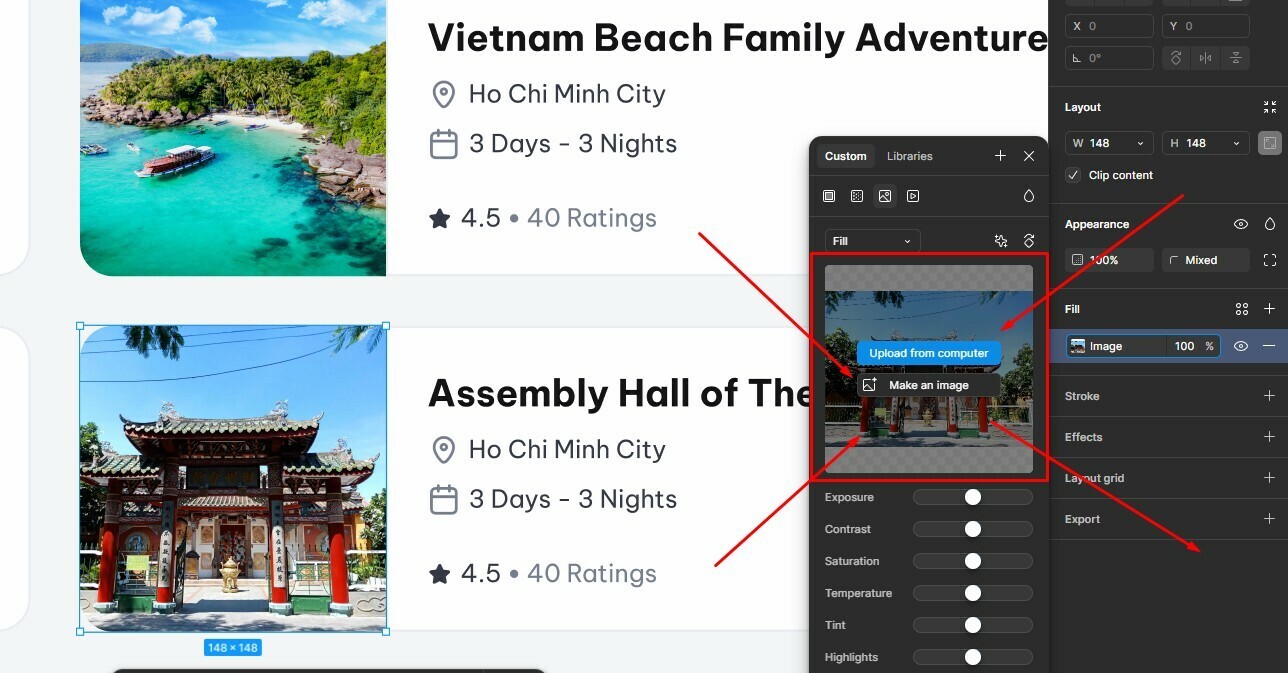


Best answer by Gayani_S

Hey everyone, quick update! The team has rolled out a fix for this 🎉

You should now be able to copy and paste images while the fill panel is open again. Please refresh Figma and give it a try.


Let me know if you’re still running into any issues!

59 replies

Tom Reem
Figmate
Figmate
May 28, 2025

Awesome, thank you for sharing this here ​@Bruno Landowski — and glad to hear it’s helpful for you as well, ​@Jazz_Ernest! 🎯

I went ahead and tested this within my own account, and it’s working just as you described. Really appreciate you both surfacing this experience — feel free to reach out if anything else comes up. 🙏

Xiajiao
New Member
June 3, 2025

Does anyone facing this problem right now? because before figma update i still can paste image on fill section image. 


Matthew_Pearson
New Participant
July 9, 2025

I’m still having this problem and it’s a pain as I need to use this an awful lot. So It’s really slowing me down.


I should add I’m using the latest desktop version on Mac.


Cash Clear
New Member
July 15, 2025

Our company pushed an update a week ago, most of our designers are now having this issue.

Uwe Steffen
New Member
July 15, 2025

I have the same problem. 

Quick fix plz. @figma 
This is a insane waste of time 

Finn_BR_Studio
New Member
July 16, 2025

Same Problem
Please fix

@Figma_Support 

Aaron Jackson
New Member
July 22, 2025

I’m experiencing the same problem along with my team. This is an insane degradation killing our workflow.


This thread is marked as ‘Solved’ but this is far from solved.


Please fix asap 🙏🏼

Matthew_Pearson
New Participant
July 22, 2025

Hi, I’ve been struggling with this on and off. But yesterday I found a way!


With an image copied on your clipboard. Locate your image fill, in it’s figma frame, but don’t click the image fill:


Then click just to the left of the grey lozenge around the fill image preview: 

My cursor clicked where the red dot is. 

This selects the fill, now CTRL V or CMD V and the image from your clipboard is added as a fill.

It’s quite tricky to click this small area, but it’s got me where I want, I think figma could improve this.

Dan Gramescu
New Member
July 27, 2025

Yeah still doesn’t work… Tried everything here but no luck

Gayani_S
Figmate
Community Support
July 28, 2025

Hey everyone! Thank you for flagging this again, we hear you! Our team is actively looking into the issue with copying and pasting image fills. We know this is a workflow many of you rely on, and we really appreciate your patience while we investigate. I’ll keep you posted here as soon as we have an update. Thanks again for bringing this to our attention and for your continued feedback!
