

Jos_Pham
New Member
April 1, 2025
Solved

Why can’t I paste an image directly into an image component in Figma anymore?

  • April 1, 2025
  • 59 replies
  • 6722 views

Hi everyone,

I used to copy an image (Ctrl+C from browser or local folder) and then paste it (Ctrl+V) directly into an image component in Figma - like for cards or avatar images - and it would automatically replace the image.

But recently, this no longer works. When I try pasting, nothing happens. Now Figma only shows options like “Upload from computer” or “Make an image” (screenshot attached).

I’m wondering: is this a recent change or bug in Figma?
Is there still a way to paste an image directly into a component without having to upload it manually?

Thanks in advance!
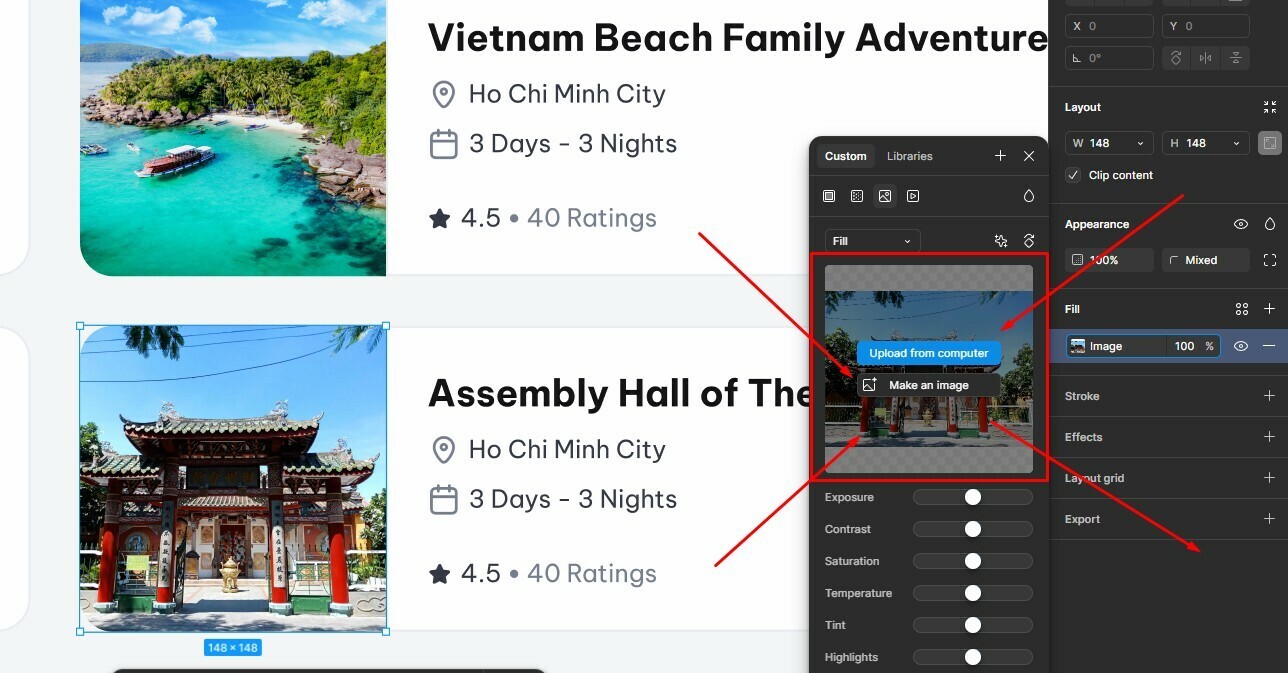


Best answer by Gayani_S

Hey everyone, quick update! The team has rolled out a fix for this 🎉

You should now be able to copy and paste images while the fill panel is open again. Please refresh Figma and give it a try.


Let me know if you’re still running into any issues!

59 replies

Bruno Landowski
New Member
April 29, 2025

Same here 😪

y_toku
Figmate
Community Support
April 30, 2025

Hi there,


Thanks for reaching out. I'm checking with our internal team. I will get back to you when I have anything I can share with you. 


Thanks for your patience.

Toku

jeromeunier
New Member
April 30, 2025

Hello,

For the past few weeks, I've been experiencing a recurring issue:
I can no longer copy/paste an image from one component to another, nor can I paste an image directly from Photoshop into a Figma component. The image only pastes outside of the component, which seriously disrupts my workflow.

My colleagues, on their end, don’t seem to have this problem. So I’m wondering if it could be related to an update or a specific configuration on my machine.

For your information, I’ve already cleared my computer’s cache as well as Figma’s, but it hasn’t changed anything.

Thank you in advance for your help,
Jérôme

Karen_Beal
Active Member
May 2, 2025

I’m having the same issue, started this week. I can’t paste an image from outside Figma into an existing image to replace it. I can’t even copy an image which is in Figma into an image to replace it. The only way I can replace an image is to upload from the computer or ‘create an image’. I wonder if this is a bug since an update I did at the beginning of the week.


Jazz_Ernest
New Participant
May 2, 2025

I just wanted to add I updated to version 125.4.7 and the issue still is still persisting

VUDU
New Member
May 3, 2025

This was never an issue. I used to copy an image. open up the fill modal, click on the modal and just paste. Now I need to actually click on the image. This is pretty frustrating as it requires more mouse movement. I should just copy, modal, paste. 

please fix this!!

VUDU
New Member
May 3, 2025

@Junko3 this solution does not work for me. The video you showed illustrates you are able to do it from outside of Figma.. which is still the case. I can do that no problem.


But when copying an image that is already in Figma, it will not allow me to paste it directly into an image component.


I made a video to show you what I mean: 


Up until a week or so ago I was able to copy an image (as a fill) from another component, and then paste it onto/overwrite the fill of another image or shape. This is no longer working. It just keeps pasting the previously copied image. I think it’s more of a ‘copy’ issue. The image fill of a component is no longer something you can copy.


Please advise.

Thanks.


Copy the original image and then click on this area of the modal containing the image frame, then paste it in.


Good luck!

This is probably the best solution so far. But this isn’t a great user experience. Please fix this asap Figma Team!

Tom Reem
Figmate
Figmate
May 15, 2025

Hey everyone,


Thank you for letting us know, ​@Jazz_Ernest — I can confirm that our internal team is actively working on a fix. In the meantime, I wanted to align on a workaround for anyone else who may be experiencing this issue: If the fill isn't selected when the Fill panel is open, copying the image may not work. However, if you select the fill first, then copy, it should paste as expected.


Let me know if this helps. Thanks again for your patience.

Bruno Landowski
New Member
May 23, 2025

@Jazz_Ernest I found a solution in another post. Actually it still works but in a different way. Instead of copy/paste from fill panel, select the thumbnail by clicking on the left of the image (where there is the order change icon). The element will turn blue, and you’ll be able to copy or paste the image by pressing Cmd + C/V.


Jazz_Ernest
New Participant
May 27, 2025

@Bruno Landowski thank you! This is super helpful
