November 17, 2023
Solved

Undo function is not working on keyboard or using Edit menu

  • November 17, 2023
  • 38 replies
  • 19485 views

I thought it was just my bluetooth keyboard glitching out, but cmd + z is not undoing any action, nor is going to the Edit menu > Undo. Has anyone encountered this issue before? And if so, how did you resolve it?

Best answer by Celine_

Hi Russell, Vero,
Sorry to hear you are still having issues! Is it happening in browser, desktop app or both?
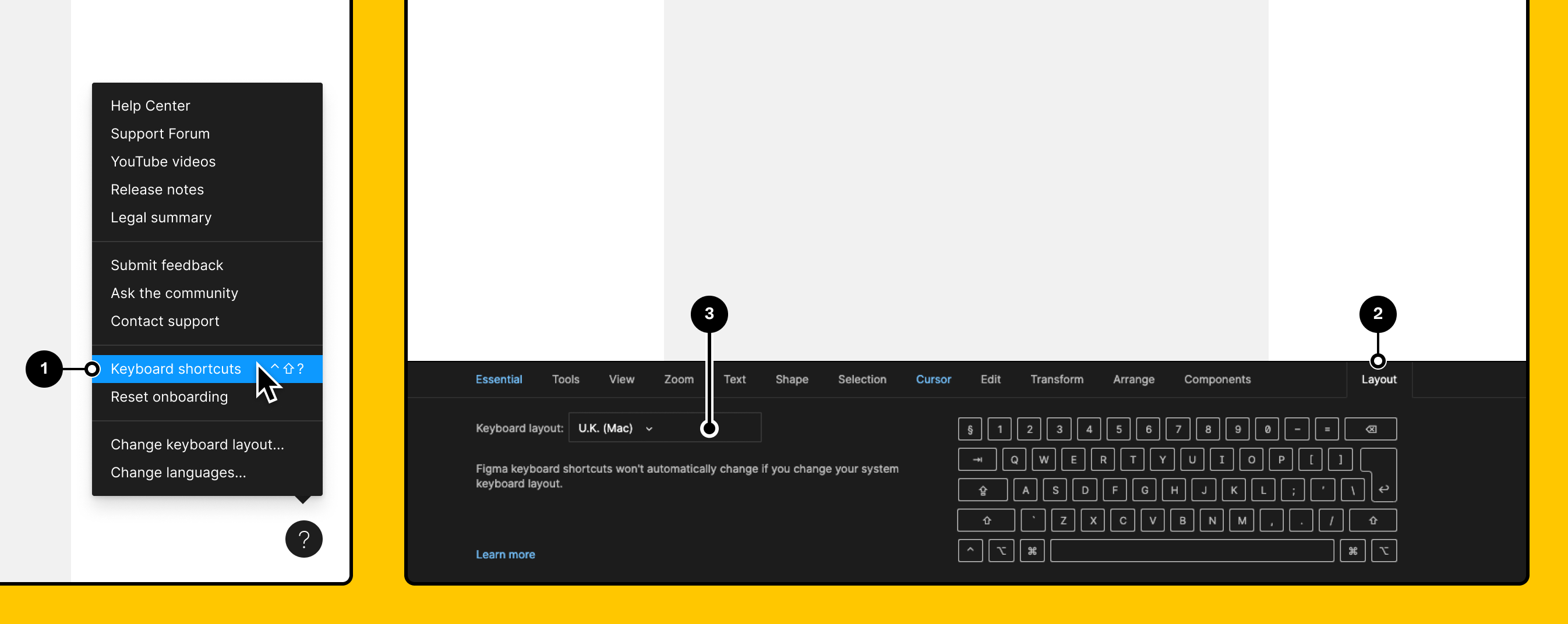
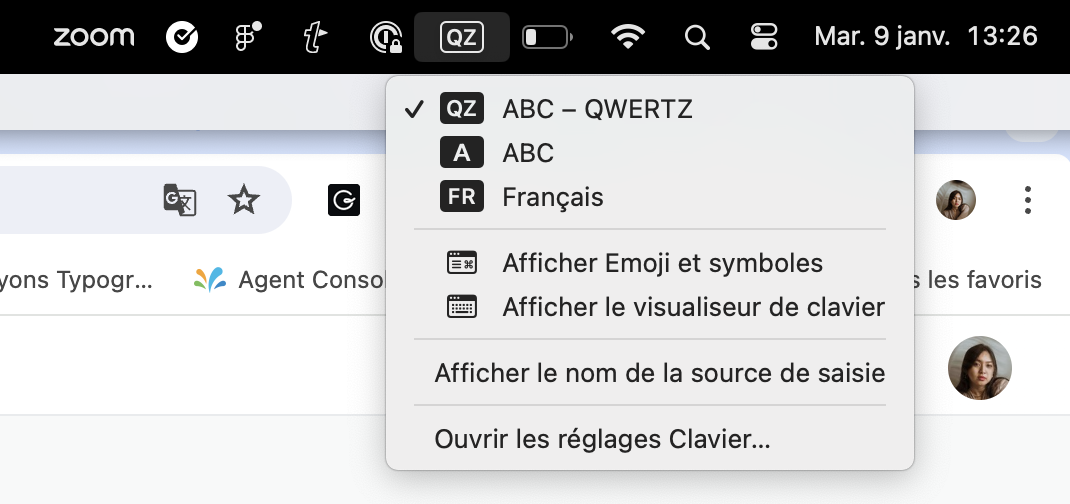
Can you also make sure you select the same keyboard layout on Figma and in your laptop?

On Figma:

On Mac:

Vero, I can’t see your ticket in our back end. Which email have you used? (I’ll remove it in this topic right after checking it in order to protect your privacy). If you haven’t yet, please reach out directly to the support team by filling this form so our team can have a deeper look into your issue: https://help.figma.com/hc/en-us/requests/new Thank you!


38 replies

Russell_Phillip
New Member
June 17, 2024

Update: still having this issue. I quit my app at least 10x times a day now. It’s unbearable. Why haven’t Figma fixed this yet?

Celine_
Figmate
Community Support
June 17, 2024

Hey @Russell_Phillip , sorry to hear you are sill having issue with the shortcut.
If the workarounds below don’t work, please reach out directly to the support team by filling this form: here
The technical specialist can investigate it further the root cause on your end.
Be sure to use your Figma email account, your desktop specs, and please mention the steps you have done. Thank you!

Russell_Phillip
New Member
June 21, 2024

Or, hear this, you guys could just fix it? ¯_(ツ)_/¯

Clearly this issue isn’t just highlighted to one or two users.

July 21, 2024

same here, so frustrating to clear the cache and restart the app, but it works… until next time

Russell_Phillip
New Member
July 22, 2024

Still having this issue

LEESUMIN
September 3, 2024

rm -rf “$HOME/Library/Application Support/Figma”

Schweiss_Kelly
New Member
September 17, 2024

This issue doesn’t seem to be solved. This bug is still randomly occurring.

ksn
Figmate
Community Support
September 18, 2024

hi @Schweiss_Kelly - I will have someone on our support team reach out to you.

At the moment, because this seems so intermittent, we have not been able to replicate this successfully However, I’d like to get you connected to see if there are any possible records/logs that I don’t have visibility into that may help.

You’ll see this come through your email shortly!

ksn
Figmate
Community Support
September 18, 2024

For anyone else that experiences this – please drop a comment here with any details/steps you were doing before the undo feature stopped working.

For example:

  • Created a frame
  • Resized it manually
  • Suddenly, undo no longer works

or even:

  • Created a new frame
  • Resized the frame
  • Changed browser tabs (checked my Gmail)
  • Opened a new browser window
  • Moved back to my Figma tab
  • Undo stopped working.

Those types of things are helpful, because we can see if there’s a trend that may be triggering this. ty everyone for your patience! I will re-title this to reflect that this may still be an issue for some.

Schweiss_Kelly
New Member
September 18, 2024

Thank you so much! Hopefully there is some insight I can offer!